SpringBoot3

从SpringBoot2开始web编程分为了两个流派,

一个使用Servlet技术栈,可以称为传统派,一个使用Reactive技术栈,也就是响应式技术栈,使用Servlet编程的话,会使用ServletAPI规范,配上Servlet容器,比如Tomcat再配合Spring一系列技术栈,比如Spring MVC,SpringSecurity,SpringData来构建web应用,这种称为阻塞同步的BIO模型。

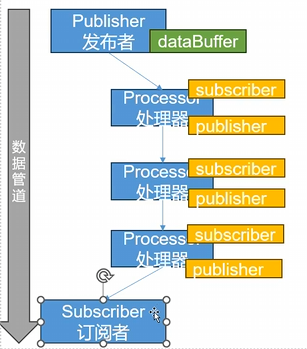
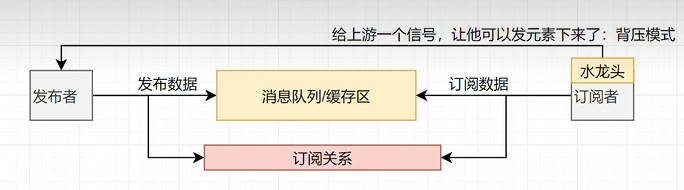
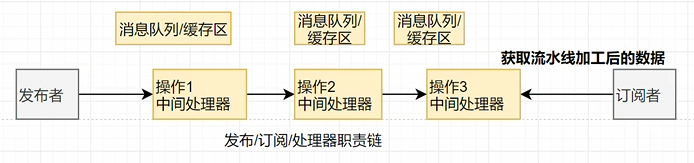
一个使用响应式技术栈,按照Reactive和Stream规范,搭配上Netty和Tomcat在Servlet3.1+标准上也支持异步请求。有了这些容器搭配Spring SecurityReactive框架做安全验证,SpringWebFlux框架做MVC,SpringDataReactive做数据处理。这样就能挖掘CPU的能力处理大量并发
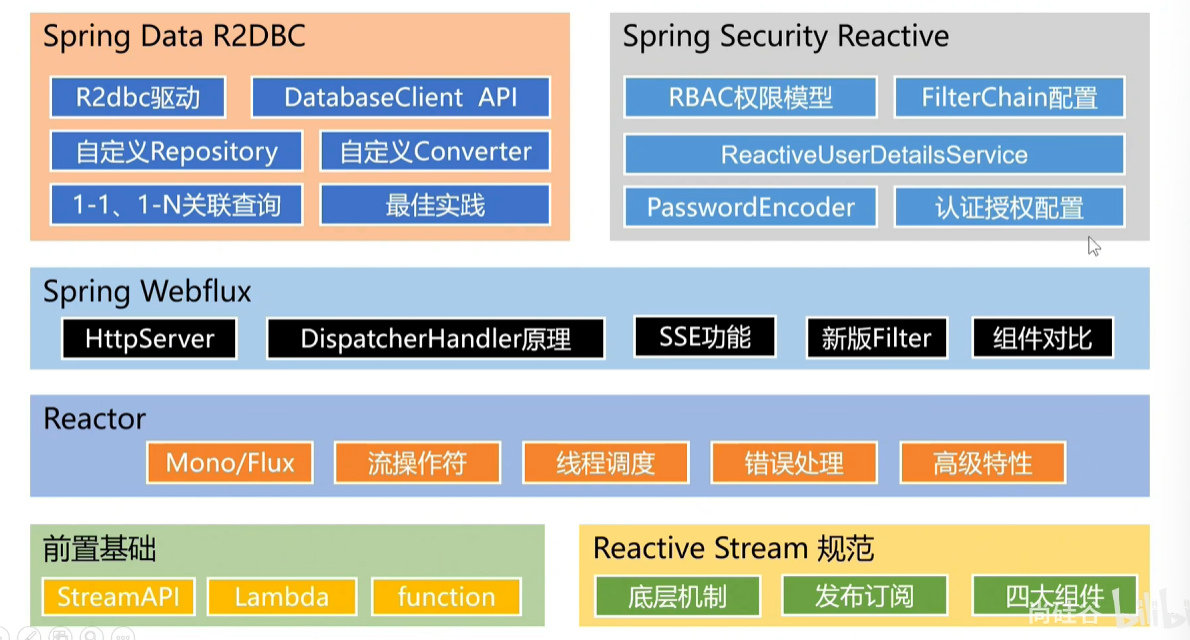

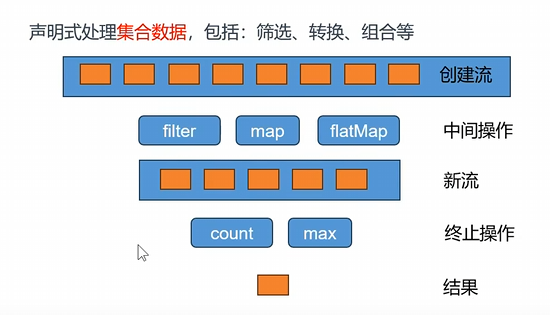
image-20251214211421617

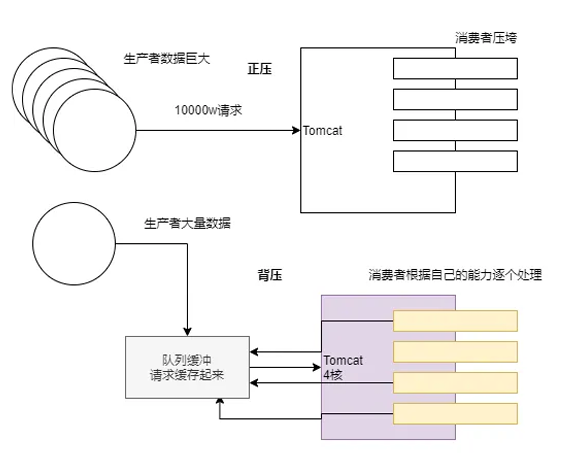
deepseek_mermaid_20251221_ccefed

前置知识

  • java17
  • Spring、SpringMVC、MyBatis
  • Maven、IDEA

环境要求

环境&工具 版本
SpringBoot 3.0.4+
IDEA 2021+
jAVA 17+
Maven 3.5+
Tomcat 10.0+
Servlet 5.0+
GraalVM Community 22.3+
Native Build Tools 0.9.19+

SpringBoot是什么

SpringBoot帮我们简单、快速的创建一个独立的、生产级别的Spring应用,大多数SpringBoot应用只需要编写少量配置,整合Spring平台以及第三方技术。

特性

  • 快速创建独立Spring应用
    • SSM:导包、写配置、启动运行
  • 直接嵌入Tomcat、Jetty or Undertow(无需部署war包)【Servlet容器】

    • linux java tomcat mysql:war放到tomcat的webapp下
    • 现在应用里嵌入这些容器打包成jar包,然后运行java -jar就好了,前提是都要有java环境啊
  • 提供可选的 starter,简化应用 整合

    • 场景启动器(starter):web、json、邮件、oss(对象存储)、异步、定时任务、缓存
    • 以前开发导包一堆,控制好版本。
    • 为每一种场景准备了一个依赖坐标,比如导入web-starter、mybatis-starter这些依赖,相关的都依赖上了。
  • 按需自动配置Spring 以及 第三方库
    • 如果这些场景我们要使用(生效),这个场景的所有配置都会自动配置好。
    • 约定大于配置:每个场景都有很多默认配置。
    • 自定义:在配置文件中修改几项就可以。
  • 提供 生产级别特性:如 监控指标、健康检查、外部化配置等。
    • 监控指标、健康检查(k8s)、外部化配置(也就是说配置可以不用写在jar包里面,只用重启就能读取到配置了)
  • 无代码生成、无xml。

总结:简化开发、简化配置、简化整合、简化部署、简化监控、简化运维。

SpringBoot3核心特性

如果想要Springboot2就https://start.aliyun.com这个网址

如果想要Springboot3就https://start.spring.io

其次创建之后该Maven配置

1、快速入门

第一步首先创建POM文件

1
2
3
4
5
6
7
8
9
10
11
12
13
14
<!--所有的spring-boot项目都需要继承spring-boot-starter-parent-->
<parent>
<groupId>org.springframework.boot</groupId>
<artifactId>spring-boot-starter-parent</artifactId>
<version>3.4.12</version>
<relativePath/> <!-- lookup parent from repository -->
</parent>
<dependencies>
<!--web相关的依赖-->
<dependency>
<groupId>org.springframework.boot</groupId>
<artifactId>spring-boot-starter-web</artifactId>
</dependency>
</dependencies>

第二步 改YML 这里不用

第三步主启动

1
2
3
4
5
6
@SpringBootApplication
public class MainApplication {
public static void main(String[] args) {
SpringApplication.run(MainApplication.class, args);
}
}

第四步 业务类 这里也不用

第五步 控制类 这里写个demoController

1
2
3
4
5
6
7
8
@RestController //@Controller + @ResponseBody
public class HelloController {

@GetMapping("/hello")
public String hello() {
return "Hello, Spring Boot!";
}
}

这里就部署好了

然后SpringBoot给我们提供了打包jar的插件,然后改POM文件

1
2
3
4
5
6
7
8
<build>
<plugins>
<plugin>
<groupId>org.springframework.boot</groupId>
<artifactId>spring-boot-maven-plugin</artifactId>
</plugin>
</plugins>
</build>

然后在右边Maven然后运行package就能打包了。

打包好后运行java -jar就能运行了。

现在假设想要改端口号,以前要打开项目然后修改YML然后重新打包,重新发布,然后重新启动。

现在只用在外面新建个application.properties

然后在里面编写配置server.port=8888

然后重新启动就可以更换端口号了

然后官方和第三方支持很多场景了官方提供的场景一般命名为

spring-boot-starter-xxx啥的。

第三方提供的场景一般命名为*.spring-boot-starter

SpringBoot两个机制

Springboot能这么方便配置主要是两个机制

1、依赖管理机制

为什么导入starter-web所有关联的依赖都导入进来?

  • 开发什么场景,导入什么 场景启动器就好
  • maven依赖传递原则,A依赖B,B依赖C,那么A就依赖C

为什么版本号都不用写?

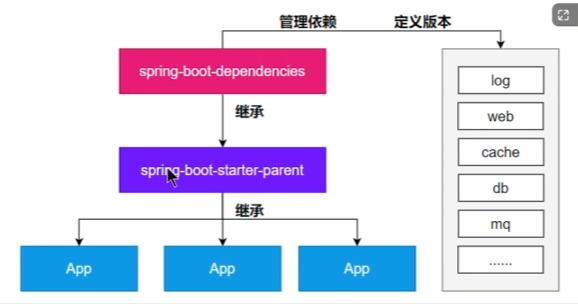
  • 每个boot项目有一个父项目spring-boot-starter-parent
  • parent父项目是 spring-boot-dependencies
  • 父项目 版本仲裁中心,把所有常见的依赖版本都声明好了。

自定义版本号

  • 利用maven的就近原则,有就用自定义的,没有就默认的。
  • 然后在原本的POM里面自定义或者用<properties/>中声明版本

image-20251215002318795

2、自动配置机制

初步理解后面再理解完整流程。

  • 自动配置的Tomcat、SpringMVC等。

    • 以前:写DispatcherServlet来拦截所有请求,ViewResolver处理页面跳转,CharacterEncodingFilter处理字符编码

    image-20251123235925402

    • 现在:自动配置好的这些组件
    • 验证:在主入口里面的SpringApplication.run进去看,然后发现这个方法给我们返回ConfigurableApplicationContext,这个其实是IOC容器,然后我们只需要验证这个IOC容器里面有没有这些组件就可以了。
    1
    2
    3
    4
    5
    6
    7
    8
    9
    10
    11
    12
    @SpringBootApplication
    public class MainApplication {
    public static void main(String[] args) {
    //java10 新特性:局部变量类型的自动推断
    var ioc = SpringApplication.run(MainApplication.class, args);
    //1、打印IOC容器中的所有Bean定义名称
    String[] beanDefinitionNames = ioc.getBeanDefinitionNames();
    for (String beanDefinitionName : beanDefinitionNames) {
    System.out.println(beanDefinitionName);
    }
    }
    }

    现在导入场景,容器中就会自动配置好这个场景的核心组件。至于为什么后面说。

    • 默认的包扫描规则

      • @SpringBootApplication 标注的类就是主程序类
      • SpringBoot只会扫描主程序所在的包及其下面的子包
      • @SpringBootApplication
      • 这个功能就类似帮我们写了component-scan,如果想要配置扫描@SpringBootApplication里面配置@SpringBootApplication(scanBasePackages = "com.bitzh"),或者用@ComponentScan("com.bitzh")注解
    • 配置默认值

      • 配置文件的所有配置项是和某个类的对象值进行一 一绑定的
      • 绑定了配置文件中每一项值的类:配置属性类
      • 比如:ServerProperties绑定了所有Tomcat服务器有关的配置
      • MultipartProperties绑定了所有文件上传相关的配置其他的参照官方文档
    • 按需加载自动配置

      • 导入场景spring-boot-starter-web
      • 场景启动器除了会导入相关功能依赖以外还导入了spring-boot-starter,是所有starter的starter,基础核心starter,这个有个包里面有个依赖spring-boot-autoconfigure,然后这个包里面都是各种场景的autoconfigure自动配置类
      • 虽然全场景的自动配置都在spring-boot-autoconfigure这个包,但是不是全都开启的。
        • 导入哪个场景就开启哪个场景。

      总结:导入场景启动器、触发spring-boot-autoconfigure这个包的自动配置生效,容器中就会具有相关场景的功能

核心技能

常用注解

SpringBoot摒弃xml配置方式,改为全注解驱动

那么就会有大量的注解了。

1、组件注册
1
2
3
4
5
@Configuration 、 @SpringBootConfiguration
@Bean
@Controller、@Servoce、@Repository、@Component
@import
@Componment

以前写组件

先创建个bean文件

1
2
3
4
5
public class User{
private Long id;
private String name;
//然后生成set和get方法
}

然后写XML配置文件

1
2
3
4
5
//然后通过bean标签注册到容器中
<bean id="user" class="com.bitzh.bean.User">
<property name="id" value = "1"></property>
<property name="name" value = "zs"></property>
</bean>

现在写组件

创建一个config文件,以前的配置文件,变成了一个配置类

1
2
3
4
5
6
7
8
9
10
11
12
13
@SpringBootConfiguration//这个注解跟下面的一样
@Configuration //替代以前的配置文件,配置类本身也是容器中的组件
public class AppConfig{
//组件默认是单实例的
@Scope("prototype")//可以通过这个注解来从单实例编程原型模式,也就是每次new都是新建一个对象
@Bean("userHaHa") //替代bean标签,组件在容器中的名字默认是方法名,也可以通过参数配置名字
public User user(){
var user = new User();
user.setId(1L);
user.setName("张三");
return user;
}
}

现在就把User注册到容器中了。

那么想要把第三方包的组件注入到容器中

1
2
3
4
5
6
7
//第一种:先导入POM然后在Configuration类里面
@Bean
public FastSqlException fastSqlException(){
return new FastSqlException();
}
//最快速的第二种,在配置类里面用@Import注解
@Import(FastSqlException.class)//给容器中放制定类型的组件,组件的名字默认是类名

总结将bean注入到容器的流程

1、@Configura 编写一个配置类

2、在配置类中,自定义方法给容器中注册组件。配合@Bean注解

3、使用@Import注解导入第三方Bean

2、条件注解

如果注解制定的条件成立,则出发指定行为

@ConfitionalOnXxx

1
2
3
4
@ConditionalOnClass:如果类路径中存在这个类,则出发指定行为
@ConditionalOnMissingClass:如果类路径中不存在这个类,则出发指定行为
@ConditionalOnBean:如果容器中存在Bean,则触发指定行为
@ConditionalOnMissingBean 等等大概都是这个意思

场景:如果存在FastsqlException这个类,就给容器中放一个User组件,叫user01,否则给容器中放一个User组件,叫user02。如果系统中有user02这个组件就给容器中放另外一个user03。

1
2
3
4
5
6
7
8
9
10
11
12
13
14
15
16
17
18
19
@SpringBootConfiguration
public class AppConfig02{
@ConditionalOnClass(name="com.alibaba.druid.FastsqlException")
@Bean
public User user01(){
return new User();
}

@ConditionalOnMissiongClass(value="com.alibaba.druid.FastsqlException")
@Bean
public User user02(){
return new User();
}
@ConditionalOnBean(value = User.class)
@Bean
public User user03(){
return new User();
}
}
3、属性绑定
1
2
3
4
5
6
7
8
9
10
11
12
13
14
15
16
17
18
19
20
21
22
23
24
25
26
27
28
29
30
31
32
33
34
35
@ConfigurationProperties:声明组件的属性和配置文件哪些前缀开始项进行绑定
@EnableConfigurationProperties:快速注册组件注解,用于导入第三方包的组件进行属性绑定
SpringBoot默认只扫描自己主程序所在的包,如果导入第三方包,即使@Component\@ConfigurationProperties也没用

将容器中任意组件的属性值和配置文件的配置项进行绑定。
1、给容器注册组件 用@Bean+@Configuration
2、使用@ConfigurationProperties 声明组件和配置文件的哪些配置项进行绑定
第一种:用@Component
首先在配置文件application.properties里面编写
假如
user.id=1
user.name=zs
然后写User类
@Component
@ConfigurationProperties(prefix = "user")
public class UserProperties {
private Long id;
private String name;
然后一堆set和get方法
}
第二种:用@EnableConfigurationProperties
user.id=1
user.name=zs
然后在类中只用加
@ConfigurationProperties(prefix = "user")
public class UserProperties {
private Long id;
private String name;
然后一堆set和get方法
}
最后在配置类或者主启动用@EnableConfigurationProperties()
@EnableConfigurationProperties(User.class)
public class AppConfig {
// 可以放其他@Bean
}

Springboot导入完整流程

1、SpringBoot怎么实现导入一个starter、写一些简单配置,应用就能跑起来,我们无需关心整合。

2、为什么Tomcat的端口号可以配置在application.properties中,并且tomcat能启动成功

3、导入场景后哪些自动配置能生效?
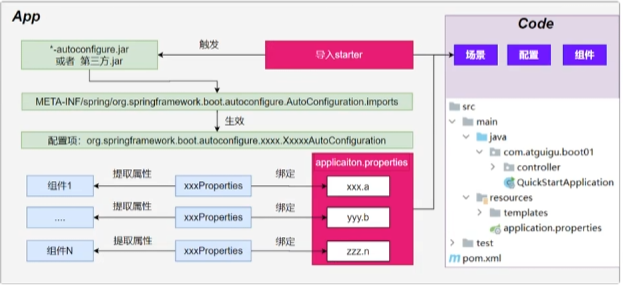
image-20251216185522689

流程:

1、导入starter-web:导入了web开发场景
  • 1、场景启动器导入了相关场景的所有依赖:starter-jsonstarter-tomcatspringmvc
  • 2、每个场景启动器都引入了一个spring-boot-starter核心场景启动器
  • 3、核心场景启动器引入了springb-boot-autoconfiguration包。
  • 4、springb-boot-autoconfiguration里面囊括了所有场景的所有配置。
  • 5、只要这个包下的所有类都能生效,那么相当于SpringBoot官方写好的整合功能就能生效。
  • 6、SpringBoot默认扫描不到springb-boot-autoconfiguration下写好的所有配置类。(这些配置类给我们做了整合操作)

总结:导包的过程就是导入了springb-boot-autoconfiguration,然后里面的配置类都引入了,至于生不生效看后面的。

2、主程序:@SpringBootApplication
  • 1、@SpringBootApplication由三个注解组成@SpringBootConfiguration@EnableAutoConfiguration@ComponentScan
  • 2、SpringBoot默认只能扫描自己主程序所在的包及其下面的子包,扫描不到spring-boot-autoconfigure包中官方写好的配置类。
  • 3、@EnableAutoConfiguration这个注解就是SpringBoot开启自动配置的核心,
    • 1、是由@Import(AutoConfigurationImportSelector.class)提供功能批量给容器中导入组件。
    • 2、SpringBoot启动会默认加载152个配置类。
    • 3、这152个配置类,来自于MET-IF一个路径中的文件,也就是上面导入的包的,然后里面有文件配置好152个文件指定
    • 项目启动的时候利用@Import批量导入组件机制把autoconfigure包下的152个自动导入类导入进来
    • 这些自动配置类里面会有@Bean放一堆组件,这些组件就能工作了

总结:SpringBoot默认只扫描主程序的配置类,然后利用@SpringBootApplication注解里面的@EnableAutoConfiguration注解里面的@Import注解导入的152个自动配置类也扫描了。自动配置类都导入了但是不一定生效,里面有@ConditionalOnClass判断,如果有这些类,才会生效。

3、自动配置类
  • 1、给容器中使用@Bean放一堆组件
  • 2、每个 自动配置类都可能有这个注解@EnableAutoConfiguration(ServerProperties.class)用来把配置文件中配的指定前置属性封装到xxxProperties 属性类中、
  • 以Tomcat为例子:把服务器的所有配置都是以server开头的,配置都封装到了属性类中。
4、写业务,全程无需关心各种整合(底层把整合写好了,而且也生效了)。

核心流程:

1、导入starter,然后就会导入autoconfigure包。

2、autoconfigure包里面有个文件,文件里面指定了所有启动要加载的自动配置类

3、@EnableAutoConfiguration会自动的把上面自动配置类文件里面写的所有自动配置类都导入进来xxxAutoConfigureation 是有条件注解进行按需加载

4、这些导入的xxxAutoConfigureation 又给容器中导入一堆组件,这些组件有152个,组件都是从xxxProperties中提取属性值

5、xxxProperties又是和配置文件进行绑定。

效果:导入stater、修改配置文件,就能修改底层行为。

如何学好SpringBoot

框架的框架,底层基于Spring。能调整每一个场景的底层行为。100%项目一定会用到底层自定义

类似于摄影:

傻瓜照相机:自动配置好

单反:教具、光圈、快门、感光度….

傻瓜+单反:

1、理解 自动配置原理

​ a.导入starter -> 生效xxxAutoConfiguration -> 组件 -> xxxProperties -> 配置文件

2、理解 其他框架底层

​ a.拦截器

3、可以随时 定制化任何组件

​ a.配置文件

​ b.自定义组件

核心:这个场景自动配置导入了哪些组件,我们能不能Autowired进来使用,如果用不了,能不能通过修改配置,改变组件的一些默认参数,需不需要自己完全定义这个组件,场景定制化非常重要。

最佳实战:

  • 选场景:导入到项目
    • 官方:starter
    • 第三方:去仓库搜
  • 写配置:改配置文件关键项
    • 数据库参数(链接地址,账号密码等)
  • 分析这个场景给我们导入了哪些能用的组件
    • 自动装配这些组件进行后续使用
    • 不满意Boot提供的自动配好的组件
      • 定制化
        • 改配置
        • 自定义组件

整合redis为案例

  • 选场景:官方提供了,直接导入spring-boot-starter-date-redis

  • 写配置:然后去看RedisAutoConfiguration里面然后看到里面的EnableConfigurationProperties,然后发现里面的配置都写在RedisProperties.class里面,然后进去配置文件看看有哪些配置。

  • 分析组件

    • 分析到RedisAutoConfiguration给容器中放了StringRedisTemplete
    • 给业务代码中自动装配StringRedisTemplete
  • 定制化

    • 修改配置文件
    • 自定义组件,自己给容器中放一个StringRedisTemplete

YAML配置文件

1
2
3
#k: v #这个是注释,大小写敏感,k: v中间有空格,属性有层级关系,下一行就是子属性
server:
port: 9999

支持的写法:

示例:

1
2
3
4
5
6
7
8
9
10
11
12
13
14
15
16
17
@Data
@Component
@ConfigurationProperties(prefix = "person")
public class Person{
private String name;
private Integer age;
private Dog dog; //嵌套对象
private Date birthDay;//日期类
private List<String> text;
private List<Dog> dogs;//数组
private Map<String,Dog> cats;//表示Map
}
@Data
public class Dog{
private String name;
private Integer age;
}

那么这个想要用YML绑定

1
2
3
4
5
6
7
8
9
10
11
12
13
14
15
16
17
18
person:
name: 张三
age: 18
birthDay: 2010/10/12 12:12:12
text: ["abcx","der"]
dog:
name: lisi
age: 12
dogs:
- name: dog1
age: 1
- name: dog2
age: 2
cats:
d1:
name: 小蓝
age: 3
d2: {name: 小绿,age: 4}

小细节

1、符合驼峰命名的名字推荐写成:birth-day

2、文本:单引号不会转义比如\n就是普通字符,但是双引号会转义会识别成换行符

3、短竖线下面的文本可以存储大文本 | 会保留文本格式

4、用> 表示大文本,会压缩 换行变成空格

5、用三个 - 可以分隔文档更美观

日志配置

首先我们先梳理清楚市面上的日志框架,然后要理清规范, 项目开发不要编写sout,应该用日志记录信息
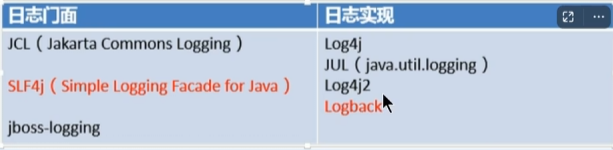
image-20251217194550374

日志门面,就像它的名字一样,是一个“接口层”或“统一入口”,它不负责实际的日志输出,而是提供一套标准的 API,让开发者可以使用一致的方式写日志代码。

日志实现就是真正干活的组件,它负责:

  • 把日志消息格式化
  • 决定输出到控制台、文件、网络等
  • 控制日志级别(debug/info/warn/error)
  • 管理日志滚动、归档等

Spring使用commons-logging作为内部日志,但底层日志实现是开放的。可对接其他日志框架。

Spring5以后commons-logging被spring直接自己写了。底层是有判断逻辑的,如果导入Log4j就用Log4j等等。

Springboog3支持jul,log4j2,logback。SpringBoot提供了默认的控制台输出配置,也可以配置输出为文件。Logback是默认使用的。

虽然日志框架很多,但是我们使用SpringBoot的默认配置就能工作的很好。

SpringBoot是怎么把日志默认配置好的

首先pom依赖会导入场景,比如web场景,然后每个场景启动器都会有spring-boot-starter。

然后在核心场景里面,引入了日志的所有功能spring-boot-starter-logging

默认使用Logback + sl4j 组合作为默认底层日志

以前说自动配置都在AutoConfigure里面,但是日志是系统一启动就要用的,而xxxAutoConfigureation是系统启动好了以后放好的组件,后来用的。

日志是利用监听器机制配置好的。ApplicationListener

日志所有的配置都可以通过修改配置文件实现。以logging开始的所有配置都是日志的配置。

核心的监听器机制后面详细说

日志格式

默认输出格式:

  • 时间和日期:毫秒级精度
  • 日志级别:ERROR、WARN、INFO、DEBUG、or TRACE
  • 进程ID
  • ---:消息分隔符
  • 线程名:使用【】包含
  • Logger名:通常是产生日志的类名
  • 消息:日志记录的内容

注意:Logback没有FATAL级别,对应的是ERROR

默认值:参照spring-bootadditional-spring-configuration-metadata.json文件

可修改为:%d{yyyy-MM-dd HH:mm:ss} %-5level [%thread] %logger{15} ===> %msg%n

或者在cmd命令里面利用java的jdk命令jps也能看运行的进程

回归到使用

如果想在业务里面写日志

1
2
3
4
5
6
7
8
9
10
11
12
13
14
15
16
17
18
19
20
@RestController
public class HelloController{
Logger logger = LoggerFactory.getLogger(getClass());//日志记录器

@GetMapping("/h")
public String hello(){
logger.info("hahaha,方法进来了");
return "hello";
}
}
//或者导入lombok然后用注解直接获得日志记录器
@Slf4j
@RestController
public class HelloController{
@GetMapping("/h")
public String hello(){
log.info("hahaha,方法进来了");
return "hello";
}
}
日志级别

由低到高:ALL、TRACE、DEBUG、INFO、WARN、ERROR、FATAL、OFF

  • 只会打印制定级别以及以上级别的日志
  • ALL:打印所有日志
  • TRACE:追踪框架详细流程日志,一般不使用
  • DEBUG:开发调试细节日志
  • INFO:关键,感兴趣信息日志
  • WARN:警告但不是错误的信息日志,比如:版本过时
  • ERROR:业务错误日志,比如出现各种异常
  • FATAL:之命错误日志,比如jvm系统崩溃
  • OFF:关闭所有日志记录

不指定级别的所有类,都是用root制定的级别作为默认级别

SpringBoot日志默认级别是INFO

1、在application.yml中配置logging.level制定日志级别

1
2
3
4
5
6
7
8
9
10
11
12
13
14
15
16
#默认所有日志没有精确指定级别就使用root的默认级别
logging:
level:
root: info #默认info
#如果想精确指定哪个包指定哪个级别
logging:
level:
com.bitzh.logging.controller: warn
#后续太精确每个包设计日志级别会太麻烦,所以提供分组
logging:
group:
abc: com.bitzh.logging.controller,com.bitzh.logging.service
logging:
level:
abc: info
#springboot还给我们分了sql和web组

2、level可取值范围

1
2
3
4
5
6
7
8
9
10
11
12
13
14
15
16
17
@Slf4j
@RestController
public class HelloController{
@GetMapping("/h")
public String hello(String a){
log.trace("trace日志")
log.debug("debug日志");
//SpringBoot底层默认的日志级别是info,只会打印info及以后的
log.info("hahaha,方法进来了");
log.warn("warn日志");
log.error("error日志");
//如果想看a的参数
log.info("a{}",a);//这样就能看到a的参数

return "hello";
}
}

3、制定日志文件

1
2
3
4
logging:
file:
path: D:\\demo.log #指定日志文件的路径,如果path和name都有就会遵循name,所以一般用name
name: demo.log #指定日志文件的名,只指定文件名就会把文件放在跟项目同位置的目录下

4、文件归档与滚动切割

首先日志文件会越来越大,所以就出现了这个功能

归档:每天的日志单独存到一个文件中

切割:每个文件10MB,超过大小切割成另外一个文件。

1、每天的日志应该独立分割出来存档。如果使用logback (SpringBoot默认整合)。可以通过yml文件指定日志滚动规则。

2、如果是其他日志系统,需要自行配置,比如添加log4j2.xml或者log4j2-spring.xml

3、支持的滚动规则设置如下

配置项 描述
logging.logback.rollingpolicy.file-name-pattern 必填。定义归档日志文件的命名模式,支持时间(如 %d{yyyy-MM-dd})和索引(如 %i)。例如:${LOG_FILE}.%d{yyyy-MM-dd}.%i.gz。该模式决定了日志如何按时间或大小滚动并压缩。
logging.logback.rollingpolicy.max-file-size 单个日志文件的最大大小,超过后触发滚动(仅在文件名模式中包含 %i 时生效)。例如:10MB
logging.logback.rollingpolicy.max-history 保留的归档日志文件最大天数(或周期数)。超过此天数的旧日志会被自动删除。例如:30 表示保留最近30天的日志。
logging.logback.rollingpolicy.total-size-cap 所有归档日志文件的总大小上限。超过后会删除最旧的归档文件。例如:1GB
logging.logback.rollingpolicy.clean-history-on-start 应用启动时是否清理过期的归档日志(true/false)。默认为 false
自定义配置

通常我们配置yml就够了,但是如果想要用以前的自定义logback配置,就直接把logback.xml放到resources下面,然后springboot就会用自己的logbcak的配置了。

但是文件名spring更推荐logback-spring.xml这种格式,这样spring就能控制的了。

如果放log4j2,可以改文件名为log4j2-spring.xml

最佳实战:自己要写配置,配置文件名加上xx-spring.xml

切换日志组合

如果不想要logback想要切换log4j2,那么需要利用maven的就近原则。

首先我们之前导入spring-boot-starter-web里面有核心场景,但是我们再导入spring-boot-starter然后我们利用排除<exclusions>排除掉logback

1
2
3
4
5
6
7
8
9
10
<dependency>
<groupId></groupId>
<artifactId></artifactId>
<exclusions>
<exclusion>
<groupId></groupId> <!-- 这里写logback,然后下面再导入新的日志实现框架 -->
<artifactId></artifactId>
</exclusion>
</exclusions>
</dependency>

2、Web开发

SpringBoot的Web开发能力,由SpringMVC提供。

1、Web场景

我们要学好整个web开发场景,我们要先了解springboot对springmvc提供了哪些场景,如果想要修改如何灵活配置,如何定制组件等等。

首先要了解自动配置了什么

1、整合配置场景

1
2
3
4
<dependency>
<groupId>org.springframework.boot</groupId>
<artifactId>spring-boot-starter-web</artifactId>
</dependency>

2、引入了autoconfigure功能

3、@EnableAutoConfiguration注解使用@Import(AutoConfigurationImportSelector.class)批量导入组件,加载META-INF/spring/%s.imports,也就是说方法底层写了一个%s的占位符,这个占位符可以通过掺入的形参来获取值,并替换掉这个占位符,那么我们导入了web包,实际上加载了

4、META-INF/spring/org.springframwork.boot.autoconfigure.AutoConfiguration.imports文件中配置的所有组件。然后进去看这个文件里面写了很多自动配置的包名。

5、所有自动配置类如下

自动配置类 说明
org.springframework.boot.autoconfigure.web.servlet.ServletWebServerFactoryAutoConfiguration 自动配置内嵌 Servlet 容器(Tomcat/Jetty/Undertow)
org.springframework.boot.autoconfigure.web.servlet.DispatcherServletAutoConfiguration 配置 DispatcherServlet(Spring MVC 核心)
org.springframework.boot.autoconfigure.web.servlet.WebMvcAutoConfiguration 自动配置 Spring Web MVC(视图解析、静态资源、拦截器等)
org.springframework.boot.autoconfigure.web.servlet.HttpEncodingAutoConfiguration 配置字符编码过滤器(解决中文乱码)
org.springframework.boot.autoconfigure.web.servlet.MultipartAutoConfiguration 支持文件上传(multipart/form-data
org.springframework.boot.autoconfigure.web.servlet.error.ErrorMvcAutoConfiguration 配置 MVC 错误页面和异常处理
org.springframework.boot.autoconfigure.websocket.servlet.WebSocketServletAutoConfiguration Servlet 环境下的 WebSocket 支持
org.springframework.boot.autoconfigure.websocket.servlet.WebSocketMessagingAutoConfiguration WebSocket + STOMP 消息代理支持

然后还有响应式的类

自动配置类 说明
org.springframework.boot.autoconfigure.web.reactive.ReactiveWebServerFactoryAutoConfiguration 配置响应式内嵌服务器(Netty/Tomcat/Jetty/Undertow Reactive)
org.springframework.boot.autoconfigure.web.reactive.HttpHandlerAutoConfiguration 配置 HttpHandler(WebFlux 底层入口)
org.springframework.boot.autoconfigure.web.reactive.WebFluxAutoConfiguration 自动配置 Spring WebFlux(路由、编解码、静态资源等)
org.springframework.boot.autoconfigure.web.reactive.ReactiveMultipartAutoConfiguration 响应式文件上传支持
org.springframework.boot.autoconfigure.web.reactive.WebSessionIdResolverAutoConfiguration 配置 WebSession ID 解析
org.springframework.boot.autoconfigure.web.reactive.error.ErrorWebFluxAutoConfiguration WebFlux 的全局错误处理
org.springframework.boot.autoconfigure.websocket.reactive.WebSocketReactiveAutoConfiguration 响应式 WebSocket 支持

6、这些自动配置类又绑定了配置文件的一堆配置项

  • 1、SpringMVC的所有配置以spring.mvc开头
  • 2、Web场景的通用配置以spring.web开头
  • 3、文件上传配置以spring.servlet.multipart开头
  • 4、服务器的配置以server开头 比如:编码方式

7、默认配置Web效果

Spring Boot 的自动配置提供了以下功能:

  • 注入 ContentNegotiatingViewResolverBeanNameViewResolver 的 Bean,方便视图解析。
  • 支持静态资源的访问,静态资源放在static文件夹下即可直接访问。
  • 自动注册 ConverterGenericConverterFormatter 的 Bean,适配常见的数据类型转换和格式化需求。
  • 支持 HttpMessageConverters,方便返回json等数据类型(方法只要是对象就转换为json)。
  • 自动注册 MessageCodesResolver,方便国际化及错误消息处理。
  • 支持静态的 index.html 页面。
  • 自动使用 ConfigurableWebBindingInitializer Bean,实现消息处理,数据绑定(就比如接受前端传来的超文本数据放在对象里面),类型转化、数据校验 等功能。

重要:

  • 如果想要保持 boot mvc 的默认配置,并且自定义更多的mvc配置,如:interceptors,formatters,view controllers等。可以使用@Configuration注解添加一个WebMvcConfigurer类型的配置类,并不要标注@EnableWebMvc
  • 如果想要保持boot mvc的默认配置,但要自定义核心组件实例,比如:RequestMappingHandlerMapping,RequestMappingHandlerAdapter或ExceptionHandlerExceptionResolver,给容器中放一个WebMvcRegistrations组件即可
  • 如果想全面接管Spring MVC,@Configuration标注一个配置类,并加上@EnableWebMvc注解,实现WebMvcConfigurer接口

所以用springboot进行web开发有三种方式

全自动 直接编写控制器逻辑 全部使用自动配置默认效果
手自一体 @Configuration + 配置 WebMvcConfigurer + 配置WebMvcRegistrations 不要标注@EnableWebMvc 自动配置效果,手动设置部分功能,定义MVC底层组件
全手动 @Configuration + 配置 WebMvcConfigurer 标注@EnableWebMvc 禁用自动配置效果,全手动设置

总结:给容器中写一个配置类 @Configuration 继承 WebMvcConfigurer 但是不要标注 @EnableWebMvc,实现手自一体的效果

现在开始了解规则

2、静态资源

0、主要研究WebMvcConfiguration原理
1、生效条件
1
2
3
4
5
6
7
8
9
10
11
12
13
14
@AutoConfiguration(
after = {DispatcherServletAutoConfiguration.class, TaskExecutionAutoConfiguration.class, ValidationAutoConfiguration.class}
)//在这些自动配置之后
@ConditionalOnWebApplication(
type = Type.SERVLET
)//只有是web应用生效,必须是servlet类型,reactive响应式
@ConditionalOnClass({Servlet.class, DispatcherServlet.class, WebMvcConfigurer.class})
@ConditionalOnMissingBean({WebMvcConfigurationSupport.class})//容器中没有这个Bean
@AutoConfigureOrder(-2147483638)//优先级
@ImportRuntimeHints({WebResourcesRuntimeHints.class})
public class WebMvcAutoConfiguration {
public static final String DEFAULT_PREFIX = "";
public static final String DEFAULT_SUFFIX = "";
private static final String SERVLET_LOCATION = "/";
2、效果

1、放了两个Filter:

HiddenHttpMethodFilter:页面表单提交Rest请求(GET、POST、PUT、DELETE)

FromContentFilter:表单内容Filter,GET(数去放URL后面)、POST(数据放请求体内)请求可以携带数据,PUT、DELETE的请求体数据会被忽略

2、给容器中放了WebMvcConfigurer组件,给SpringMVC添加各种定制功能。

这里放了很多底层规则,所有的 功能最终会和配置文件绑定

WebMvcProperties.class: spring.mvc开头配置文件

WebProperties.classspring.web开头配置文件

1
2
3
4
5
6
7
@Configuration(
proxyBeanMethods = false
)
@Import({EnableWebMvcConfiguration.class})//额外导入了其他配置
@EnableConfigurationProperties({WebMvcProperties.class, WebProperties.class})//这里属性绑定
@Order(0)
public static class WebMvcAutoConfigurationAdapter implements WebMvcConfigurer, ServletContextAware {
3、WebMvcConfigurer接口

提供了配置SpringMVC底层的所有组件入口
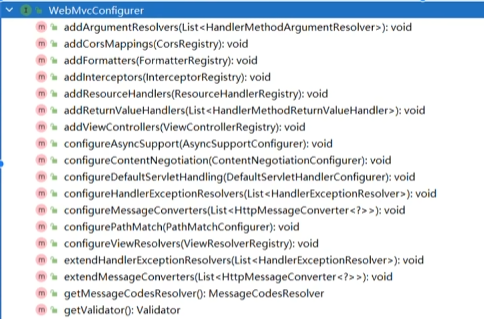
image-20251218113429282

1
2
3
4
5
6
7
8
9
10
11
12
13
14
15
16
17
参数解析器(controller上的所有参数都要解析)
跨域
格式化器
拦截器
添加资源处理器,处理静态资源规则
返回值处理器
视图控制器:/a 直接跳转到xxx.html页面。
异步支持
内容协商
默认处理,默认接受/ 请求
配置异常解析器
消息转化器
路径匹配
视图解析
扩展:异常解析器
扩展:消息转换
后面两个get是获取的
4、静态资源规则源码
1
2
3
4
5
6
7
8
9
10
11
12
13
14
15
public void addResourceHandlers(ResourceHandlerRegistry registry) {
if (!this.resourceProperties.isAddMappings()) {
logger.debug("Default resource handling disabled");
} else {
this.addResourceHandler(registry, this.mvcProperties.getWebjarsPathPattern(), "classpath:/META-INF/resources/webjars/");
this.addResourceHandler(registry, this.mvcProperties.getStaticPathPattern(), (Consumer)((registration) -> {
registration.addResourceLocations(this.resourceProperties.getStaticLocations());
if (this.servletContext != null) {
ServletContextResource resource = new ServletContextResource(this.servletContext, "/");
registration.addResourceLocations(new Resource[]{resource});
}

}));
}
}

首先可以看到这个源码里面addResourceHandler调用了两次,添加了两种静态资源规则。

5、 EnableWebMvcConfiguration 源码
1
2
3
4
5
6
//SpringBoot 给容器中放 WebMvcConfigurationSupport 组件。
//我们如果⾃⼰放了WebMvcConfigurationSupport 组件,Boot的WebMvcAutoConfiguration都会失效。
@Configuration(proxyBeanMethods = false)
@EnableConfigurationProperties(WebProperties.class)
public static class EnableWebMvcConfiguration extends DelegatingWebMvcConfiguration implements ResourceLoaderAware
{}
  1. HandlerMapping : 根据请求路径 /a 找那个handler能处理请求

    a. WelcomePageHandlerMapping :

    ⅰ. 访问 /** 路径下的所有请求,都在以前四个静态资源路径下找,欢迎⻚也⼀样

    ⅱ. 找 index.html :只要静态资源的位置有⼀个 index.html ⻚⾯,项⽬启动默认访问

6、为什么容器中放一个WebMvcConfigurer就能生效
  1. WebMvcAutoConfiguration 是⼀个⾃动配置类,它⾥⾯有⼀个 EnableWebMvcConfiguration
  2. EnableWebMvcConfiguration 继承与 DelegatingWebMvcConfiguration ,这两个都 ⽣效
  3. DelegatingWebMvcConfiguration 利⽤ DI 把容器中 所有 WebMvcConfigurer注⼊进来
  4. 别⼈调⽤ DelegatingWebMvcConfiguration 的⽅法配置底层规则,⽽它调⽤所有 WebMvcConfigurer 的配置底层⽅法。

总结:Spring Boot 通过一个“委托代理类”自动聚合所有 WebMvcConfigurer 实现,并统一调用它们的方法。

第一步:自动配置入口 —— WebMvcAutoConfiguration

  • Spring Boot 启动时,会加载 WebMvcAutoConfiguration(条件满足时)。
  • 这个类是 Spring MVC 的自动配置类,负责设置默认的视图解析器、消息转换器、静态资源处理等。

第二步:关键角色 —— DelegatingWebMvcConfiguration

WebMvcAutoConfiguration 内部,有一个静态内部类:而DelegatingWebMvcConfiguration 是真正的核心:

第三步:依赖注入聚合所有 WebMvcConfigurer

  • @Autowired List<WebMvcConfigurer> configurers
    → Spring 容器会自动把所有类型为 WebMvcConfigurer 的 Bean 收集到一个 List 中
  • 然后交给 WebMvcConfigurerComposite(一个组合器)管理。

静态资源映射规则

1、默认规则

1、静态资源映射规则在WebMvcConfiguration中进行了定义:

规则一:访问 /webjars/** 路径就去classpath:/META-INF/resources/webjars/下找资源

maven导入依赖比如导入vue相关js,相关的js就进来了,,然后访问webjars对应路径就能访问对应js了。

但是这个不常用

规则二:访问:/**路径就去静态资源默认的四个位置找资源

"classpath:/META-INF/resources/",

"classpath:/resources/",

"classpath:/static/",

"classpath:/public/"

也就是放在类路径下的这四个位置就能访问静态资源。

类路径就是java包下面或者resoutces包下面就是两个类路径。

2、静态资源缓存规则

3、规则三:静态资源默认都有缓存规则的设置。

a. 所有缓存的设置,直接通过配置文件: spring.web

b. cachePeriod:缓存周期,多久不用找服务器要新的。默认没有,以秒为单位

c. cacheControl:HTTP缓存控制,默认无,缓存大体分为私有缓存和共享缓存 HTTP 缓存 - HTTP | MDN

d. useLastModified:是否使用最后一次修改。注意:Last-Modified首部,只是告诉浏览器,要想使用缓存,必须每次带该首部去服务器验证,通过就响应304,不通过就返回完整资源,并重写设置Last-Modified

如果浏览器访问了一个静态资源index.js,如果这个资源没有发生变化,下次访问的视乎就可以直接让浏览器用自己缓存中的东西,而不用给服务器发请求。

1
2
3
registration.setCachePeriod(this.getSeconds(this.resourceProperties.getCache().getPeriod()));
registration.setCacheControl(this.resourceProperties.getCache().getCachecontrol().toHttpCacheControl());
registration.setUseLastModified(this.resourceProperties.getCache().isUseLastModified());

欢迎页

欢迎页规则在 WebMvcAutoConfiguration中进行了定义:

1、在静态资源目录下找index.html

2、没有就在templates下找index模版页

Favicon

  1. 在静态资源⽬录下找 favicon.ico

缓存实验

上面讲解了三种静态资源规则,无论哪种规则都配了三个方法来控制缓存,

一个是setCacheControl,

一个是SetCachePeriod,

一个是setUseLastModified,

然后这三个方法都要通过resourceProperties来绑定配置项,

那么就去里面看有什么配置项,

然后看到里面的配置项是spring.web开头的,

然后看这个类配什么信息,

可以配locale国际化信息,第二个配resources,然后resource里面配置静态资源策略,然后resources里面可以配

1
2
3
4
staticLocations 静态资源的路径
addMappings 是否开启静态资源的映射
Chain 静态资源处理链
Cache 缓存规则

那么我们看了源码之后就会配置,然后我们想要配置cache,又可以点进去看源码,看cache里面需要配什么

1
2
3
4
5
6
7
8
spring:
web:
resources:
add-mappings: true #这样就开启了静态资源映射了
cache:
period: 3600 #缓存3600秒,一小时后面如果需要更详细的配置,可以继续看
cachecontrol: #缓存详细合并项控制,覆盖Period配置
max-age: 7200 #浏览器第一次请求服务器,服务器告诉浏览器此资源缓存7200秒。

上面就了解了默认规则如何了解以及配置了,下面开始自定义规则了

2、自定义静态资源规则

自定义静态资源路径,自定义缓存规则

有两种自定义静态资源的方式,以静态资源为例看源码,他绑定了两个一个是上面的webProperties,一个是webMvc

1、配置方式

所以说以后想要自定义规则一个就是改spring.web的跟上面一样,一个是修改spring.mvc的配置。

现在这里搞清楚,这两个能配哪些?

1
2
3
4
5
6
7
8
9
10
11
12
13
14
15
16
17
18
19
20
21
22
23
24
#1spring.web
# 1.配置国际化的区域信息
# 2.静态资源策略(开启、处理链、缓存)
#开启静态资源映射规则
spring.web.resources.add-mappings=true
#设置缓存
#spring.web.resources.cache.period=3600
##缓存详细合并项控制,覆盖period配置:
## 浏览器第⼀次请求服务器,服务器告诉浏览器此资源缓存7200秒,7200秒以内的所有此资源访问不⽤发给服务器请求,7200秒以后发请求给服务器
spring.web.resources.cache.cachecontrol.max-age=7200
## 共享缓存
spring.web.resources.cache.cachecontrol.cache-public=true
#使⽤资源last-modified 时间,来对⽐服务器和浏览器的资源是否相同没有变化。相同返回304
spring.web.resources.cache.use-last-modified=true


#⾃定义静态资源⽂件夹位置,这个是资源位置路径,其他两个是访问路径
spring.web.resources.static-locations=classpath:/a/,classpath:/b/,classpath:/static/

#2、spring.mvc
## 2.1.⾃定义webjars路径前缀
spring.mvc.webjars-path-pattern=/wj/**
## 2.2. 静态资源访问路径前缀
spring.mvc.static-path-pattern=/static/**

小提示:

1
2
3
4
5
6
7
spring.web.resources.static-locations=classpath:/a/,classpath:/b/,classpath:/static/
表示 Spring 会从以下三个 classpath 目录中查找静态资源。
spring.mvc.static-path-pattern=/static/**
表示:所有以 /static/ 开头的请求,都会被当作静态资源处理。
例如:
用户访问 http://localhost:8080/static/logo.png
Spring 会去 a/, b/, static/ 这些目录下找 logo.png

总结:

spring.mvc : 配置静态资源访问前缀路径

spring.web:配置

  • 静态资源目录

  • 静态资源缓存策略

2、代码方式

所有代码的方式,都应该写一个配置类,然后放到一个包下。

容器中只要有⼀个 WebMvcConfigurer 组件。配置的底层⾏为都会⽣效

@EnableWebMvc //禁⽤boot的默认配置

1
2
3
4
5
6
7
8
9
10
11
12
13
14
15
16
17
18
19
20
21
22
23
24
25
26
27
28
29
30
//第一种写法利用实现,重写
@Configuration //这是⼀个配置类
public class MyConfig implements WebMvcConfigurer {
@Override
public void addResourceHandlers(ResourceHandlerRegistry registry) {
//保留以前规则
WebMvcConfigurer.super.addResourceHandlers(registry);
//⾃⼰写新的规则。
registry.addResourceHandler("/static/**")
.addResourceLocations("classpath:/a/","classpath:/b/")
.setCacheControl(CacheControl.maxAge(1180, TimeUnit.SECONDS));
}
}

//第二种写法,直接重写利用return,
@Configuration
public class MyConfig {
@Bean
public WebMvcConfigurer webMvcConfigurer() {
return new WebMvcConfigurer() {
@Override
public void addResourceHandlers(ResourceHandlerRegistry registry) {
// 将 /static/** 的请求映射到多个 classpath 资源位置
registry.addResourceHandler("/static/**")
.addResourceLocations("classpath:/a/", "classpath:/b/")
.setCacheControl(CacheControl.maxAge(1180, TimeUnit.SECONDS)); // 注意:单位是秒,不是分钟
}
};
}
}

3、路径匹配

Spring5.3 之后加⼊了更多的 请求路径匹配的实现策略;

以前只⽀持 AntPathMatcher 策略, 现在提供了 PathPatternParser 策略。并且可以让我们指定 到底使⽤那种策略。

1、Ant风格路径用法

Ant ⻛格的路径模式语法具有以下规则:

1
2
3
4
5
6
7
8
9
10
11
12
13
*:表示任意数量的字符。
?:表示任意⼀个字符。
**:表示任意数量的⽬录。
{}:表示⼀个命名的模式占位符。
[]:表示字符集合,例如[a-z]表示⼩写字⺟。
例如:
*.html 匹配任意名称,扩展名为.html的⽂件。
/folder1/*/*.java 匹配在folder1⽬录下的任意两级⽬录下的.java⽂件。
/folder2/**/*.jsp 匹配在folder2⽬录下任意⽬录深度的.jsp⽂件。
/{type}/{id}.html 匹配任意⽂件名为{id}.html,在任意命名的{type}⽬录下的⽂件。
注意:Ant ⻛格的路径模式语法中的特殊字符需要转义,如:
要匹配⽂件路径中的星号,则需要转义为\\*。
要匹配⽂件路径中的问号,则需要转义为\\?。
2、模式切换

AntPathMatcher 与 PathPatternParser

● PathPatternParser 在 jmh 基准测试下,有 6~8 倍吞吐量提升,降低 30%~40%空间分配 率

● PathPatternParser 兼容 AntPathMatcher语法,并⽀持更多类型的路径模式

● PathPatternParser “**” 多段匹配的⽀持仅允许在模式末尾使⽤

1
2
3
4
5
6
7
@GetMapping("/a*/b?/{p1:[a-f]+}")
public String hello(HttpServletRequest request, @PathVariable("p1") String path) {
log.info("路径变量p1:{}", path);
//获取请求路径
String uri = request.getRequestURI();
return uri;
}

总结:

使⽤默认的路径匹配规则,是由 PathPatternParser 提供的

如果路径中间需要有 **,替换成ant⻛格路径

1
2
3
4
# 改变路径匹配策略:
# ant_path_matcher ⽼版策略;
# path_pattern_parser 新版策略;
spring.mvc.pathmatch.matching-strategy=ant_path_matcher

4、内容协商

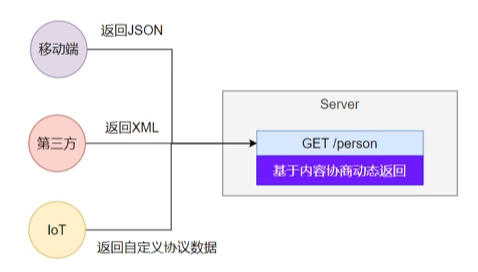
一套系统适配多端数据返回

image-20251220000446975

1、多端内容适配
1、默认规则

基于请求头的内容协商是默认开启的,基于请求参数的是默认关闭的
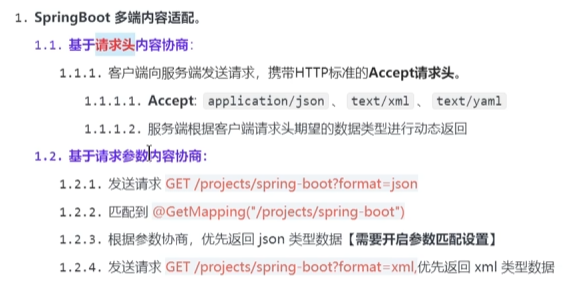
image-20251220001519599

2、效果演示

请求同一个接口,可以返回json和xml不同格式数据

首先我们导入web的启动器里面默认引入了json包,然后默认是利用jackson包的功能

1
2
3
4
<dependency>
<groupId>com.fasterxml.jackson.dataformat</groupId>
<artifactId>jackson-dataformat-xml</artifactId>
</dependency>

然后默认是返回json数据的,但是如果加上jackson的注解并且开启基于请求参数的内容协商就能实现内容协商的功能。

1
2
3
4
5
6
7
8
@JacksonXmlRootElement  // 可以写出为xml⽂档
@Data
public class Person {
private Long id;
private String userName;
private String email;
private Integer age;
}
3、开启基于请求参数的内容协商
1
2
3
4
 #开启基于请求参数的内容协商功能。默认参数名:format。默认此功能不开启
spring.mvc.contentnegotiation.favor-parameter=true
# 指定内容协商时使⽤的参数名。默认是format
spring.mvc.contentnegotiation.parameter-name=type

那如果后面还想返回Yml呢?那么我们就需要了解内容协商的底层原理

2、自定义内容返回

下面演示如何自定义组件了

1、增加Yaml返回支持

之前,我们看EnableWebMvcConfiguration里面写了支持的返回格式里面没有,那么我们如果要添加,就先看EnableWebMvcConfiguration,然后发现EnableWebMvcConfiguration继承了DelegatingWebMvcConfiguration,然后这个又继承了WebMvcConfigurationSupport(也就是最终继承的是这个),然后看了里面没有支持yml的,有xml所以之前导个包,然后配置一下就能支持了,但是这里底层没有支持yaml,所以我们需要自定义了。

首先导入依赖

1
2
3
4
<dependency>
<groupId>com.fasterxml.jackson.dataformat</groupId>
<artifactId>jackson-dataformat-yaml</artifactId>
</dependency>

把对象写出成YAML

1
2
3
4
5
6
7
8
9
10
11
12
//测试类
public static void main(String[] args) throws JsonProcessingException {
Person person = new Person();
person.setId(1L);
person.setUserName("张三");
person.setEmail("aaa@qq.com");
person.setAge(18);
YAMLFactory factory = new YAMLFactory().disable(YAMLGenerator.Feature.WRITE_DOC_START_MARKER);
ObjectMapper mapper = new ObjectMapper(factory);//在底层转json或者其他都是利用这个,然后发现里面可以传入工厂的方法
String s = mapper.writeValueAsString(person);
System.out.println(s);
}

现在能在测试类里进行转化,后面就是要进行配置,告知springboot,存在一种新格式叫yaml

编写配置

1
2
#新增⼀种媒体类型
spring.mvc.contentnegotiation.media-types.yaml=text/yaml

增加 HttpMessageConverter 组件,专⻔负责把对象写出为yaml格式

1
2
3
4
5
6
7
8
9
@Bean
public WebMvcConfigurer webMvcConfigurer(){
return new WebMvcConfigurer() {
@Override //配置⼀个能把对象转为yaml的messageConverter
public void configureMessageConverters(List<HttpMessageConverter<?> > converters) {
converters.add(new MyYamlHttpMessageConverter());//这里就是增加自定义的转换器了
}
};
}
1
2
3
4
5
6
7
8
9
10
11
12
13
14
15
16
17
18
19
20
21
22
23
24
25
public class MyYamlHttpMessageConverter extends AbstractHttpMessageConverter<Object>{
private ObjectMapper objectMapper = null;
public MyYamlHttpMessageConverter(){
//springboot不知道这个转换器支持哪种类型,所以调用父类构造器,刚好里面有一种方法就是告诉springboot支持哪种类型的
super(new MediaType("text","yaml",Charset.forName("UTF-8")));//这里其实跟上面的配置是要对应的
this.objectMapper = new ObjectMapper(new YAMLFactory().disable(YAMLGenerator.Feature.WRITE_DOC_START_MARKER));
}
@Override
protected boolean supports(Class<?> clazz){
return true;//这里可以写判断,但这里省略了,只要是对象类型都支持
}
@Override //@RequestBody配合,这次我们的实例是ResponseBody,不用管如何读取,只用管返回就好了,所以这个不用写
protected Object readInternal(Class<?> clazz, HttpInputMessage inputMessage){
return null;
}
@Override
protected void writeInternal(Object methodReturnValue, HttpOutputMessage outputMessage)
throws IOException, HttpMessageNotWritableException {
//try-with语法
try (OutputStream os = outputMessage.getBody()){
// 将对象转换为YAML并写入输出流
this.objectMapper.writeValue(os, methodReturnValue);
}
}
}
2、思考:如何增加其他

第一步:配置媒体类型的支持。

spring.mvc.contentnegotiation.media-types.yaml=text/yaml

第二步:编写对应的HttpMessageConverter。

​ 按照上面的示例

第三步:把MessageConverter加入到底层。

​ 容器中放一个webMvcConfigurer组件并配置底层的MessageConverter

3、内容协商原理-HttpMessageConverter

HttpMessageConverter怎么工作?何时工作?

定制HttpMessageConverter 来实现多端内容协商

编写 WebMvcConfigurer 提供的 configureMessageConverters 底层,修改底层的HttpMessageConverter 就行了。

实现上我们利用WebMvcConfigurer 提供的 configureMessageConverters ,然后自定义这个configureMessageConverters 就能修改底层的HttpMessageConverter 就行了。但是为什么?那么我们先了解@ResponseBody的原理

1、@ReeponseBodyHttpMessageConverter 处理

标注了@ReeponseBody 的返回值 将会由支持他的 HttpMessageConverter 写给浏览器

如果controller方法的返回值标注了@RespomseBody注解

流程:

​ 1、请求进来,先到了 DispatcherServletdoDispatch()进行处理

​ 2、找到一个 HandlerAdapter适配器

​ 3、然后我们标注了GetMapping,然后匹配到了 RequestMappingHandlerAdapter 来执行,调用invokeHandlerMethod()方法来执行。

​ 4、在目标方法执行之前,准备好两个东西

​ a. HandlerMethodArgumentResolver : 参数解析器,确定目标方法每个参数值

​ b. HandlerMethodReturnValueHandler : 返回值处理器,确定目标方法的反追只该怎么写出去。

​ 5、RequestMappingHandlerAdapter 里面的invokeAndHandle(webReques,mavContainer) 真正执行目标方法

​ 6、目标方法执行完成,会返回 返回值对象

​ 7、找到一个合适的返回值处理器 HandlerMethodReturnValueHandler

​ 8、最终找到 RequestResponseBodyMethodProcessor 能处理 标注了 @ResponseBody 注解的⽅法

​ 9、RequestResponseBodyMethodProcessor调⽤ writeWithMessageConverters ,利用

MessageConverter 把返回值写出去

上面解释:@ResponseBodyHttpMessageConverter 处理,下面解释HttpMessageConverter 如何处理的

2、HttpMessageConverter 会先进行内容协商

​ 1、遍历所有的 MessageConverter 看谁支持这种内容类型的数据

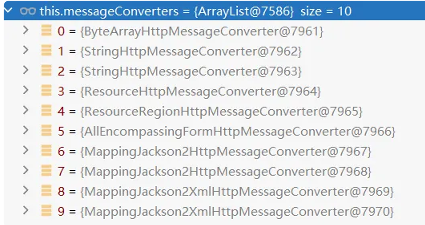
​ 2、默认的 MessageConverter 有很多Converter

image-20251220021951029

​ 3、 最终因为要 json 所以 MappingJackson2HttpMessageConverter ⽀持写出json

​ 4、 jackson⽤ ObjectMapper 把对象写出去

3、WebMvcAutoConfiguration 提供几种默认 HttpMessageConverters
1
2
3
4
5
6
7
EnableWebMvcConfiguration 通过 addDefaultHttpMessageConverters 添加了默认的 MessageConverter,如下:
ByteArrayHttpMessageConverter : ⽀持字节数据读写
StringHttpMessageConverter : ⽀持字符串读写
ResourceHttpMessageConverter :⽀持资源读写
ResourceRegionHttpMessageConverter : ⽀持分区资源写出
AllEncompassingFormHttpMessageConverter :⽀持表单xml/json读写
MappingJackson2HttpMessageConverter : ⽀持请求响应体Json读写

系统提供默认的MessageConverter 功能有限,仅⽤于json或者普通返回数据。额外增加新的内容协商 功能,必须增加新的 HttpMessageConverter

那么就自然想到,导入相关的POM包然后编写配置,增加相应的Converter就可以了。

4、WebMvcConfigurationSupport

提供了很多的默认设置。

判断系统中是否有相应的类:如果有,就加入相应的HttpMessageConverter

5、模板引擎

由于 SpringBoot 使⽤了嵌⼊式 Servlet 容器。所以 JSP 默认是不能使⽤的。

如果需要服务端⻚⾯渲染,优先考虑使⽤ 模板引擎
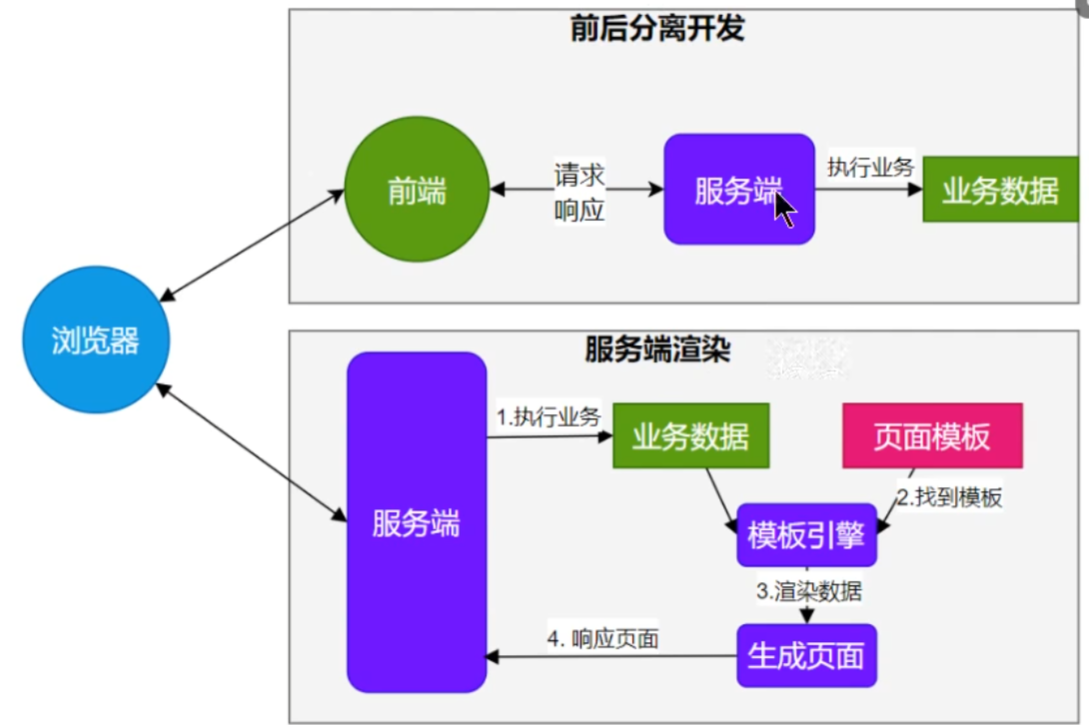
image-20251220043210589

上面是前后端分离开发,下面是前后端不分离开发。

模板引擎⻚⾯默认放在 src/main/resources/templates

SpringBoot 包含以下模板引擎的⾃动配置

FreeMarker

Groovy

Thymeleaf

Mustache

1、Thymeleaf整合
1
2
3
4
<dependency>
<groupId>org.springframework.boot</groupId>
<artifactId>spring-boot-starter-thymeleaf</artifactId>
</dependency>

⾃动配置原理

  1. 开启了 org.springframework.boot.autoconfigure.thymeleaf.ThymeleafAutoConfiguration ⾃动配置
  2. 属性绑定在 ThymeleafProperties 中,对应配置⽂件 spring.thymeleaf 内容
  3. 所有的模板⻚⾯默认在 classpath:/templates ⽂件夹下
  4. 默认效果
    1. 所有的模板⻚⾯在 classpath:/templates/ 下⾯找
    2. 找后缀名为 .html 的⻚⾯
2、基础语法
1、核心用法

th:xxx :动态渲染制定的html标签属性值或者th指令(遍历、判断等)

1
2
3
4
5
6
th:text 标签内文本值渲染
th:utext 不会转义,显示为html原本的样子
th:属性 标签制定属性渲染
th:attr 标签任意属性渲染
th:if
th:each等

例如

1
2
3
4
<p th:text="${content}">原内容</p>
<a th:href="${url}">登录</a>
<img src="../../images/gtvglogo.png"
th:attr="src=@{/images/gtvglogo.png},title=#{logo},alt=#{logo}" />

表达式:用来动态取值

1
2
3
4
5
${} 变量取值,使用model共享给页面的值都直接用${}
@{} url路径
#{} 国际化消息
~{} 片段引用
*{} 变量选择,需要配合th:object绑定对象

系统工具&内置对象

1
2
3
4
5
6
7
8
9
10
11
12
13
14
15
16
17
18
19
20
param :请求参数对象
session :session对象
application :application对象
#execInfo :模板执⾏信息
#messages :国际化消息
#uris :uri/url⼯具
#conversions :类型转换⼯具
#dates :⽇期⼯具,是ava.util.Date 对象的⼯具类
#calendars :类似#dates,只不过是java.util.Calendar 对象的⼯具类
#temporals : JDK8+ java.time API ⼯具类
#numbers :数字操作⼯具
#strings :字符串操作
#objects :对象操作
#bools :bool操作
#arrays :array⼯具
#lists :list⼯具
#sets :set⼯具
#maps :map⼯具
#aggregates :集合聚合⼯具(sum、avg)
#ids :id⽣成工具
2、语法示例
1
2
3
4
5
6
7
8
9
10
11
12
13
14
15
16
17
18
19
20
21
22
23
24
25
26
27
表达式:
变量取值:${...}
url 取值:@{...}
国际化消息:#{...}
变量选择:*{...}
⽚段引⽤: ~{...}

⽂本操作:
拼串: +
⽂本替换:| The name is ${name} |

布尔操作:
⼆进制运算: and,or
取反:!,not

⽐较运算:
⽐较: >,<,<=,>=(gt,lt,ge,le)
等值运算: ==,!=(eq,ne)
条件运算:
if-then: (if)?(then)
if-then-else: (if)?(then):(else)
default: (value)?:(defaultValue)
特殊语法:
⽆操作:_

所有以上都可以嵌套组合
'User is of type ' + (${user.isAdmin()} ? 'Administrator' : (${user.type} ?: 'Unknown'))
3、属性设置
1
2
3
4
1.th:href="@{/product/list}"
2.th:attr="class=${active}"
3.th:attr="src=@{/images/gtvglogo.png},title=${logo},alt=#{logo}"
4.th:checked="${user.active}"

案例:

1
2
3
<p th:text="${content}">原内容</p>
<a th:href="${url}">登录</a>
<img src="../../images/gtvglogo.png" th:attr="src=@{/images/gtvglogo.png},title=#{logo},alt=#{logo}" />
4、遍历

语 法: th:each=” 元素名 , 迭代状态 : ${ 集合 }”

1
2
3
4
5
6
7
8
9
10
11
12
13
<tr th:each="prod : ${prods}">
<td th:text="${prod.name}">Onions</td>
<td th:text="${prod.price}">2.41</td>
<td th:text="${prod.inStock}? #{true} : #{false}">yes</td>
</tr>
<tr th:each="prod,iterStat : ${prods}" th:class="${iterStat.odd}? 'odd'">
<td th:text="${prod.name}">Onions</td>
<td th:text="${prod.price}">2.41</td>
<td th:text="${prod.inStock}? #{true} : #{false}">yes</td>
<td>
index: [[${iterStat.index}]]
</td>
</tr>
1
2
3
4
5
6
7
8
iterStat 有以下属性:
index:当前遍历元素的索引,从0开始
count:当前遍历元素的索引,从1开始
size:需要遍历元素的总数量
current:当前正在遍历的元素对象
even/odd:是否偶数/奇数⾏
first:是否第⼀个元素
last:是否最后⼀个元素
5、判断

th:if

1
2
3
4
5
<a
href="comments.html"
th:href="@{/product/comments(prodId=${prod.id})}"
th:if="${not #lists.isEmpty(prod.comments)}"
>view</a>

th:switch

1
2
3
4
5
<div th:switch="${user.role}">
<p th:case="'admin'">User is an administrator</p>
<p th:case="#{roles.manager}">User is a manager</p>
<p th:case="*">User is some other thing</p>
</div>
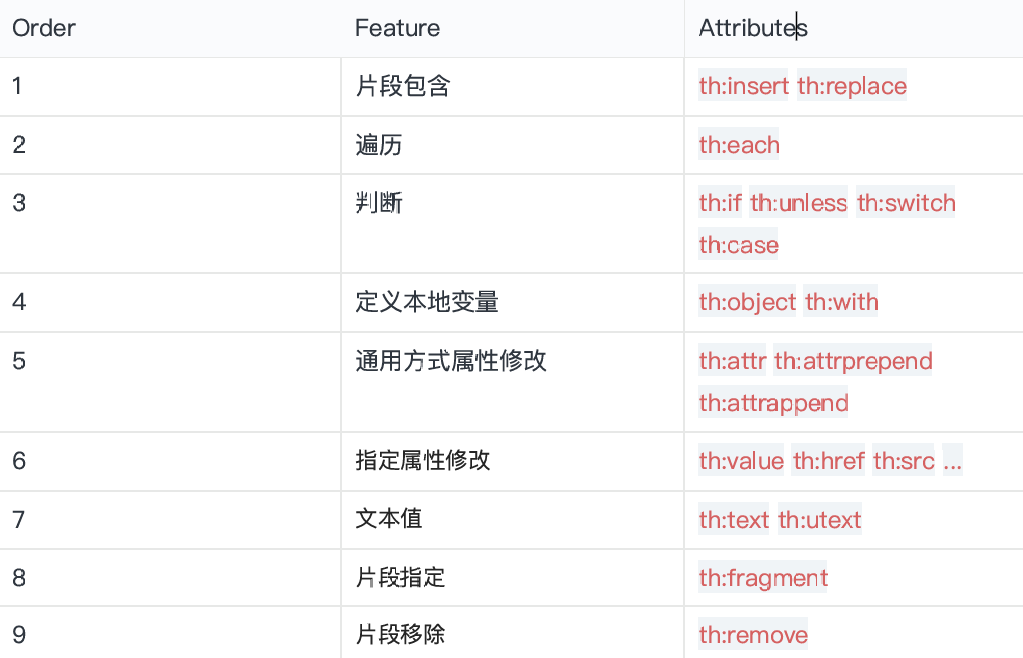
6、属性优先级

片段》遍历》判断

1
2
3
<ul>
<li th:each="item : ${items}" th:text="${item.description}">Item description here...</li>
</ul>

image-20251220054531309

7、行内写法

[[...]] or [(...)]

1
<p>Hello, [[${session.user.name}]]!</p>
8、变量选择
1
2
3
4
5
<div th:object="${session.user}">
<p>Name: <span th:text="*{firstName}">Sebastian</span>.</p>
<p>Surname: <span th:text="*{lastName}">Pepper</span>.</p>
<p>Nationality: <span th:text="*{nationality}">Saturn</span>.</p>
</div>

等同于

1
2
3
4
5
<div>
<p>Name: <span th:text="${session.user.firstName}">Sebastian</span>.</p>
<p>Surname: <span th:text="${session.user.lastName}">Pepper</span>.</p>
<p>Nationality: <span th:text="${session.user.nationality}">Saturn</span>.</p>
</div>
9、模板布局
1
2
3
定义模板: th:fragment 
引⽤模板:~{templatename::selector}
插⼊模板:th:insert 、th:replace
1
2
3
4
5
6
7
8
9
10
11
12
13
14
<footer th:fragment="copy">&copy; 2011 The Good Thymes Virtual Grocery</footer>
<body>
<div th:insert="~{footer :: copy}"></div>
<div th:replace="~{footer :: copy}"></div>
</body>
<body>
结果:
<body>
<div>
<footer>&copy; 2011 The Good Thymes Virtual Grocery</footer>
</div>
<footer>&copy; 2011 The Good Thymes Virtual Grocery</footer>
</body>
</body>
10、devtools
1
2
3
4
<dependency>
<groupId>org.springframework.boot</groupId>
<artifactId>spring-boot-devtools</artifactId>
</dependency>

修改⻚⾯后; ctrl+F9 刷新效果; java代码的修改,如果 devtools 热启动了,可能会引起⼀些bug,难以排查

6、国际化

国际化的⾃动配置参照 MessageSourceAutoConfiguration

实现步骤:

  1. Spring Boot 在类路径根下查找 messages资源绑定⽂件。⽂件名为: messages.properties

  2. 多语⾔可以定义多个消息⽂件,命名为 messages_ 区域代码 .properties 。如:

    a. messages.properties :默认

    b. messages_zh_CN.properties :中⽂环境

    c. messages_en_US.properties :英语环境

  3. 在程序中可以⾃动注⼊ MessageSource 组件,获取国际化的配置项值

  4. 在⻚⾯中可以使⽤表达式 #{} 获取国际化的配置项值
1
2
3
4
5
6
7
8
9
@Autowired  //国际化取消息⽤的组件
MessageSource messageSource;
@GetMapping("/haha")
public String haha(HttpServletRequest request){
Locale locale = request.getLocale();
//利⽤代码的⽅式获取国际化配置⽂件中指定的配置项的值
String login = messageSource.getMessage("login", null, locale);
return login;
}

通常是开发两套系统,不然就是配两套properties,一个中文一个英文然后分别绑定。

7、错误处理

1、默认机制
1
2
3
4
错误处理的⾃动配置都在 ErrorMvcAutoConfiguration 中,
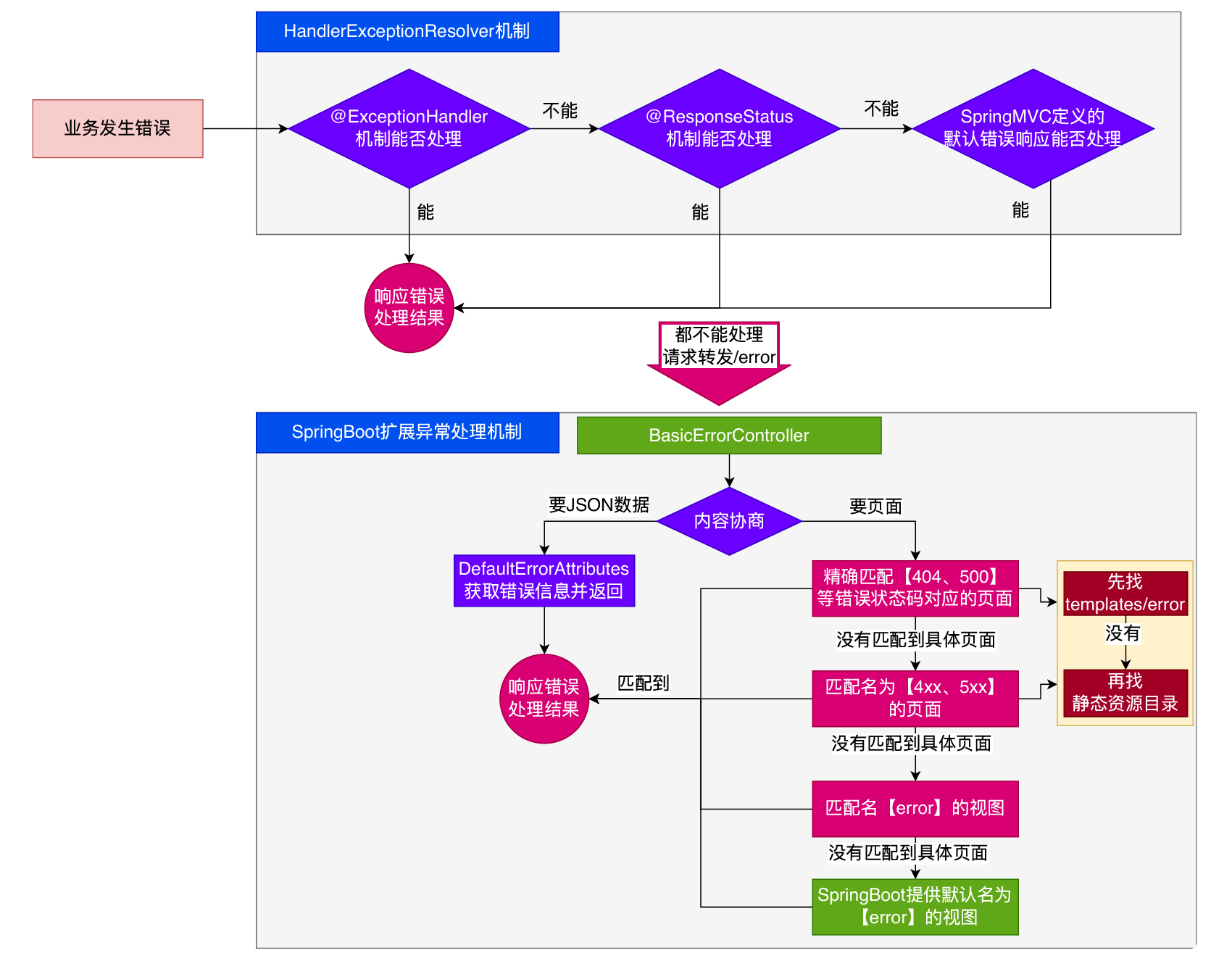
两⼤核⼼机制:
1. SpringBoot 会⾃适应处理错误,响应⻚⾯或JSON数据
2. SpringMVC的错误处理机制依然保留,MVC处理不了,才会交给boot进⾏处理

image-20251220055831325

我们可以在配置文件里面配置错误路径,当发生错误以后,错误的请求转发的路径。

1
server.error.path=/error

发⽣错误以后,转发给/error路径,SpringBoot在底层写好⼀个 BasicErrorController的组件,专⻔ 处理这个请求

1
2
3
4
5
6
7
8
9
10
11
12
13
14
15
16
17
@RequestMapping(produces = MediaType.TEXT_HTML_VALUE) //返回HTML
public ModelAndView errorHtml(HttpServletRequest request, HttpServletResponse response) {
HttpStatus status = getStatus(request);
Map<String, Object> model = Collections.unmodifiableMap(getErrorAttributes(request, getErrorAttributeOptions(request, MediaType.TEXT_HTML)));
response.setStatus(status.value());
ModelAndView modelAndView = resolveErrorView(request, response, status, model);
return (modelAndView != null) ? modelAndView : new ModelAndView("error", model);
}
@RequestMapping //返回ResponseEntity, JSON
public ResponseEntity<Map<String, Object>> error(HttpServletRequest request) {
HttpStatus status = getStatus(request);
if (status == HttpStatus.NO_CONTENT) {
return new ResponseEntity<>(status);
}
Map<String, Object> body = getErrorAttributes(request, getErrorAttributeOptions(request, MediaType.ALL));
return new ResponseEntity<>(body, status);
}

如果要响应页面,错误页面是这么解析到的

1
2
3
4
//1、解析错误的⾃定义视图地址
ModelAndView modelAndView = resolveErrorView(request, response, status, model);
//2、如果解析不到错误⻚⾯的地址,默认的错误⻚就是error
return (modelAndView != null) ? modelAndView : new ModelAndView("error", model);

容器中专门有⼀个错误视图解析器

1
2
3
4
5
6
@Bean
@ConditionalOnBean(DispatcherServlet.class)
@ConditionalOnMissingBean(ErrorViewResolver.class)
DefaultErrorViewResolver conventionErrorViewResolver() {
return new DefaultErrorViewResolver(this.applicationContext, this.resources);
}

SpringBoot解析错误页的默认规则

1
2
3
4
5
6
7
8
9
10
11
12
13
14
15
16
17
18
19
20
21
22
23
24
25
26
27
28
29
30
31
32
33
34
35
36
37
38
39
40
41
42
43
44
45
46
47
48
49
50
51
52
@Override
public ModelAndView resolveErrorView(HttpServletRequest request,
HttpStatus status,
Map<String, Object> model) {
// 首先尝试通过状态码解析视图
ModelAndView modelAndView = resolve(String.valueOf(status.value()), model);

// 如果找不到具体的状态码视图,尝试通过状态系列查找
if (modelAndView == null && SERIES_VIEWS.containsKey(status.series())) {
modelAndView = resolve(SERIES_VIEWS.get(status.series()), model);
}

return modelAndView;
}

private ModelAndView resolve(String viewName, Map<String, Object> model) {
// 构建错误视图名称:error/ + 状态码
String errorViewName = "error/" + viewName;

// 检查模板是否可用
TemplateAvailabilityProvider provider = this.templateAvailabilityProviders
.getProvider(errorViewName, this.applicationContext);

// 如果模板可用,返回ModelAndView
if (provider != null) {
return new ModelAndView(errorViewName, model);
}

// 否则尝试解析静态资源
return resolveResource(errorViewName, model);
}

private ModelAndView resolveResource(String viewName, Map<String, Object> model) {
// 遍历所有静态资源位置
for (String location : this.resources.getStaticLocations()) {
try {
// 获取资源并构建相对路径
Resource resource = this.applicationContext.getResource(location);
resource = resource.createRelative(viewName + ".html");

// 检查资源是否存在
if (resource.exists()) {
return new ModelAndView(new HtmlResourceView(resource), model);
}
} catch (Exception ex) {
// 忽略资源访问异常,继续尝试下一个位置
}
}

// 所有位置都找不到资源,返回null
return null;
}

容器中有一个默认的名为 error 的 View,提供了默认白页的功能

1
2
3
4
5
@Bean(name = "error")
@ConditionalOnMissingBean(name = "error")
public View defaultErrorView() {
return this.defaultErrorView;
}

封装了JSON格式的错误信息

1
2
3
4
5
@Bean
@ConditionalOnMissingBean(value = ErrorAttributes.class, search = SearchStrategy.CURRENT)
public DefaultErrorAttributes errorAttributes() {
return new DefaultErrorAttributes();
}

规则:

1、解析一个错误页

​ a. 如果发生了 500、404、503、403 这些错误

​ 如果有模板引擎,默认在 classpath:/templates/error/精确码.html

​ 如果没有模板引擎,在静态资源文件夹下找 精确码.html

​ b.如果匹配不到 精确码.html ,这些精确的错误页面,就去找5xx.html4xx.html 模糊匹配

​ 如果有模板引擎,默认在 classpath:/templates/error/5xx.html

​ 如果没有模板引擎,在静态资源文件夹下找 5xx.html

2、如果模板引擎路径templates下有error.html页面,就直接渲染

2、自定义错误响应
1、自定义json响应

使 ⽤@ControllerAdvice + @ExceptionHandler 进⾏统⼀异常处理

2、自定义页面响应

根据boot的错误页面规则,自定义页面模板

3、最佳实战
  • 前后分离
    • 后台发生的所有错误,使 ⽤@ControllerAdvice + @ExceptionHandler 进⾏统⼀异常处理
  • 服务端页面渲染

    • 不可预知的一些HTTP码错误,服务器或者客户端的错误

      • classpath:templates/error/ 下面,放一个精确的错误码页面,500.html,404.html
      • classpath:templates/error/ 下面,放常用模糊匹配的错误码页面
    • 发生业务错误

      • 核心业务,每一种错误都应该代码控制,跳转到自己的错误页。
      • 通用业务,利用通用错误页面,直接返回通用错误页面

页面、JSON,可用的Model数据如下

image-20251220220943114

8、嵌入式容器

servlet容器,管理、运行Servlet组件(Servlet,Filter,Listerner)的环境,一般指服务器

1、自动配置原理
  • SpringBoot 默认嵌⼊Tomcat作为Servlet容器。
  • ⾃动配置类是 ServletWebServerFactoryAutoConfiguration , EmbeddedWebServer FactoryCustomizerAutoConfiguration
  • ⾃动配置类开始分析功能。xxxxAutoConfiguration

首先分析ServletWebServerFactoryAutoConfiguration

1
2
3
4
5
6
7
8
9
10
11
12
13
14
@AutoConfiguration
@AutoConfigureOrder(Ordered.HIGHEST_PRECEDENCE) // 最高优先级
@ConditionalOnClass(ServletRequest.class) // 依赖Servlet类
@ConditionalOnWebApplication(type = Type.SERVLET) // Servlet类型Web应用
@EnableConfigurationProperties(ServerProperties.class) // 绑定服务器配置
@Import({
ServletWebServerFactoryAutoConfiguration.BeanPostProcessorsRegistrar.class,
ServletWebServerFactoryConfiguration.EmbeddedTomcat.class, // 导入Tomcat
ServletWebServerFactoryConfiguration.EmbeddedJetty.class, // 导入Jetty
ServletWebServerFactoryConfiguration.EmbeddedUndertow.class // 导入Undertow
})
public class ServletWebServerFactoryAutoConfiguration {
// 自动配置了嵌入式容器场景
}

1、ServletWebServerFactoryAutoConfiguration自动配置了嵌入式容器场景

2、绑定了 ServerProperties配置类,所有和服务器有关的配置 server开头的配置里面。(server开始的都是嵌入式容器 服务器的配置)

3、ServletWebServerFactoryAutoConfiguration 导⼊了 嵌⼊式的三⼤服务器 tomcatJettyUndertow

​ a. 导⼊ TomcatJettyUndertow 都有条件注解。系统中有这个类才⾏(也就是导了 包)

​ b. 默认 Tomcat 配置⽣效。给容器中放 TomcatServletWebServerFactory

​ c. 都给容器中 ServletWebServerFactory 放了⼀个 web服务器⼯⼚(造web服务器的)

​ d. web服务器⼯⼚ 都有⼀个功能, getWebServer 获取web服务器

​ e. TomcatServletWebServerFactory 创建了 tomcat

  1. ServletWebServerFactory什么时候会创建 webServer出来。
  2. ServletWebServerApplicationContextioc容器,启动的时候会调⽤创建web服务器
  3. Spring容器刷新(启动)的时候,会预留⼀个时机,刷新⼦容器。
  4. refresh() 容器刷新 (容器启动)会预留一个时机,容器刷新十二步刷新⼦容器会调⽤ onRefresh()

总结:Web场景的Spring容器启动,在onRefresh的时候,会调用创建web服务器的方法。

web服务器的创建是通过webServerFactory搞定的。容器中会根据导了什么包,条件注解,启动相关的服务器配置,比如默认嵌入式的tomcat工厂,然后创建tomcat服务器。

2、自定义

案例
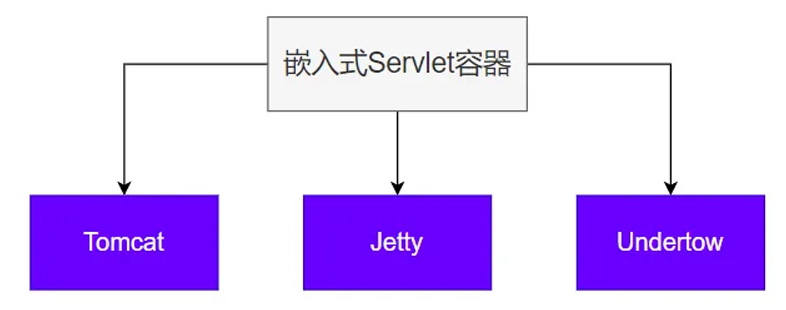
image-20251221035229703

切 换服务器

1
2
3
4
5
6
7
8
9
10
11
12
13
14
15
16
17
18
19
<properties>
<servlet-api.version>3.1.0</servlet-api.version>
</properties>
<dependency>
<groupId>org.springframework.boot</groupId>
<artifactId>spring-boot-starter-web</artifactId>
<exclusions>
<!-- Exclude the Tomcat dependency -->
<exclusion>
<groupId>org.springframework.boot</groupId>
<artifactId>spring-boot-starter-tomcat</artifactId>
</exclusion>
</exclusions>
</dependency>
<!-- Use Jetty instead -->
<dependency>
<groupId>org.springframework.boot</groupId>
<artifactId>spring-boot-starter-jetty</artifactId>
</dependency>
3、最佳实践

用法:

  • 修改server相关配置就可以修改服务器的参数
  • 通过给容器中放一个ServletWebServerFactory,来禁用掉SpringBoot默认放的服务器工厂,实现自定义嵌入任意服务器。

9、全面接管SpringMVC

SpringBoot 默认配置好了 SpringMVC 的所有常⽤特性。

如果我们需要全⾯接管SpringMVC的所有配置并禁⽤默认配置,仅需要编写⼀个 WebMvcConfigurer 配置类,并标注 @EnableWebMvc 即可

全⼿动模式

  • @EnableWebMvc : 禁⽤默认配置

  • WebMvcConfigurer 组件:定义MVC的底层⾏为

1、WebMvcAutoConfiguration 到底⾃动配置了哪些规则

SpringMVC ⾃动配置场景给我们配置了如下所有默认⾏为

1、WebMvcAutoConfiguration web场景的⾃动配置类

​ 1.1. ⽀持RESTful的filter:HiddenHttpMethodFilter

​ 1.2. ⽀持⾮POST请求,请求体携带数据:FormContentFilter

​ 1.3. 导⼊ EnableWebMvcConfiguration :

​ 1.3.1. RequestMappingHandlerAdapter

​ 1.3.2. WelcomePageHandlerMapping :欢迎⻚功能⽀持(模板引擎⽬录、静态资源⽬录 放index.html),项⽬访问/ 就默认展示这个⻚⾯.

​ 1.3.3. RequestMappingHandlerMapping :找每个请求由谁处理的映射关系

​ 1.3.4. ExceptionHandlerExceptionResolver :默认的异常解析器

​ 1.3.5. LocaleResolver :国际化解析器

​ 1.3.6. ThemeResolver :主题解析器

​ 1.3.7. FlashMapManager :临时数据共享

​ 1.3.8. FormattingConversionService : 数据格式化 、类型转化

​ 1.3.9. Validator : 数据校验 JSR303 提供的数据校验功能

​ 1.3.10. WebBindingInitializer :请求参数的封装与绑定

​ 1.3.11. ContentNegotiationManager :内容协商管理器

​ 1.4. WebMvcAutoConfigurationAdapter 配置⽣效,它是⼀个 义mvc底层组件

​ 1.4.1. 定义好 WebMvcConfigurer ,定 WebMvcConfigurer 底层组件默认功能;所有功能详⻅列表

​ 1.4.2. 视图解析器: InternalResourceViewResolver

​ 1.4.3. 视图解析器: BeanNameViewResolver ,视图名(controller⽅法的返回值字符串)就 是组件名

​ 1.4.4. 内容协商解析器: ContentNegotiatingViewResolver

​ 1.4.5. 请求上下⽂过滤器: RequestContextFilter : 任意位置直接获取当前请求

​ 1.4.6. 静态资源链规则

​ 1.4.7. ProblemDetailsExceptionHandler :错误详情

​ 1.4.7.1. SpringMVC内部场景异常被它捕获:

​ 1.5. 定义了MVC默认的底层⾏为: WebMvcConfigurer

配置方法 核心参数 功能描述 Spring Boot 默认提供
addFormatters FormatterRegistry 格式化器:支持属性上 @NumberFormat@DateTimeFormat 的数据类型转换 GenericConversionService
getValidator 数据校验:校验 @Controller 上使用 @Valid 标注的参数合法性 需要导入 starter-validation
addInterceptors InterceptorRegistry 拦截器:拦截收到的所有请求
configureContentNegotiation ContentNegotiationConfigurer 内容协商:支持多种数据格式返回,需要配合支持这种类型的 HttpMessageConverter 支持 JSON
configureMessageConverters List<HttpMessageConverter<?>> 消息转换器:标注 @ResponseBody 的返回值会利用 MessageConverter 直接写出去 8 个,支持 byte、string、multipart、resource、json
addViewControllers ViewControllerRegistry 视图映射:直接将请求路径与物理视图映射,用于无 Java 业务逻辑的直接视图页渲染 <mvc:view-controller>
configureViewResolvers ViewResolverRegistry 视图解析器:逻辑视图转为物理视图 ViewResolverComposite
addResourceHandlers ResourceHandlerRegistry 静态资源处理:静态资源路径映射、缓存控制 ResourceHandlerRegistry
configureDefaultServletHandling DefaultServletHandlerConfigurer 默认 Servlet:可以覆盖 Tomcat 的 DefaultServlet,让 DispatcherServlet 拦截 /
configurePathMatch PathMatchConfigurer 路径匹配:自定义 URL 路径匹配,可以自动为所有路径加上指定前缀,比如 /api
configureAsyncSupport AsyncSupportConfigurer 异步支持 TaskExecutionAutoConfiguration
addCorsMappings CorsRegistry 跨域
addArgumentResolvers List<HandlerMethodArgumentResolver> 参数解析器 MVC 默认提供
addReturnValueHandlers List<HandlerMethodReturnValueHandler> 返回值解析器 MVC 默认提供
configureHandlerExceptionResolvers List<HandlerExceptionResolver> 异常处理器 默认 3 个: 1. ExceptionHandlerExceptionResolver 2. ResponseStatusExceptionResolver 3. DefaultHandlerExceptionResolver
getMessageCodesResolver 消息码解析器:国际化使用

数据处理类

功能 配置方法 默认实现
数据格式化 addFormatters() GenericConversionService
数据校验 getValidator() 需手动配置
消息转换 configureMessageConverters() 8 种转换器
内容协商 configureContentNegotiation() JSON 支持

视图处理类

功能 配置方法 默认实现
视图映射 addViewControllers()
视图解析 configureViewResolvers() ViewResolverComposite
静态资源 addResourceHandlers() ResourceHandlerRegistry

请求处理类

功能 配置方法 默认实现
拦截器 addInterceptors()
参数解析 addArgumentResolvers() MVC 默认
路径匹配 configurePathMatch()
跨域支持 addCorsMappings()

异常与国际化

功能 配置方法 默认实现
异常处理 configureHandlerExceptionResolvers() 3 个解析器
国际化 getMessageCodesResolver()
异步支持 configureAsyncSupport() TaskExecutionAutoConfiguration**

Servlet 处理

功能 配置方法 默认实现
默认 Servlet configureDefaultServletHandling()
返回值处理 addReturnValueHandlers() MVC 默认
2、@EnableWebMvc 禁⽤默认⾏为
  1. @EnableWebMvc 给容器中导⼊ DelegatingWebMvcConfiguration 组件,他是 WebMvcConfigurationSupport
  2. WebMvcAutoConfiguration 有⼀个核⼼的条件注解, @ConditionalOnMissingBean(Web MvcConfigurationSupport.class) ,容器中没有 WebMvcConfigurationSupport , WebMvcAutoConfiguration 才⽣效.
  3. @EnableWebMvc 导⼊ WebMvcConfigurationSupport 导致 WebMvcAutoConfiguration 失效。导致禁⽤了默认⾏为

@EnableWebMVC 禁⽤了 Mvc的⾃动配置

WebMvcConfigurer 定义SpringMVC底层组件的功能类

10、最佳实战

所以用springboot进行web开发有

三种方式
全自动 直接编写控制器逻辑 全部使用自动配置默认效果
手自一体 @Configuration + 配置 WebMvcConfigurer + 配置WebMvcRegistrations 不要标注@EnableWebMvc 自动配置效果,手动设置部分功能,定义MVC底层组件
全手动 @Configuration + 配置 WebMvcConfigurer 标注@EnableWebMvc 禁用自动配置效果,全手动设置

总结:给容器中写一个配置类 @Configuration 继承 WebMvcConfigurer 但是不要标注 @EnableWebMvc,实现手自一体的效果

两种模式

1、 前后分离模式 : @RestController 响应JSON数据

2、前后不分离模式 :@Controller + Thymeleaf模板引擎

11、Web新特性

1、Problemdetails

错误信息返回新格式

原理:

1
2
3
4
5
6
7
8
9
10
@Configuration(proxyBeanMethods = false)
//配置过⼀个属性spring.mvc.problemdetails.enabled=true
@ConditionalOnProperty(prefix = "spring.mvc.problemdetails", name = "enabled", havingValue = "true")
static class ProblemDetailsErrorHandlingConfiguration {
@Bean
@ConditionalOnMissingBean(ResponseEntityExceptionHandler.class)
ProblemDetailsExceptionHandler problemDetailsExceptionHandler() {
return new ProblemDetailsExceptionHandler();
}
}
  1. ProblemDetailsExceptionHandler 是⼀个 @ControllerAdvice 集中处理系统异常
  2. 处理以下异常。如果系统出现以下异常,会被SpringBoot⽀持以 RFC 7807 规范⽅式返回错误 数据
1
2
3
4
5
6
7
8
9
10
11
12
13
14
15
16
17
18
@ExceptionHandler({
HttpRequestMethodNotSupportedException.class, //请求⽅式不⽀持
HttpMediaTypeNotSupportedException.class,
HttpMediaTypeNotAcceptableException.class,
MissingPathVariableException.class,
MissingServletRequestParameterException.class,
MissingServletRequestPartException.class,
ServletRequestBindingException.class,
MethodArgumentNotValidException.class,
NoHandlerFoundException.class,
AsyncRequestTimeoutException.class,
ErrorResponseException.class,
ConversionNotSupportedException.class,
TypeMismatchException.class,
HttpMessageNotReadableException.class,
HttpMessageNotWritableException.class,
BindException.class
})

没开启的效果:默认响应错误的json。状态码405.

开启ProblemDetails返回, 使⽤新的MediaType Content-Type: application/problem+json + 额外扩展返回
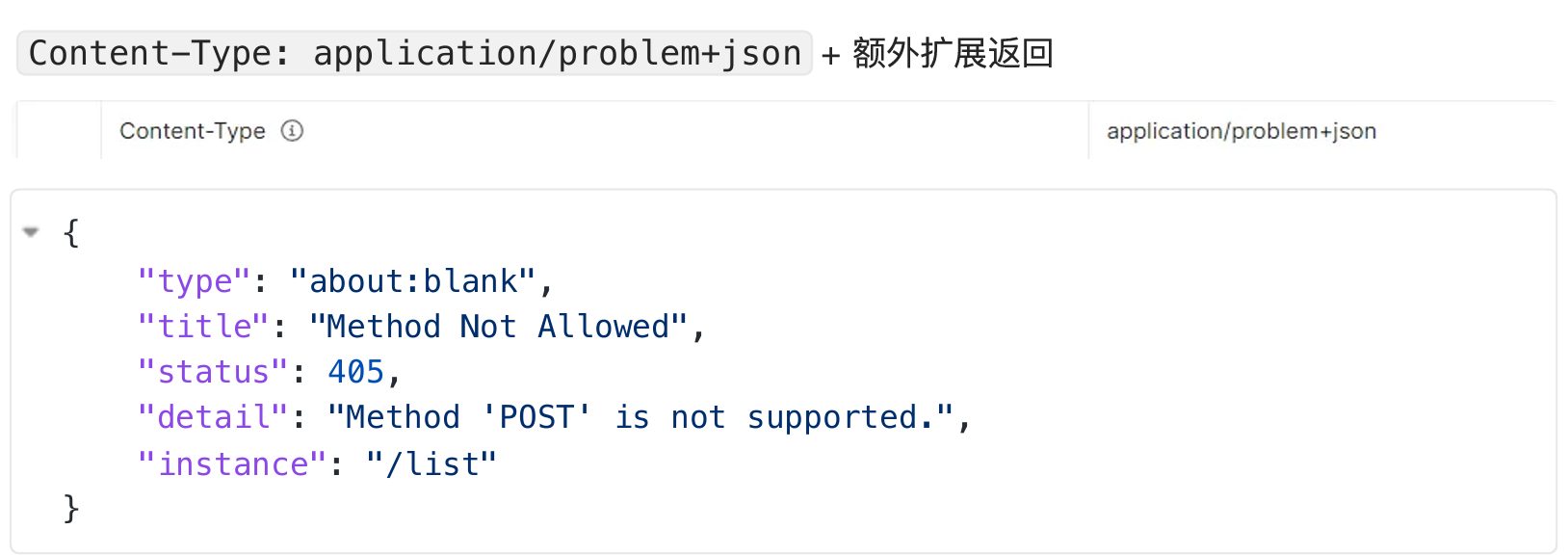
image-20251221142115532

2、函数式Web

用的不多,仅做了解。

SpringMVC 5.2 以后 允许我们使⽤函数式的⽅式,定义Web的请求处理流程。

函数式接⼝

Web请求处理的⽅式:

  1. @Controller + @RequestMapping :耦合式 (路由、业务耦合)
  2. 函数式Web:分离式(路由集中管理起来、和业务分离)
1、场景

场景:User RESTful - CRUD

GET /user/1 获取1号⽤户

GET /users 获取所有⽤户

POST /user 请求体携带JSON,新增⼀个⽤户

PUT /user/1 请求体携带JSON,修改1号⽤户

DELETE /user/1 删除1号⽤户

2、核心类
  • RouterFunction
  • RequestPredicate
  • ServerRequest
  • ServerResponse
3、示例
1
2
3
4
5
6
7
8
9
10
11
12
13
14
15
16
17
18
19
20
21
22
23
24
25
26
27
28
29
30
31
32
33
34
35
36
37
38
39
40
41
import org.springframework.context.annotation.Bean;
import org.springframework.context.annotation.Configuration;
import org.springframework.http.MediaType;
import org.springframework.web.servlet.function.RequestPredicate;
import org.springframework.web.servlet.function.RouterFunction;
import org.springframework.web.servlet.function.ServerResponse;

import static org.springframework.web.servlet.function.RequestPredicates.accept;
import static org.springframework.web.servlet.function.RouterFunctions.route;

/**
* 函数式Web路由配置类
* 使用 Spring 5.2+ 引入的函数式Web框架(Spring WebFlux风格)
* 替代传统的 @Controller + @RequestMapping 注解方式
* @Configuration(proxyBeanMethods = false) 优化性能,避免不必要的代理创建
*/
@Configuration(proxyBeanMethods = false)
public class MyRoutingConfiguration {
/**
* 请求谓词:定义只接受JSON格式的请求
* 静态常量,可以在多个路由中复用
*/
private static final RequestPredicate ACCEPT_JSON = accept(MediaType.APPLICATION_JSON);

/**
* 定义路由函数
* @param userHandler 用户请求处理器(Spring会自动注入)
* @return 配置好的路由规则
*/
@Bean
public RouterFunction<ServerResponse> routerFunction(MyUserHandler userHandler) {
return route()
// 路由规则1: GET /{user} -> 获取指定用户信息
.GET("/{user}", ACCEPT_JSON, userHandler::getUser)
// 路由规则2: GET /{user}/customers -> 获取用户的客户列表
.GET("/{user}/customers", ACCEPT_JSON, userHandler::getUserCustomers)
// 路由规则3: DELETE /{user} -> 删除指定用户
.DELETE("/{user}", ACCEPT_JSON, userHandler::deleteUser)
.build(); // 构建路由函数
}
}

请求处理器

1
2
3
4
5
6
7
8
9
10
11
12
13
14
15
16
17
18
19
20
21
22
23
24
25
26
27
28
29
30
31
32
33
34
35
36
37
38
39
40
41
42
43
44
45
46
47
48
49
50
51
52
53
54
55
56
57
58
59
60
61
62
63
64
65
66
67
68
import org.springframework.stereotype.Component;
import org.springframework.web.servlet.function.ServerRequest;
import org.springframework.web.servlet.function.ServerResponse;

/**
* 用户请求处理器
* 处理具体的业务逻辑,类似于传统Controller中的方法
* 但使用函数式编程风格,更加清晰和类型安全
*/
@Component
public class MyUserHandler {

/**
* 处理获取用户请求
* @param request 服务器请求对象,包含请求参数、路径变量等
* @return 服务器响应
*/
public ServerResponse getUser(ServerRequest request) {
// 1. 从请求中获取路径变量
String userId = request.pathVariable("user");
// 2. 执行业务逻辑(查询数据库等)
// User user = userService.findById(userId);
// 3. 构建响应
return ServerResponse.ok()
.contentType(MediaType.APPLICATION_JSON)
// .body(user); // 实际应返回用户数据
.build();
}

/**
* 处理获取用户客户列表请求
*
* @param request 服务器请求对象
* @return 服务器响应
*/
public ServerResponse getUserCustomers(ServerRequest request) {
// 获取路径变量
String userId = request.pathVariable("user");

// 可选:获取查询参数
// String page = request.param("page").orElse("1");
// String size = request.param("size").orElse("20");

// 执行业务逻辑
// List<Customer> customers = customerService.findByUserId(userId);

return ServerResponse.ok()
.contentType(MediaType.APPLICATION_JSON)
// .body(customers);
.build();
}

/**
* 处理删除用户请求
*
* @param request 服务器请求对象
* @return 服务器响应(通常返回204 No Content)
*/
public ServerResponse deleteUser(ServerRequest request) {
String userId = request.pathVariable("user");

// 执行业务逻辑
// userService.deleteById(userId);

// 删除成功,返回204 No Content
return ServerResponse.noContent().build();
}
}

3、数据访问

整合SSM场景

SpringBoot 整合 Spring 、 SpringMVC 、 MyBatis 进⾏数据访问场景开发

1、创建SSM整合项目
1
2
3
4
5
6
7
8
9
10
<dependency>
<groupId>org.mybatis.spring.boot</groupId>
<artifactId>mybatis-spring-boot-starter</artifactId>
<version>3.0.1</version>
</dependency>
<dependency>
<groupId>com.mysql</groupId>
<artifactId>mysql-connector-j</artifactId>
<scope>runtime</scope>
</dependency>
2、配置数据源
1
2
3
4
5
spring.datasource.url=jdbc:mysql://192.168.200.100:3306/demo
spring.datasource.driver-class-name=com.mysql.cj.jdbc.Driver
spring.datasource.username=root
spring.datasource.password=123456
spring.datasource.type=com.zaxxer.hikari.HikariDataSource

安装MyBatisX 插件,帮我们⽣成Mapper接⼝的xml⽂件即可

3、配置MyBatis
1
2
3
4
#指定mapper映射⽂件位置
mybatis.mapper-locations=classpath:/mapper/*.xml
#参数项调整
mybatis.configuration.map-underscore-to-camel-case=true
4、CRUD编写

编写Bean

1
2
3
4
5
6
7
@Data
public class TUser{
private Long id;
private String loginName;
private String nickName;
private String passwd;
}

编写Mapper

1
2
3
4
public interface UserMapper {
//每个方法都在Mapper文件中有一个标签对应,所有参数都应该用@Param进行签名,以后使用制定的名字在SQL中取值
public TUser getUserById(@Param("id") Long id);
}

使⽤ mybatisx 插件,

快速⽣成MapperXML

1
2
3
4
5
6
7
8
9
10
<!--上面接口的全类名和namespace对应好-->
<select id="getUserById" resultType="com.bitzh.bean.TUser">
select * from t_user where id = #{id}
</select>
<!--当然如果数据库名字和类名不一致比如数据库中是nick_name类中名字是nickName那么我们可以写别名
select nick_name nickName from t_user这样。
或者在配置properties文件中开启驼峰命名,也就是说 _n = N
#参数项调整
mybatis.configuration.map-underscore-to-camel-case=true
-->

但是现在SpringBoot还不知道我们的Mapper接口是让MyBatis来做代理对象进行增删改查的。

所以在主启动类里面使用注解

1
2
@MapperScan(basePackages = "com.bitzh.mapper")//1、告诉MyBatis,扫描哪个接口
//2、告诉MyBatis,每个接口的XML文件都在哪里?利用配置项

测试CRUD

5、自动配置原理

SSM整合总结:

  1. 导⼊ mybatis-spring-boot-starter

  2. 配置数据源信息

  3. 配置mybatis的 mapper 接⼝扫描 与 xml 映射⽂件扫描

  4. 编写bean,mapper,⽣成xml,编写sql 进⾏crud。事务等操作依然和Spring中⽤法⼀样

  5. 效果:

    ​ a. 所有sql写在xml中

    ​ b. 所有 mybatis 配置 写在 application.properties 下⾯

    jdbc 场景的⾃动配置

    mybatis-spring-boot-starter 导⼊ 数据库的场景 spring-boot-starter-jdbc ,jdbc是操作数据库的场景

    Jdbc 场景的⼏个⾃动配置 :

    1、org.springframework.boot.autoconfigure.jdbc.DataSourceAutoConfiguration

    ​ 数据源的⾃动配置

    ​ 所有和数据源有关的配置都绑定在 DataSourceProperties

    ​ 默认使⽤ HikariDataSource

    2、org.springframework.boot.autoconfigure.jdbc.JdbcTemplateAutoConfiguration

    ​ 给容器中放了 JdbcTemplate 操作数据库

    3、org.springframework.boot.autoconfigure.jdbc.JndiDataSourceAutoConfiguration

    4、org.springframework.boot.autoconfigure.jdbc.XADataSourceAutoConfiguration

    ​ 基于XA⼆阶提交协议的分布式事务数据源

    5、org.springframework.boot.autoconfigure.jdbc.DataSourceTransactionManagerAutoConfiguration ⽀持事务

    具有的底层能⼒:数据源、 JdbcTemplate 、事务

MyBatisAutoConfiguration :配置了MyBatis的整合流程

mybatis-spring-boot-starter 导⼊ mybatis-spring-boot-autoconfigure ( mybatis 的⾃动配置包)

默认加载两个⾃动配置类:

​ org.mybatis.spring.boot.autoconfigure.MybatisLanguageDriverAutoConfiguration

​ org.mybatis.spring.boot.autoconfigure.MybatisAutoConfiguration

​ 必须在数据源配置好之后才配置

​ 给容器中 SqlSessionFactory 组件。创建和数据库的⼀次会话

​ 给容器中 SqlSessionTemplate 组件。操作数据库

MyBatis的所有配置绑定在 MybatisProperties

每个Mapper接⼝的代理对象是怎么创建放到容器中。详⻅@MapperScan原理:

​ 利⽤ @Import(MapperScannerRegistrar.class) 批量给容器中注册组件。解析指 定的包路径⾥⾯的每⼀个类,为每⼀个Mapper接⼝类,创建Bean定义信息,注册到容器中。

这里Mapper的代理对象只是为了注入ioc,mybatis执行时根据mapperRegistry的mapper信息再基于原型模式和jdk动态代理每次都生成mapper的代理类

如何分析哪个场景导⼊以后,开启了哪些⾃动配置类。 找: classpath:/META-INF/spring/org.springframework.boot.autoconfigure. AutoConfiguration.imports ⽂件中配置的所有值,就是要开启的⾃动配置类,但是每个 类可能有条件注解,基于条件注解判断哪个⾃动配置类⽣效了。

6、快速定位生效的配置
1
2
3
#开启调试模式,详细打印开启了哪些⾃动配置
debug=true
# Positive (⽣效的⾃动配置)Negative(不⽣效的⾃动配置)
7、整合其他数据源
1、Druid数据源

暂不⽀持 SpringBoot3

导⼊ druid-starter

写配置

分析⾃动配置了哪些东⻄,怎么⽤

1
2
3
4
5
6
7
8
9
10
11
12
13
14
15
16
17
18
19
20
21
22
23
24
25
26
27
28
29
30
31
#数据源基本配置
spring.datasource.url=jdbc:mysql://192.168.200.100:3306/demo
spring.datasource.driver-class-name=com.mysql.cj.jdbc.Driver
spring.datasource.username=root
spring.datasource.password=123456
spring.datasource.type=com.alibaba.druid.pool.DruidDataSource
# 配置StatFilter监控
spring.datasource.druid.filter.stat.enabled=true
spring.datasource.druid.filter.stat.db-type=mysql
spring.datasource.druid.filter.stat.log-slow-sql=true
spring.datasource.druid.filter.stat.slow-sql-millis=2000
# 配置WallFilter防⽕墙
spring.datasource.druid.filter.wall.enabled=true
spring.datasource.druid.filter.wall.db-type=mysql
spring.datasource.druid.filter.wall.config.delete-allow=false
spring.datasource.druid.filter.wall.config.drop-table-allow=false
# 配置监控⻚,内置监控⻚⾯的⾸⻚是/druid/index.html
spring.datasource.druid.stat-view-servlet.enabled=true
spring.datasource.druid.stat-view-servlet.login-username=admin
spring.datasource.druid.stat-view-servlet.login-password=admin
spring.datasource.druid.stat-view-servlet.allow=*
# 其他Filter 配置不再演示
# ⽬前为以下Filter 提供了配置⽀持,请参考⽂档或者根据IDE提示(spring.datasource.druid.filter.*)进⾏配置。
# StatFilter
# WallFilter
# ConfigFilter
# EncodingConvertFilter
# Slf4jLogFilter
# Log4jFilter
# Log4j2Filter
# CommonsLogFilter

4、基础特性

1、SpringApplication

1.1 自定义banner

启动时候的图标就是banner

1
2
3
4
5
#类路径添加banner.txt或设置
spring.banner.location
#就可以定制 banner
# 关闭banner
spring.main.banner-mode=off

定制banner网站: https://www.bootschool.net/ascii

1.2自定义SpringApplication

然后在主启动里面每次都是SpringApplication.run,现在我们要研究这个。

1
2
3
4
5
6
7
8
9
10
11
12
13
14
15
16
17
@SpringBootApplication//主程序类
public class BootApplication{
public static void main(String[] args){
//1、SpringApplication是Boot应用的核心API入口
//SpringApplication.run(BootApplication.class.args);点击源码看出这一步可以分解成
//我们能拆成两步来写,那么我们就能自定义application应用
//1、自定义SpringApplication的底层设置
SpringApplication springApplication = new SpringApplication(BootApplication.class);

//然后这里也可以设置banner等各种底层配置
//application.setDefaultProperties()
//这个配置不优先,但是有用
application.setBannerMode(Banner.Mode.OFF);
//2、SpringApplication 运行起来
application.run(args);
}
}
1.3FluentBuilder API
1
2
3
4
5
6
7
8
9
10
11
12
@SpringBootApplication//主程序类
public class BootApplication{
public static void main(String[] args){
//第二种运行的方式,通过流式API进行设置
new SpringApplicationBuilder()
.main(BootApplication.class)
.sources(BootApplication.class)
//.child(Application.class)
.bannerMode(Banner.Mode.OFF)
.run(args);
}
}

2、Profiles

环境隔离能力:快速切换开发、测试、生产环境

步骤:

1、标识环境,指定哪些组件、配置在那个环境生效

2、切换环境:这个环境对应的所有组件和配置就应该生效

2.1使用
2.1.1 指定环境
  • Spring Profiles 提供一种 隔离配置 的方式,使其仅在 特定环境 生效
  • 任何 @Component@Configuration 或者 @ConfigurationProperties 可以使用@Profile标记,来指定何时被加载 【容器中的组件都可以被 @Profile标记】
1
2
3
4
5
6
7
8
9
10
11
12
13
14
15
16
17
//1、标识环境
// 1)区分出几个环境: dev (开发环境) , test(测试环境),prod(生产环境)
// 2) 指定每个组件在那个环境生效:default环境:默认环境
// 组件没有标注@Profile那么就是任何环境都生效
// 3) 默认只有激活指定的环境,这些组件才会生效


//现在我们有组件,底层可以放数组
//第一种写法@Profile("dev")
//第二种@Profile({"dev","test"})
@Component
public class Cat{

}
//那么我们怎么确定容器中有没有这个组件,我们利用builder返回的上下文来
ConfigurableApplicationContext context = new SpringApplicationBuilder();
context.getBean(Cat.class);//这样就知道应用中有没有了
2.1.2 激活环境
1
2
3
2、激活环境
配置文件激活:spring.profiles.active=dev,test
命令行激活: java -jar xxx.jar --spring.profiles.active=dev
2.1.3 环境包含

注意:

  1. spring.profiles.active 和 spring.profiles.default 只能⽤到 ⽆ profile 的⽂件中,如果在 application-dev.yaml中编写就是⽆效的

  2. 也可以额外添加⽣效⽂件,⽽不是激活替换。⽐如:

  3. ```properties

    包含制定环境,不管你激活哪个环境,这个都要有,总是要生效的

    spring.profiles.include[0]=common
    spring.profiles.include[1]=local

    1
    2
    3
    4
    5
    6
    7
    8
    9
    10
    11
    12
    13
    14
    15
    16
    17
    18

    最佳实战:

    ⽣效的环境 = 激活的环境/默认环境 + 包含的环境

    项⽬⾥⾯这么⽤

    ​ 基础的配置 mybatis 、 log 、 xxx :写到包含环境中

    ​ 需要动态切换变化的 db 、 redis :写到激活的环境中

    ##### 2.2Profile 分组

    创建prod组,指定包含db和 mq配置

    ```text
    spring.profiles.group.prod[0]=db
    spring.profiles.group.prod[1]=mq

使⽤--spring.profiles.active=prod,就会激活 proddb,mq配置⽂件

2.3 Profile配置文件

application-{profile}.properties 可以作为指定环境的配置⽂件。

激活这个环境,配置就会⽣效。最终⽣效的所有配置是

 `application.properties ` :主配置⽂件,任意时候都⽣效 

application-{profile}.properties :指定环境配置⽂件,激活指定环境⽣效

profile优先级 > application

3、外部化配置

场景:线上应⽤如何快速修改配置,并应⽤最新配置?

SpringBoot 使⽤ 配置优先级 + 外部配置 简化配置更新、简化运维。 只需要给 jar 应⽤所在的⽂件夹放⼀个 application.properties 最新配置⽂件,重 启项⽬就能⾃动应⽤最新配置

3.1 配置优先级

Spring Boot 允许将配置外部化,以便可以在不同的环境中使⽤相同的应⽤程序代码。

我们可以使⽤各种外部配置源,包括 Java Properties⽂件、 YAML⽂件环境变量命令⾏参数

@Value可以获取值,也可以⽤ @ConfigurationProperties将所有属性绑定到 java object

以下是 SpringBoot 属性源加载顺序。 后⾯的会覆盖前⾯的值。由低到⾼,⾼优先级配置覆盖低 优先级

  1. 默认属性(通过 SpringApplication.setDefaultProperties 指定的)
  2. @PropertySource指定加载的配置(需要写在 @Configuration类上才可⽣效)
  3. 配置⽂件application.properties/yml等)
  4. RandomValuePropertySource⽀持的 random.*配置(如:@Value("${random.int}"))
  5. OS 环境变量
  6. Java 系统属性( System.getProperties()
  7. JNDI 属性(来⾃ java:comp/env
  8. ServletContext初始化参数
  9. ServletConfig初始化参数
  10. SPRING_APPLICATION_JSON属性(内置在环境变量或系统属性中的 JSON)
  11. 命令⾏参数
  12. 测试属性。( @SpringBootTest进⾏测试时指定的属性)
  13. 测试类 @TestPropertySource注解
  14. Devtools 设置的全局属性。( $HOME/.config/spring-boot)

结论:配置可以写到很多位置,常⻅的优先级顺序:

命令⾏ > 配置⽂件 > springapplication 配置

配置⽂件优先级如下:(后⾯覆盖前⾯)

1、 jar 包内的 application.properties/yml

2、jar 包内的 application-{profile}.properties/yml

3、jar 包外的 application.properties/yml

4、 jar 包外的 application-{profile}.properties/yml

如果 建议:⽤⼀种格式的配置⽂件。 .properties 和 结 .yml 同时存在 , 则 .properties 优先

结论: 包外 > 包内 ; 同级情况: profile 配置 > application 配置

所有参数均可由命令⾏传⼊,使⽤ --参数项 = 参数值 ,将会被添加到环境变量中,并优先于 置⽂件 。 ⽐如 java -jar app.jar --name="Spring" ,可以使⽤ server.port=8000 @Value("${name}")获取

演示场景:

​ 包内: application.properties server.port=8000

​ 包内: application-dev.properties server.port=9000

​ 包外: application.properties server.port=8001

​ 包外: application-dev.properties server.port=9001

启动端⼝?:命令⾏ > 9001 > 8001 > 9000 > 8000

3.2 外部配置

SpringBoot 应⽤启动时会⾃动寻找 application.propertiesapplication.yaml位置,进⾏加载。

顺序如下:(后⾯覆盖前⾯)

  1. 类路径: 内部

​ a. 类根路径

​ b. 类下 /config包

  1. 当前路径(项⽬所在的位置)

    a. 当前路径

    b. 当前下 /config⼦⽬录

    c. /config⽬录的直接⼦⽬录

最终效果:优先级由⾼到低,前⾯覆盖后⾯

命令⾏ > 包外config直接⼦⽬录 > 包外config⽬录 > 包外根⽬录 > 包内⽬录

同级⽐较:

​ profile配置 > 默认配置

​ properties配置 > yaml配置

image-20251222180321086

规律:最外层的最优先。

命令⾏ > 所有 包外 > 包内 config⽬录 > 根⽬录 profile > application

配置不同就都⽣效(互补),配置相同⾼优先级覆盖低优先级

3.3 导入配置

使⽤ spring.config.import可以导⼊额外配置

1
2
spring.config.import=my.properties
my.property=value

⽆论以上写法的先后顺序, my.properties的值总是优先于直接在⽂件中编写的

3.4 属性占位符

配置⽂件中可以使⽤ ${name:default}形式取出之前配置过的值。

1
2
app.name=MyApp
app.description=${app.name} is a Spring Boot application written by ${username:Unknown}

4、单元测试-JUnit5

4.1 整合

SpringBoot 提供⼀系列测试⼯具集及注解⽅便我们进⾏测试。 spring-boot-test提供核⼼测试能⼒, 置。 我们只需要导⼊ spring-boot-test-autoconfigure 提供测试的⼀些⾃动配 spring-boot-starter-test即可整合测试

1
2
3
4
5
<dependency>
<groupId>org.springframework.boot</groupId>
<artifactId>spring-boot-starter-test</artifactId>
<scope>test</scope>
</dependency>

spring-boot-starter-test 默认提供了以下库供我们测试使⽤

1
2
3
4
5
6
7
JUnit 5 
Spring Test
AssertJ
Hamcrest
Mockito
JSONassert
JsonPat
4.2 测试
4.2.0 组件测试

直接 @Autowired 容器中的组件进行测试

4.2.1 注解

Junit5的注解和Junit4的注解有所变化

https://junit.org/junit5/docs/current/user-guide/#writing-tests-annotations

1
2
3
4
5
6
7
8
9
10
11
12
@Test :表示⽅法是测试⽅法。但是与JUnit4的@Test不同,他的职责⾮常单⼀不能声明任何属性,拓展的测试将会由Jupiter提供额外测试
@ParameterizedTest :表示⽅法是参数化测试,下⽅会有详细介绍
@RepeatedTest :表示⽅法可重复执⾏,下⽅会有详细介绍
@DisplayName :为测试类或者测试⽅法设置展示名称
@BeforeAll :表示在所有单元测试之前执⾏
@BeforeEach :表示在每个单元测试之前执⾏
@AfterEach :表示在每个单元测试之后执⾏
@AfterAll :表示在所有单元测试之后执⾏
@Tag :表示单元测试类别,类似于JUnit4中的@Categories
@Disabled :表示测试类或测试⽅法不执⾏,类似于JUnit4中的@Ignore
@Timeout :表示测试⽅法运⾏如果超过了指定时间将会返回错误
@ExtendWith :为测试类或测试⽅法提供扩展类引用
4.2.2 断言
断言方法 作用说明
assertEquals(expected, actual) 判断两个对象或原始类型是否相等(调用 equals() 方法进行比较)
assertNotEquals(expected, actual) 判断两个对象或原始类型是否不相等
assertSame(expected, actual) 判断两个对象引用是否指向同一个对象(使用 == 比较引用)
assertNotSame(expected, actual) 判断两个对象引用是否指向不同的对象
assertTrue(condition) 判断给定的布尔表达式是否为 true
assertFalse(condition) 判断给定的布尔表达式是否为 false
assertNull(object) 判断给定的对象引用是否为 null
assertNotNull(object) 判断给定的对象引用是否不为 null
assertArrayEquals(expectedArray, actualArray) 判断两个数组是否内容相等(逐元素比较)
assertAll(() -> {...}, () -> {...}, ...) 组合多个断言,即使其中某个失败,其余也会继续执行(常用于一次性验证多个条件)
assertThrows(expectedExceptionClass, executable) 验证执行某段代码时是否抛出指定类型的异常
assertTimeout(Duration, executable) 验证某段代码是否在指定时间内完成执行,超时则测试失败
fail(message) 强制使测试失败,通常用于验证“本不该执行到此处”的逻辑
4.2.3 嵌套测试

JUnit 5 可以通过 Java 中的内部类和@Nested 注解实现嵌套测试,从⽽可以更好的把相关的测 试⽅法组织在⼀起。在内部类中可以使⽤@BeforeEach 和@AfterEach 注解,⽽且嵌套的层次 没有限制。

1
2
3
4
5
6
7
8
9
10
11
12
13
14
15
16
17
18
19
20
21
22
23
24
25
26
27
28
29
30
31
32
33
34
35
36
37
38
39
40
41
42
43
44
45
46
47
48
49
50
51
52
53
54
55
56
57
58
59
60
61
62
63
64
65
66
67
68
69
70
71
72
73
74
75
import org.junit.jupiter.api.*;
import java.util.EmptyStackException;
import java.util.Stack;

@DisplayName("栈(Stack)")
class StackTest {

Stack<Object> stack;

@Test
@DisplayName("可以通过 new Stack() 实例化")
void canBeInstantiatedWithNew() {
new Stack<>();
}

@Nested
@DisplayName("当栈是新建的")
class WhenNew {

@BeforeEach
void createNewStack() {
stack = new Stack<>();
}

@Test
@DisplayName("栈是空的")
void isEmpty() {
assertTrue(stack.isEmpty());
}

@Test
@DisplayName("弹出元素时抛出 EmptyStackException")
void throwsExceptionWhenPopped() {
assertThrows(EmptyStackException.class, stack::pop);
}

@Test
@DisplayName("查看栈顶时抛出 EmptyStackException")
void throwsExceptionWhenPeeked() {
assertThrows(EmptyStackException.class, stack::peek);
}

@Nested
@DisplayName("压入一个元素之后")
class AfterPushingElement {

String testElement = "一个测试元素";

@BeforeEach
void pushAnElement() {
stack.push(testElement);
}

@Test
@DisplayName("栈不再为空")
void isNotEmpty() {
assertFalse(stack.isEmpty());
}

@Test
@DisplayName("弹出时返回该元素,并且栈变为空")
void popReturnsElementAndEmptiesStack() {
assertEquals(testElement, stack.pop());
assertTrue(stack.isEmpty());
}

@Test
@DisplayName("查看栈顶返回该元素,且栈仍不为空")
void peekReturnsElementAndStackRemainsNotEmpty() {
assertEquals(testElement, stack.peek());
assertFalse(stack.isEmpty());
}
}
}
}
4.2.4 参数化测试

参数化测试是JUnit5很重要的⼀个新特性,它使得⽤不同的参数多次运⾏测试成为了可能,也为 我们的单元测试带来许多便利。

利⽤@ValueSource等注解,指定⼊参,我们将可以使⽤不同的参数进⾏多次单元测试,⽽不需要 每新增⼀个参数就新增⼀个单元测试,省去了很多冗余代码。

@ValueSource: 为参数化测试指定⼊参来源,⽀持⼋⼤基础类以及String类型,Class类型 @NullSource: 表示为参数化测试提供⼀个null的⼊参

@EnumSource: 表示为参数化测试提供⼀个枚举⼊参

@CsvFileSource:表示读取指定CSV⽂件内容作为参数化测试⼊参

@MethodSource:表示读取指定⽅法的返回值作为参数化测试⼊参(注意⽅法返回需要是⼀个流)

1
2
3
4
5
6
7
8
9
10
11
12
13
14
15
16
17
18
@ParameterizedTest
@ValueSource(strings = {"one", "two", "three"})
@DisplayName("参数化测试1")
public void parameterizedTest1(String string) {
System.out.println(string);
Assertions.assertTrue(StringUtils.isNotBlank(string));
}
@ParameterizedTest
@MethodSource("method")
@DisplayName("⽅法来源参数")
//指定⽅法名
public void testWithExplicitLocalMethodSource(String name) {
System.out.println(name);
Assertions.assertNotNull(name);
}
static Stream<String> method() {
return Stream.of("apple", "banana");
}

5、核心原理

有助于理解SpringBoot的底层行为

1、事件和监听器

1、生命周期监听

场景:监听应用生命周期

1、监听器-SpringApplicationRunListener
  1. ⾃定义 SpringApplicationRunListener 来监听事件;

    1.1. 编写 SpringApplicationRunListener 实现类

    1.2. 在 META-INF/spring.factories 中配置 org.springframework.boot.Spri ngApplicationRunListener= ⾃⼰的 Listener ,还可以指定⼀个有参构造器,接 受两个参数 (SpringApplication application, String[] args)

    1.3. springboot 在 spring-boot.jar 中配置了默认的 Listener,如下

    image-20251222200001848

    现在我们来自定义Listener来模拟框架做的事情,从而弄清楚框架做了什么

    1
    2
    3
    4
    5
    6
    7
    8
    9
    10
    11
    12
    13
    14
    15
    16
    17
    18
    19
    20
    21
    22
    23
    24
    25
    26
    27
    28
    29
    30
    31
    32
    33
    34
    35
    36
    37
    38
    39
    40
    41
    42
    43
    44
    45
    46
    47
    48
    49
    50
    51
    /**
    * 自定义 SpringApplicationRunListener,用于监听 Spring Boot 启动各阶段
    *
    * 必须提供带 SpringApplication 和 String[] 参数的构造函数(Spring Boot 反射调用)
    */
    public class MySpringApplicationRunListener implements SpringApplicationRunListener {

    private final SpringApplication application;
    private final String[] args;

    // ⚠️ 必须提供此构造函数!Spring Boot 通过反射调用
    public MySpringApplicationRunListener(SpringApplication application, String[] args) {
    this.application = application;
    this.args = args;
    }

    @Override
    public void starting() {
    System.out.println("【引导阶段】starting: 应用开始启动,BootstrapContext 已创建");
    }

    @Override
    public void environmentPrepared(ConfigurableEnvironment environment) {
    System.out.println("【引导阶段】environmentPrepared: 环境已准备完成(配置已加载),但 IOC 容器尚未创建");
    }

    @Override
    public void contextPrepared(ConfigurableApplicationContext context) {
    System.out.println("【启动阶段】contextPrepared: IOC 容器已创建,主配置类尚未加载,引导上下文即将关闭");
    }

    @Override
    public void contextLoaded(ConfigurableApplicationContext context) {
    System.out.println("【启动阶段】contextLoaded: 主配置类已加载,但容器尚未刷新(Bean 还没创建)");
    }

    @Override
    public void started(ConfigurableApplicationContext context) {
    System.out.println("【启动阶段】started: 容器已刷新(所有 Bean 已创建),但 Runner 尚未执行");
    }

    @Override
    public void ready(ConfigurableApplicationContext context) {
    System.out.println("【启动阶段】ready: 所有 Runner 已执行完毕,应用完全就绪,开始运行!");
    }

    @Override
    public void failed(ConfigurableApplicationContext context, Throwable exception) {
    System.out.println("【异常】启动失败: " + (exception != null ? exception.getMessage() : "未知错误"));
    }
    }

    现在我们编写好了实现类,然后就要根据他的1.2步骤的要求进行配置了

    src/main/resources/META-INF/spring.factories

    1
    2
    3
    # META-INF/spring.factories
    org.springframework.boot.SpringApplicationRunListener=\
    com.example.listener.MySpringApplicationRunListener

    然后启动应用看看打印顺序,就知道流程了。

    image-20251222202340772

    1
    2
    3
    4
    5
    6
    7
    8
    9
    10
    11
    12
    Listener先要从META-INF/spring.factories 读到找到所有注册的 SpringApplicationRunListener 实现类,并在启动早期就实例化它们,用于监听后续生命周期事件。
    1、引导:利⽤BootstrapContext 引导整个项⽬启
    starting:应⽤开始,SpringApplication的run⽅法⼀调⽤,只要有了BootstrapContext 就执⾏
    environmentPrepared:环境准备好(把启动参数等绑定到环境变量中),但是ioc还没有创建;【调⼀次】
    2、启动:
    contextPrepared:ioc容器创建并准备好,但是sources(主配置类)没加载。并关闭引导上下⽂;组件都没创建【调⼀次】
    contextLoaded:ioc容器加载。主配置类加载进去了。但是ioc容器还没刷新(我们的bean没创建)。
    截⽌以前,ioc容器⾥⾯还没造bean呢
    started:ioc容器刷新了(所有bean造好了),但是runner 没调⽤。
    ready: ioc容器刷新了(所有bean造好了),所有 runner 调⽤完了。
    3、运⾏
    以前步骤都正确执⾏,代表容器running

    看这个流程,还会有很多疑问runner是什么?加载是什么意思?

    1
    这里的“加载”指的是:将你的 @Configuration 类、@Component 类等 Spring Bean 定义(BeanDefinition)注册到 IOC 容器中,但此时 Bean 尚未被实例化(即没调用构造函数或 @PostConstruct)。

2、事件触发时机
1、各种回调监听器

BootstrapRegistryInitializer : 感知特定阶段:感知引导初始化 ,这个是启动之前

META-INF/spring.factories

​ 创建引导上下⽂ bootstrapContext 的时候触发。

application. addBootstrapRegistryInitializer ();

​ 场景: 进⾏密钥校对授权。

ApplicationContextInitializer: 感知特定阶段: 感知ioc容器初始化 ,这个阶段就是环境准备完成之后

META-INF/spring.factories

application.addInitializers();

ApplicationListener感知全阶段:基于事件机制,感知事件。.AOP。环绕通知这些。⼀旦到了哪个阶段可以做别的事

@Bean 或 @EventListener : 事件驱动

 `SpringApplication.addListeners(…)`  或  `SpringApplicationBuilder.listeners(…)  `

 `META-INF/spring.factories `

​ 类似粉丝,只能知道干嘛

SpringApplicationRunListener感知全阶段⽣命周期 + 各种阶段都能⾃定义操作功能更完善

  `META-INF/spring.factories`

​ 类似经理,能全部管理

ApplicationRunner: 感知特定阶段:感知应⽤就绪Ready。卡死应⽤,就不会就绪

​ @Bean

CommandLineRunner: 感知特定阶段:感知应⽤就绪Ready。卡死应⽤,就不会就绪

​ @Bean

最佳实战:

​ 如果项⽬启动前做事: BootstrapRegistryInitializerApplicationContextInitializer

​ 如果想要在项⽬启动完成后做事: ApplicationRunnerCommandLineRunner

​ 如果要⼲涉⽣命周期做事: SpringApplicationRunListener

​ 如果想要⽤事件机制: ApplicationListener

2、完整触发流程

springboot启动的期间也会启动事件,刚刚我们理解了启动流程,现在了解启动期间发生的事件。

9 ⼤事件 触发顺序&时机

1、ApplicationStartingEvent:应用启动但没有做任何事情,除了注册 listeners and intializers

2、ApplicationEnvironmentPreparedEventEnvironment准备好,但context未创建。

3、ApplicationContextInitializedEvent: ApplicationContext 准备好, ApplicationContextInitializers 调⽤,但是任何bean未加载

4、ApplicationPreparedEvent : 容器刷新之前,bean定义信息加载

5、ApplicationStartedEvent : 容器刷新完成, runner未调⽤

以下就开始插⼊了探针机制


6、AvailabilityChangeEvent : LivenessState.CORRECT 应⽤存活; 存活探针

7、ApplicationReadyEvent : 任何runner被调⽤

8、AvailabilityChangeEvent :ReadinessState.ACCEPTING_TRAFFIC 就绪探针,可以接请求

9、ApplicationFailedEvent :启动出错

这个存活探针和就绪探针对应k8s云平台,这样就知道应用什么时候可以用了
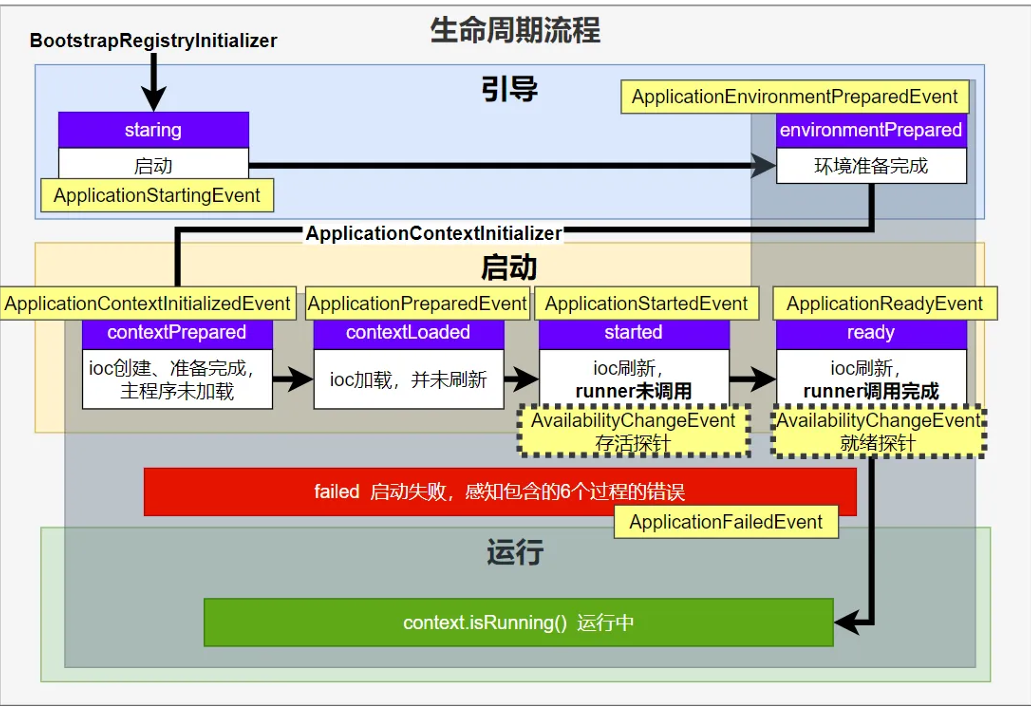
image-20251222224115461

应⽤事件发送顺序如下:

image-20251222224132487

感知应⽤是否存活了:可能植物状态,虽然活着但是不能处理请求。

应⽤是否就绪了:能响应请求,说明确实活的⽐较好。

小总结:就是springtboot启动时会调用几个函数和发布几个事件,触发点就是启动、准备环境后、ioc初始化、主配置类加载、ioc刷新、runner执行之后。

3、SpringBoot事件驱动开发

上面了解了启动流程和流程中的事件,然后有的事件是基于事件驱动开发,那么我们要知道如何基于事件驱动开发的了。

应用启动过程生命周期事件感知(9大事件)、应用运行中事件感知。

  • 事件发布:ApplicationEventPublisherAware注⼊: ApplicationEventMulticaster
  • 事件监听:组件 + @EventListener

image-20251223001131640

如果不是事件驱动,我们假设登录的时候需要一堆业务,比如用户登录之后,需要自动签到,随机发放优惠卷等等,然后写@Autowired注入其他的服务然后在登录业务里面一个个调用。

但是如果这种编码方式,如果要增加业务会非常麻烦。

设计模式:对新增开放,对修改关闭。
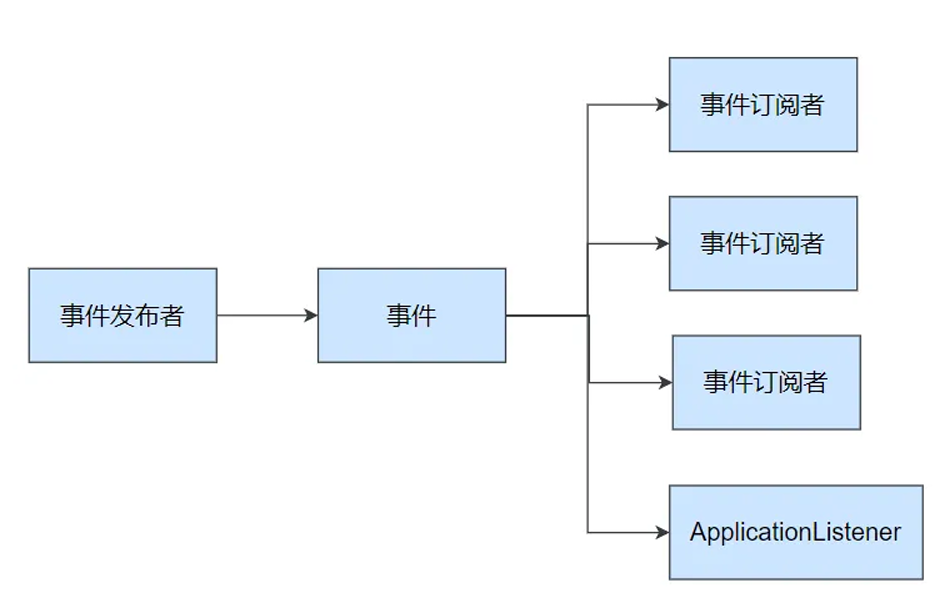
image-20251223001141018

事件发布者

1
2
3
4
5
6
7
8
9
10
11
12
13
14
15
16
17
18
19
20
21
22
23
24
25
26
27
28
29
30
31
32
33
/**
* 事件发布器服务类
*/
//SpringBoot已经给我们准备好了,所以我们继承ApplicationEventPublisherAware然后发布就调用底层的就好了
@Service
public class EventPublisher implements ApplicationEventPublisherAware {

/**
* 底层发送事件用的组件。
* Spring Boot 会通过 ApplicationEventPublisherAware 接口自动注入给我们。
* 事件是广播出去的,所有监听该事件的监听器都可以收到。
*/
private ApplicationEventPublisher applicationEventPublisher;

/**
* 发送任意 ApplicationEvent 事件。
* @param event 要发布的事件对象
*/
public void sendEvent(ApplicationEvent event) {
// 调用底层 API 发送事件
applicationEventPublisher.publishEvent(event);
}

/**
* 会被 Spring 自动调用,将真正的事件发布组件注入进来。
*
* @param applicationEventPublisher Spring 提供的事件发布器
*/
@Override
public void setApplicationEventPublisher(ApplicationEventPublisher applicationEventPublisher) {
this.applicationEventPublisher = applicationEventPublisher;
}
}

事件订阅者

1
2
3
4
5
6
7
8
9
10
11
12
13
14
15
16
17
18
19
20
@Service
public class CouponService {

/**
* 监听登录成功事件,优先级为 1(数值越小优先级越高)
*/
@EventListener
@Order(1)
public void onLoginSuccess(LoginSuccessEvent event) {
System.out.println("===== CouponService ===== 感知到事件: " + event);

// 假设 LoginSuccessEvent 内部已封装 UserEntity,而不是通过 getSource()
UserEntity user = event.getUser(); // 更安全、更清晰
sendCoupon(user.getUsername());
}

private void sendCoupon(String username) {
System.out.println(username + " 随机得到了一张优惠券");
}
}

整个案例如下:事件是广播形式的

1
2
3
4
5
6
7
8
9
10
11
12
13
14
15
16
17
18
19
20
21
22
23
24
25
26
27
28
29
30
31
32
33
34
35
36
37
38
39
40
41
42
43
44
45
46
47
48
49
50
51
52
53
54
55
56
57
58
59
60
61
62
63
64
65
66
67
68
69
70
71
72
73
74
75
76
77
78
79
80
81
82
83
84
85
86
87
88
89
//实体类:UserEntity.java
@Data
@AllArgsConstructor
public class UserEntity {
private String username;
}

//事件类:LoginSuccessEvent.java
/**
* 登录成功事件
* 继承 ApplicationEvent,表示这是一个 Spring 应用事件
*/
public class LoginSuccessEvent extends ApplicationEvent {

// 虽然 source 就是 UserEntity,但我们提供类型安全的 getter
public LoginSuccessEvent(UserEntity user) {
super(user); // 将 user 作为 source 传给父类
}

// 类型安全地获取用户(避免外部强转)
public UserEntity getUser() {
return (UserEntity) getSource();
}
}
//Controller:发布事件
@RestController
public class LoginController {

private final EventPublisher eventPublisher;

public LoginController(EventPublisher eventPublisher) {
this.eventPublisher = eventPublisher;
}

@GetMapping("/login")
public String login(@RequestParam("username") String username) {
UserEntity user = new UserEntity(username);
LoginSuccessEvent event = new LoginSuccessEvent(user);

// 发布事件
eventPublisher.sendEvent(event);

return "登录成功,已触发事件!";
}
}
//事件发布工具类
@Service
public class EventPublisher implements ApplicationEventPublisherAware {

private ApplicationEventPublisher applicationEventPublisher;

public void sendEvent(ApplicationEvent event) {
applicationEventPublisher.publishEvent(event);
}

@Override
public void setApplicationEventPublisher(ApplicationEventPublisher applicationEventPublisher) {
this.applicationEventPublisher = applicationEventPublisher;
}
}
//积分增加服务,同时实现监听器功能
//方式一
@Service
public class AccountScoreService implements ApplicationListener<LoginSuccessEvent> {

@Override
public void onApplicationEvent(LoginSuccessEvent event) {
UserEntity user = event.getUser();
addAccountScore(user.getUsername());
}

private void addAccountScore(String username) {
System.out.println(username + " 加了1分(通过 ApplicationListener)");
}
}
//方式二
@Service
public class CouponService {

@EventListener
public void handleLoginSuccess(LoginSuccessEvent event) {
UserEntity user = event.getUser();
sendCoupon(user.getUsername());
}

private void sendCoupon(String username) {
System.out.println(username + " 随机得到了一张优惠券(通过 @EventListener)");
}
}

2、自动配置原理

1、入门理解

应 ⽤关注的三⼤核⼼:场景、配置、组件

1、自动配置流程
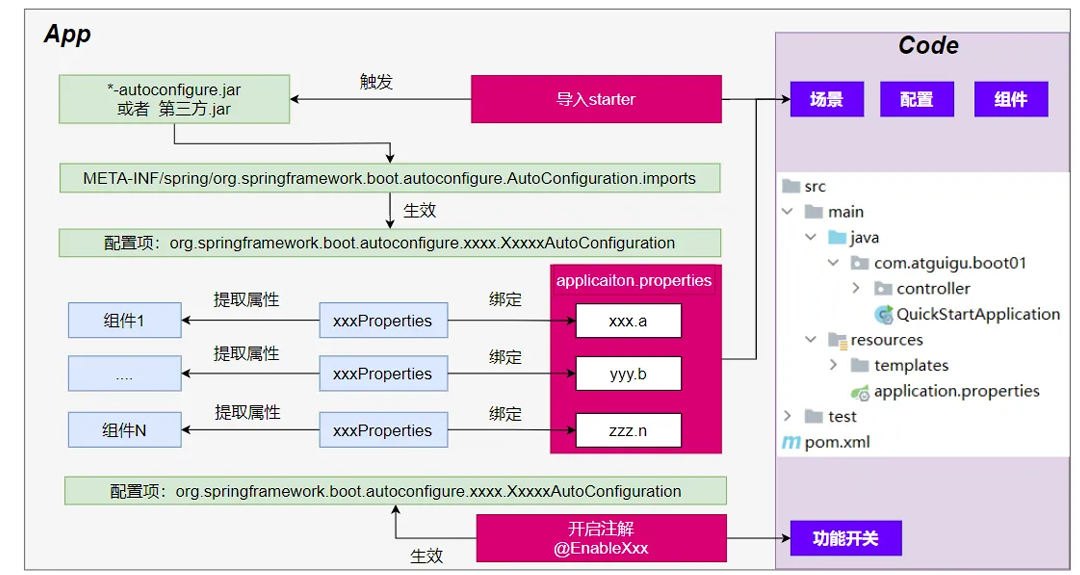
image-20251223010045177

  1. 导⼊ starter

  2. 依赖导⼊ autoconfigure

  3. 寻找类路径下 META-INF/spring/org.springframework.boot.autoconfigure.AutoConfiguration.imports ⽂件

  4. 启动,加载所有 ⾃动配置类 xxxAutoConfiguration

    a. 给容器中配置功能 组件

    b. 组件参数 绑定到 属性类 中。

    c. 属 性类 和 xxxProperties 配置⽂件 前缀项绑定

    d. @Contional 派⽣的条件注解 进⾏判断是否组件⽣效

  5. 效果:

    a. 修改配置⽂件,修改底层参数

    b. 所有场景⾃动配置好直接使⽤

    c. 可以注⼊SpringBoot配置好的组件随时使⽤

2、SPI机制

​ 上面这种都是SPI思想。

Java中的SPI(Service Provider Interface)是⼀种软件设计模式⽤于在应⽤程序中动态地发现 和加载组件。SPI的思想是,定义⼀个接⼝或抽象类,然后通过在classpath中定义实现该接⼝的类 来实现对组件的动态发现和加载。

SPI的主要⽬的是解决在应⽤程序中使⽤可插拔组件的问题。例如,⼀个应⽤程序可能需要使⽤不 同的⽇志框架或数据库连接池,但是这些组件的选择可能取决于运⾏时的条件。通过使⽤SPI,应 ⽤程序可以在运⾏时发现并加载适当的组件,⽽⽆需在代码中硬编码这些组件的实现类。

在Java中,SPI的实现⽅式是通过在 META-INF/services ⽬录下创建⼀个以服务接⼝全限定名 为名字的⽂件,⽂件中包含实现该服务接⼝的类的全限定名。当应⽤程序启动时,Java的SPI机制 会⾃动扫描classpath中的这些⽂件,并根据⽂件中指定的类名来加载实现类。

通过使⽤SPI,应⽤程序可以实现更灵活、可扩展的架构,同时也可以避免硬编码依赖关系和增加 代码的可维护性。

1
2
3
4
5
6
7
8
9
10
11
12
13
14
15
16
17
18
19
20
21
22
23
24
25
26
27
28
29
30
31
32
33
//步骤 1:定义接口(或抽象类)
public interface Robot {
void sayHello();
}

//步骤 2:编写实现类(由不同厂商或模块提供)
public class Bumblebee implements Robot {
@Override
public void sayHello() {
System.out.println("Bumblebee: Hello! I'm from Transformers.");
}
}
public class OptimusPrime implements Robot {
@Override
public void sayHello() {
System.out.println("Optimus Prime: Freedom is the right of all sentient beings.");
}
}
//步骤 3:创建配置文件(关键!)
//在 resources 目录下创建:src/main/resources/META-INF/services/com.example.Robot
//文件内容(每行一个实现类的全限定名):
com.example.Bumblebee
com.example.OptimusPrime

//步骤 4:通过 ServiceLoader 加载服务
public class RobotApp {
public static void main(String[] args) {
ServiceLoader<Robot> robots = ServiceLoader.load(Robot.class);
for (Robot robot : robots) {
robot.sayHello();
}
}
}

ServiceLoader工作原理

1
2
3
4
5
6
7
ServiceLoader.load(Robot.class) 的内部流程:
获取当前线程上下文类加载器(Thread.currentThread().getContextClassLoader())
在 classpath 下查找所有 META-INF/services/com.example.Robot 文件
读取文件内容,逐行解析为类名
使用类加载器动态加载这些类(Class.forName())
通过反射调用无参构造器,实例化对象
返回一个 惰性迭代器(Lazy Iterator),遍历时才创建实例
功能 Java 原生 SPI Spring Bean 机制
自动发现 META-INF/services/ @ComponentScan
依赖注入 ❌ 不支持 ✅ 支持
条件加载 ❌ 不支持 @Conditional
命名访问 ❌ 只能遍历 @Qualifier, @Primary
生命周期管理 ❌ 无 InitializingBean, DisposableBean

Spring 本质上是一种更强大的“SPI 实现”

3、功能开关

⾃动配置:全部都配置好,什么都不⽤管。 ⾃动批量导⼊

​ 项⽬⼀启动,spi⽂件中指定的所有都加载。

@EnableXxxx :⼿动控制哪些功能的开启; ⼿动导⼊。

​ 开启xxx功能

​ 都是利⽤ @Import 把此功能要⽤的组件导⼊进去

2、进阶理解
1、@SpringBootApplication
1
2
3
4
5
6
7
8
9
10
11
12
13
@Target(ElementType.TYPE)
@Retention(RetentionPolicy.RUNTIME)
@Documented
@Inherited
@SpringBootConfiguration
@EnableAutoConfiguration
@ComponentScan(excludeFilters = {
@Filter(type = FilterType.CUSTOM, classes = TypeExcludeFilter.class),
@Filter(type = FilterType.CUSTOM, classes = AutoConfigurationExcludeFilter.class)
})
public @interface SpringBootApplication {
// ...
}

@SpringBootConfiguration 就是: @Configuration ,容器中的组件,配置类。spring ioc启动就会加载创建这个类对象

@EnableAutoConfiguration:开启⾃动配置

​ @AutoConfigurationPackage:扫描主程序包:加载⾃⼰的组件

​ 利⽤ @Import(AutoConfigurationPackages.Registrar.class) 想要给容器中导⼊组件。

​ 把主程序所在的包的所有组件导⼊进来。

​ 为什么SpringBoot默认只扫描主程序所在的包及其⼦包?

@Import(AutoConfigurationImportSelector.class)加载所有⾃动配置类:加载starter导⼊的组件

1
2
3
//他的代码是这样写的
List<String> configurations = ImportCandidates.load(AutoConfiguration.class,getBeanClassLoader())
.getCandidates();

扫描SPI⽂件: META-INF/spring/org.springframework.boot.autoconfigure.AutoConf iguration.imports

@ComponentScan

组件扫描:排除⼀些组件(哪些不要) ,注意这里也会扫描注册,只是添加了排除路径而已

无脑注册,它不会看 @ConditionalOnMissingBean 等条件

排除前⾯已经扫描进来的 配置类 、和 ⾃动配置类 。因为一个是自己的组件一个是starter的,那么如果自己的组件里面也写了个starter那么就重复注册了两次,而自动配置必须在所有用户 Bean 加载完后,根据条件判断。如果提前把类加载了,自动配置的逻辑就全乱了。

1
2
@ComponentScan(excludeFilters = { @Filter(type = FilterType.CUSTOM, classes = TypeExcludeFilter.class),
@Filter(type = FilterType.CUSTOM, classes = AutoConfigurationExcludeFilter.class) })
2、完整启动加载流程

image-20251223023144725

第一阶段:初始化 SpringApplication 实例

当你调用 SpringApplication.run(Main.class, args) 时,后台首先会通过构造函数创建一个 SpringApplication 对象。

  1. 推断应用类型:判断当前应用是普通项目(None)、Web 项目(Servlet)还是响应式项目(Reactive)。
  2. 加载初始化器 (Initializers):从 META-INF/spring.factories(或 Spring 3.0+ 的新位置)中读取所有 ApplicationContextInitializer 的实现类。
  3. 加载监听器 (Listeners):同样从配置文件中读取所有 ApplicationListener。
  4. 推断主启动类:通过线程栈找到包含 main 方法的那个类,方便后续包扫描。

第二阶段:执行 run() 方法(核心流程)

这是 Spring Boot 启动的最核心部分,包含了环境准备、容器创建和 Bean 注入。

  1. 开启计时与监听
  • 启动 StopWatch:记录启动耗时。
  • 获取并启动监听器:从 spring.factories 获取 SpringApplicationRunListeners,并发布“正在启动”的事件(starting)。
  1. 准备环境 (Environment)
  • 封装命令行参数:将 args 封装进 DefaultApplicationArguments。
  • 创建并配置 Environment:读取 application.properties/yml 以及环境变量。
  • 发布环境准备就绪事件:通知监听器环境已 OK。
  1. 创建应用上下文 (ApplicationContext)
  • 根据第一阶段推断的类型,通过反射创建具体的容器:
    • Servlet 应用:AnnotationConfigServletWebServerApplicationContext
    • Reactive 应用:AnnotationConfigReactiveWebServerApplicationContext
  1. 容器预处理 (prepareContext)
  • 关联环境:将 Environment 注入容器。
  • 应用初始化器:执行之前加载的 Initializers。
  • 加载资源:将主启动类(Main Class)注册为 Bean 定义(BeanDefinition),这是后续自动配置的入口。
  • 发布上下文准备就绪事件
  1. 刷新容器 (refreshContext) —— 最重要的步骤

这一步调用的是 Spring 核心框架的 refresh() 方法,它是 Bean 生命周期的核心

  • 解析配置类:ConfigurationClassPostProcessor 开始工作,解析 @SpringBootApplication,扫描包,解析 @Import。
  • 自动配置 (Auto-Configuration):根据 Condition 条件决定哪些配置生效。
  • 实例化 Bean:创建所有的单例 Bean(Service, Controller 等)。
  • 启动内嵌服务器:如果是 Web 项目,在 onRefresh 阶段会创建并启动 Tomcat/Jetty
  1. 容器刷新后处理 (afterRefresh)
  • 停止 StopWatch 计时。
  • 打印启动成功的日志。
  • 发布应用已启动事件
  1. 执行 Runner (Call Runners)
  • 查找并依次执行实现了 CommandLineRunner 或 ApplicationRunner 接口的类。这通常用于在项目启动后立即执行某些初始化逻辑(如预热缓存)。

3、自定义starter

为什么需要自定义starter

场景:抽取聊天机器⼈场景,它可以打招呼。

效果:任何项⽬导⼊此 starter 都具有打招呼功能,并且问候语中的⼈名需要可以在配置⽂件中修 改

  1. 创建 ⾃定义 starter 项⽬,引⼊ spring-boot-starter 基础依赖
  2. 编写模块功能,引⼊模块所有需要的依赖。
  3. 编写 xxxAutoConfiguration ⾃动配置类,帮其他项⽬导⼊这个模块需要的所有组件
  4. 编写配置⽂件 META-INF/spring/org.springframework.boot.autoconfigure. AutoConfiguration.imports 指定启动需要加载的⾃动配置
  5. 其他项⽬引⼊即可使⽤
1、业务代码
1
2
3
4
5
6
7
8
@ConfigurationProperties(prefix = "robot")  //此属性类和配置⽂件指定前缀绑定
@Component
@Data
public class RobotProperties {
private String name;
private String age;
private String email;
}
2、基本抽取

创建starter项⽬,把公共代码需要的所有依赖导⼊

把公共代码复制进来

⾃⼰写⼀个

RobotAutoConfiguration ,给容器中导⼊这个场景需要的所有组件

​ 为什么这些组件默认不会扫描进去?

​ starter所在的包和 引⼊它的项⽬的主程序所在的包不是⽗⼦层级

别⼈引⽤这个 starter ,直接导⼊这个 RobotAutoConfiguration ,就能把这个场景的组件导⼊进来

功能⽣效

测试编写配置⽂件

3、使用@EnableXxx机制
1
2
3
4
5
6
@Retention(RetentionPolicy.RUNTIME)
@Target({ElementType.TYPE})
@Documented
@Import(RobotAutoConfiguration.class)
public @interface EnableRobot {
}

别⼈引⼊ starter 需要使⽤ @EnableRobot 开启功能

4、完全自动配置

依赖SpringBoot的SPI机制 Java

META-INF/spring/org.springframework.boot.autoconfigure.AutoConfiguration.imports ⽂件中编写好我们⾃动配置类的全类名即可

项⽬启动,⾃动加载我们的⾃动配置类

完整案例
1
2
3
4
5
6
7
8
9
10
11
hello-spring-boot-starter/
├── pom.xml
└── src/main/java
└── com/example/starter
├── HelloProperties.java // 配置属性
├── HelloService.java // 核心服务
└── HelloAutoConfiguration.java // 自动配置类
└── src/main/resources
└── META-INF
└── spring
└── org.springframework.boot.autoconfigure.AutoConfiguration.imports
1
2
3
4
5
6
7
8
9
10
11
12
13
14
15
16
17
18
19
20
21
22
23
24
25
26
27
28
29
30
31
32
33
34
35
36
37
38
39
40
41
42
43
44
45
46
47
48
49
50
51
//第一步:创建 Starter 项目(Maven)
//1、pom文件不要引入 spring-boot-starter(避免传递依赖污染)只依赖 spring-boot-autoconfigure
//第二步:编写核心代码
//2.1 配置属性类:HelloProperties.java
@ConfigurationProperties(prefix = "example.hello")
public class HelloProperties {

/**
* 打招呼的前缀,默认 "Hello"
*/
private String prefix = "Hello";

public String getPrefix() {
return prefix;
}

public void setPrefix(String prefix) {
this.prefix = prefix;
}
}
//2.2 服务类:HelloService.java
public class HelloService {
private final String prefix;
public HelloService(String prefix) {
this.prefix = prefix;
}
public String sayHello(String name) {
return prefix + ", " + name + "!";
}
}
//2.3 自动配置类:HelloAutoConfiguration.java
@AutoConfiguration // Spring Boot 2.7+ 推荐注解(替代 @Configuration + EnableAutoConfiguration)
@EnableConfigurationProperties(HelloProperties.class) // 绑定配置
public class HelloAutoConfiguration {

@Bean
@ConditionalOnMissingBean // 如果用户没自定义 HelloService,才自动创建
public HelloService helloService(HelloProperties properties) {
return new HelloService(properties.getPrefix());
}
}
//2.4 注册自动配置类(关键!)
//创建文件:src/main/resources/META-INF/spring/org.springframework.boot.autoconfigure.AutoConfiguration.imports
//内容
//com.example.starter.HelloAutoConfiguration

//第三步:安装到本地 Maven 仓库
//在 hello-spring-boot-starter 目录下执行:
//mvn clean install这个命令就把这个打包成mvn了

//然后再主应用maven中导入就可以正常使用了

SpringBoot3场景整合

环境准备

0 云服务器

服务器开通,然后安装以下组件

  • docker
  • redis
  • kafka
  • prometheus
  • grafana

开通阿里云服务器为例

(12 封私信 / 2 条消息) 2026年阿里云免费云服务器及学生云服务器申请图文教程 - 知乎

创建完之后利用MobaXterm连上linux主机。公网IP,然后端口号22(SSH 服务默认监听的端口),用户root

公网想要访问端口号需要设置安全组

1 docker安装

1
2
3
4
5
6
7
8
9
10
11
12
13
14
15
16
17
18
19
20
21
22
23
24
25
26
27
28
29
30
31
# 1. 安装 yum-utils 工具集(提供 yum-config-manager 命令,用于添加软件仓库配置)
sudo yum install -y yum-utils

# 2. 添加 Docker 官方 YUM 软件仓库(确保安装的是官方正版 Docker,而非 CentOS 自带的旧版本)
sudo yum-config-manager \
--add-repo \
https://download.docker.com/linux/centos/docker-ce.repo

sudo yum-config-manager --add-repo https://mirrors.aliyun.com/docker-ce/linux/centos/docker-ce.repo
# 3. 安装 Docker 核心组件及相关插件
# docker-ceDocker 社区版服务端(核心程序)
# docker-ce-cliDocker 命令行客户端(用于执行 docker 相关命令)
# containerd.io:容器运行时(负责管理容器的生命周期)
# docker-buildx-pluginDocker 构建增强插件(支持多架构构建等高级功能)
# docker-compose-pluginDocker 编排插件(支持 docker compose 命令,用于管理多容器应用)
sudo yum install docker-ce docker-ce-cli containerd.io docker-buildx-plugin docker-compose-plugin

# 4. 设置 Docker 服务开机自启,并立即启动 Docker 服务
# enable:配置开机自启
# --now:立即执行启动操作(等同于先执行 systemctl enable docker,再执行 systemctl start docker
sudo systemctl enable docker --now

# 5. 验证 Docker 服务是否正常运行
# docker ps:列出当前运行中的容器,若命令不报错(即使无容器输出),说明 Docker 服务已正常启动
docker ps

# 6. (补充说明)若需通过 docker compose 批量部署/安装软件(编排多容器应用)
# 需先编写 docker-compose.yml 配置文件,再执行以下命令(注释内为示例命令,需根据实际配置文件调整)
# docker compose up -d # 后台启动 docker-compose.yml 中定义的所有服务
# docker compose down # 停止并移除所有服务容器、网络等
# docker compose up -d --build # 若镜像需重新构建,后台启动所有服务

创建 /prod 文件夹 ,准备以下文件

2 prometheus.yml

1
2
3
4
5
6
7
8
9
10
11
12
13
14
15
16
17
18
19
20
21
22
23
# Prometheus 全局配置
global:
# 抓取目标指标的间隔时间
scrape_interval: 15s
# 评估告警规则和记录规则的间隔时间
evaluation_interval: 15s

# 抓取配置列表(定义需要监控的目标)
scrape_configs:
# 监控 Prometheus 自身
- job_name: 'prometheus'
static_configs:
- targets: ['localhost:9090']

# 监控 Redis 服务
- job_name: 'redis'
static_configs:
- targets: ['redis:6379']

# 监控 Kafka 服务
- job_name: 'kafka'
static_configs:
- targets: ['kafka:9092']

3 docker-compose.yml

1
2
3
4
5
6
7
8
9
10
11
12
13
14
15
16
17
18
19
20
21
22
23
24
25
26
27
28
29
30
31
32
33
34
35
36
37
38
39
40
41
42
43
44
45
46
47
48
49
50
51
52
53
54
55
56
57
58
59
60
61
62
63
64
65
66
67
68
69
70
71
72
73
74
75
76
77
78
79
80
81
82
83
84
85
86
87
88
89
90
91
92
93
94
95
96
97
98
99
100
101
# Docker Compose 配置版本(3.9 兼容大部分 Docker 版本,稳定性强)
version: '3.9'

# 定义所有服务容器
services:
# Redis 服务
redis:
image: redis:latest
container_name: redis
restart: always # 容器异常退出时自动重启
ports:
- "6379:6379" # 主机端口:容器端口 映射
networks:
- backend # 加入 backend 自定义网络

# Zookeeper 服务(为 Kafka 提供协调支持)
zookeeper:
image: bitnami/zookeeper:latest
container_name: zookeeper
restart: always
environment:
# Zookeeper 客户端连接端口
ZOOKEEPER_CLIENT_PORT: 2181
# 关键:开启匿名登录,解决Zookeeper启动失败
ALLOW_ANONYMOUS_LOGIN: "yes"
# Zookeeper 心跳间隔时间
ZOOKEEPER_TICK_TIME: 2000
networks:
- backend

kafka:
image: wurstmeister/kafka
container_name: kafka
restart: always
depends_on:
- zookeeper
ports:
- "9092:9092"
environment:
# 仅用容器名连接 Zookeeper,格式无错,同一 backend 网络可解析
KAFKA_ZOOKEEPER_CONNECT: zookeeper:2181
# 单节点必配,避免副本数冲突
KAFKA_OFFSETS_TOPIC_REPLICATION_FACTOR: 1
# 核心:公告地址为容器名 kafka:9092,与 Kafka UI 连接地址完全一致
KAFKA_ADVERTISED_LISTENERS: PLAINTEXT://kafka:9092
# 核心:监听容器内所有网卡,确保能接收 Kafka UI 的连接
KAFKA_LISTENERS: PLAINTEXT://0.0.0.0:9092
networks:
- backend

# Kafka UI 可视化管理工具
kafka-ui:
image: provectuslabs/kafka-ui:latest
container_name: kafka-ui
restart: always
depends_on:
- kafka # 依赖 Kafka 服务
ports:
- "8080:8080" # 访问端口:主机 8080 对应容器 8080
environment:
# 定义 Kafka 集群名称
KAFKA_CLUSTERS_0_NAME: dev
# 👇 新增这一行:告诉 Kafka UI Zookeeper 地址
KAFKA_CLUSTERS_0_ZOOKEEPER: zookeeper:2181
# 连接 Kafka 集群的地址
KAFKA_CLUSTERS_0_BOOTSTRAPSERVERS: kafka:9092
# 可选:延长连接超时时间,避免短暂延迟被判定为 offline
KAFKA_CLUSTERS_0_CONNECT_TIMEOUT: 10000
KAFKA_CLUSTERS_0_READ_TIMEOUT: 30000
networks:
- backend

# Prometheus 监控服务
prometheus:
image: prom/prometheus:latest
container_name: prometheus
restart: always
volumes:
# 挂载本地 prometheus.yml 配置文件到容器内对应路径
- ./prometheus.yml:/etc/prometheus/prometheus.yml
ports:
- "9090:9090" # Prometheus 访问端口
networks:
- backend

# Grafana 可视化监控面板
grafana:
image: grafana/grafana:latest
container_name: grafana
restart: always
depends_on:
- prometheus # 依赖 Prometheus,获取监控数据
ports:
- "3000:3000" # Grafana 访问端口(默认账号密码:admin/admin)
networks:
- backend

# 定义自定义网络(使所有服务在同一网络内,可通过容器名互相访问)
networks:
backend:
name: backend # 自定义网络名称为 backend

4 启动环境

如果失败配置镜像加速

1
docker compose -f docker-compose.yml up -d

5 验证

  • redis: 你的ip:6379
    • 填写表单,下载可视化工具
    • redisinsight

pom导入

1
2
3
4
<dependency>
<groupId>org.springframework.boot</groupId>
<artifactId>spring-boot-starter-data-redis</artifactId>
</dependency>

配置yaml

1
2
3
4
spring.application.name=boot3-09-redis

spring.data.redis.host=你的redisIP
spring.data.redis.port=6379

编写业务

编写controller

1
2
3
4
5
6
7
8
9
10
11
12
13
14
@RestController
public class RedisTestController {

@Resource
private StringRedisTemplate stringRedisTemplate;


@GetMapping("/count")
public String count(){
Long count = stringRedisTemplate.opsForValue().increment("hello");
return "访问了:"+ count + "次";
}
}

主启动

测试成功。

Redis整合

Redis自动配置原理

  1. META-INF/spring/org.springframework.boot.autoconfigure.AutoConfiguration.imports中 导⼊了 RedisAutoConfigurationRedisReactiveAutoConfigurationRedisRepositoriesAutoConfiguration。所有属性绑定在 RedisProperties
  2. RedisReactiveAutoConfiguration属于响应式编程,不⽤管。 RedisRepositoriesAutoConfiguration属于 JPA 操作,也不⽤管
  3. RedisAutoConfiguration 配置了以下组件
    1. LettuceConnectionConfiguration: 给容器中注⼊了连接⼯⼚ LettuceConnectionFactory,和操作 redis 的客户端 DefaultClientResources
    2. RedisTemplate : 可给 redis 中存储任意对象,会使⽤ jdk 默 认序列化⽅式。
    3. StringRedisTemplate : 给 redis 中存储字符串,如果要存对象,需要开发⼈员⾃ ⼰进⾏序列化。key-value都是字符串进⾏操作

定制化

1、序列化机制

为什么需要序列化机制?

因为如果我们想给redis传入对象,使用RedisTemplate中的方法,那么会利用默认的序列化机制导致传入到redis的对象是乱码,为了统一,我们统一转为json存储,那么就需要序列化机制了。另外对象想要在网络传输需要实现序列化接口。

那么如果想要改掉序列化机制,我们可以自定义edisTemplate

新建一个配置类config包下AppRedisConfiguration

1
2
3
4
5
6
7
8
9
10
11
12
13
14
15
16
17
18
19
20
21
22
23
24
25
26
27
/**
* Redis 配置类
* 允许 Object 类型的 key-value 都可以被转为 json 进行存储
*/
@Configuration
public class AppRedisConfiguration {

/**
* 自定义 RedisTemplate,支持 Object 类型数据的 JSON 序列化存储
* @param redisConnectionFactory Spring 自动配置的 Redis 连接工厂
* @return 配置好的 RedisTemplate<Object, Object>
*/
@Bean
public RedisTemplate<Object, Object> redisTemplate(RedisConnectionFactory redisConnectionFactory) {
// 创建 RedisTemplate 实例
RedisTemplate<Object, Object> template = new RedisTemplate<>();

// 设置 Redis 连接工厂
template.setConnectionFactory(redisConnectionFactory);

// 配置默认序列化器:将对象转为 JSON 字符串进行存储
template.setDefaultSerializer(new GenericJackson2JsonRedisSerializer());

// 返回配置完成的 RedisTemplate
return template;
}
}
2、redis客户端

RedisTemplate、StringRedisTemplate: 操作redis的⼯具类

要从redis的连接⼯⼚获取链接才能操作redis

Redis客户端

Lettuce: 默认

Jedis:可以使⽤以下切换

1
2
3
4
5
6
7
8
9
10
11
12
13
14
15
<dependency>
<groupId>org.springframework.boot</groupId>
<artifactId>spring-boot-starter-data-redis</artifactId>
<exclusions>
<exclusion>
<groupId>io.lettuce</groupId>
<artifactId>lettuce-core</artifactId>
</exclusion>
</exclusions>
</dependency>
<!--切换jedis作为操作redis的底层客户端-->
<dependency>
<groupId>redis.clients</groupId>
<artifactId>jedis</artifactId>
</dependency>

修改配置

1
2
3
4
5
6
7
8
9
spring.data.redis.host=redisIP
spring.data.redis.port=6379
#spring.data.redis.client-type=lettuce
#设置lettuce的底层参数
#spring.data.redis.lettuce.pool.enabled=true
#spring.data.redis.lettuce.pool.max-active=8
spring.data.redis.client-type=jedis
spring.data.redis.jedis.pool.enabled=true
spring.data.redis.jedis.pool.max-active=8
对比维度 Jedis Lettuce
线程模型 非线程安全(单线程独占使用),多线程环境下需配合连接池(如 JedisPool)使用,否则会出现并发问题 线程安全(基于 Netty 实现异步非阻塞 I/O,采用共享连接模式),多线程可安全共享一个连接实例,无需额外封装连接池(底层已优化连接管理)
I/O 模型 同步阻塞 I/O,每次 Redis 操作都会阻塞当前线程,直到获取响应结果 异步非阻塞 I/O(底层依赖 Netty 框架),支持异步、响应式编程(适配 Spring WebFlux),操作不会阻塞当前线程,性能更高
功能支持 功能简洁,仅支持 Redis 基础命令操作,不支持 Redis 集群(Cluster)、哨兵(Sentinel)等高级特性的原生封装(需额外依赖第三方工具) 功能丰富,原生支持 Redis 集群(Cluster)、哨兵(Sentinel)、管道(Pipeline)、发布订阅(Pub/Sub)等高级特性,还支持 Redis 6.0+ 的 RESP3 协议、ACL 权限控制等新特性
连接管理 简单的连接池管理(JedisPool),配置相对繁琐,连接复用效率一般 基于 Netty 实现高效连接管理,支持自动重连、连接池优化、TCP 连接复用,管理更智能,性能损耗更低
编程范式 仅支持同步编程,代码编写风格简洁直观,符合传统同步开发习惯 支持同步、异步(Callback/Future)、响应式(Reactive)三种编程范式,适配现代分布式系统的开发需求(如 Spring Cloud/Spring WebFlux)
依赖与轻量性 轻量级组件,依赖极少,打包后体积小,学习成本低 依赖 Netty 框架(异步 I/O 核心依赖),打包后体积略大,学习成本稍高(需了解异步 / 响应式编程思想)

接口文档

OpenAPI 3 与 Swagger

Swagger 可以快速⽣成实时接⼝⽂档,⽅便前后开发⼈员进⾏协调沟通。遵循 OpenAPI 规范。 ⽂档:https://springdoc.org/v2/

1、OpenAPI 3 架构
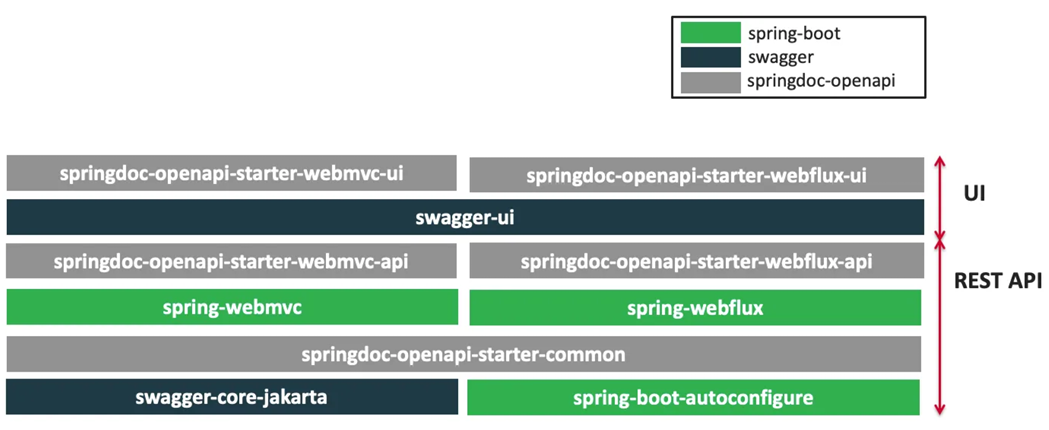
image-20251228161500752

2、整合
1
2
3
4
5
<dependency>
<groupId>org.springdoc</groupId>
<artifactId>springdoc-openapi-starter-webmvc-ui</artifactId>
<version>2.1.0</version>
</dependency>

配置

1
2
3
4
5
6
# /api-docs endpoint custom path 默认 /v3/api-docs
springdoc.api-docs.path=/api-docs
# swagger 相关配置在 springdoc.swagger-ui
# swagger-ui custom path
springdoc.swagger-ui.path=/swagger-ui.html
springdoc.show-actuator=true
3、使用
1、常用注解
注解名称 标注位置 作用描述
@Tag controller 类 标识 controller 的整体作用(用途说明)
@Parameter 方法参数 标识单个参数的作用(参数说明)
@Parameters 方法 对方法的多个参数进行多重说明(批量参数描述)
@Schema model 层的 JavaBean(类 / 属性) 描述模型的整体作用及每个属性的含义、约束等
@Operation controller 中的方法 描述单个接口方法的作用(接口用途、功能说明)
@ApiResponse controller 中的方法 描述接口的单个响应状态码、响应信息、响应模型等
2、Docket配置

这个就是让swagger-ui的界面更加好看,比如一个部门类里面的注释在一起,员工类的注释在一起

1
2
3
4
5
6
7
8
9
10
11
12
13
14
@Bean
public GroupedOpenApi publicApi() {
return GroupedOpenApi.builder()
.group("员工管理")
.pathsToMatch("/emp/**")
.build();
}
@Bean
public GroupedOpenApi adminApi() {
return GroupedOpenApi.builder()
.group("部门管理")
.pathsToMatch("/dept/**")
.build();
}
3、OpenAPI配置

上面的是分组配置,这个是总的介绍类似于文档梗概

1
2
3
4
5
6
7
8
9
10
11
@Bean
public OpenAPI springShopOpenAPI() {
return new OpenAPI()
.info(new Info().title("SpringShop API")
.description("专门测试接口文档")
.version("v0.0.1")
.license(new License().name("Apache 2.0").url("http://springdoc.org")))
.externalDocs(new ExternalDocumentation()
.description("SpringShop Wiki Documentation")
.url("https://springshop.wiki.github.org/docs"));
}

远程调用

RPC(Remote Procedure Call):远程过程调⽤
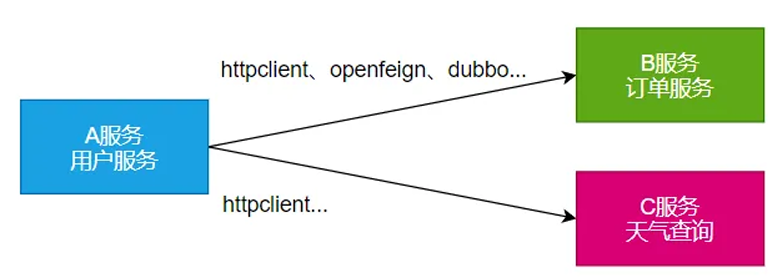
image-20251228223141589

本地过程调⽤: a(); b(); a() { b();}: 不同⽅法都在同⼀个JVM运⾏

远程过程调用

服务提供者:

服务消费者:

通过连接对⽅服务器进⾏请求\响应交互,来实现调⽤效果

API / SDK 的区别是什么?

api:接⼝(Application Programming Interface)

​ ○ 远程提供功能;

sdk:⼯具包(Software Development Kit)

​ ○ 导⼊jar包,直接调⽤功能即可

开发过程中,我们经常需要调⽤别⼈写的功能

如果是内部微服务,可以通过依赖cloud、注册中⼼、openfeign等进⾏调⽤

如果是外部暴露的,可以发送 http 请求、或遵循外部协议进⾏调⽤

SpringBoot 整合提供了很多⽅式进⾏远程调⽤

​ 轻量级客户端⽅式

​ RestTemplate: 普通开发

WebClient: 响应式编程开发

Http Interface: 声明式编程

​ Spring Cloud分布式解决⽅案⽅式

​ Spring Cloud OpenFeign

​ 第三⽅框架

​ Dubbo

​ gRPC

WebClient

非阻塞、响应式HTTP客户端

由于这是响应式编程了,后面也会讲解,现在只是演示一下。首先引入spring reactive web了,导入spring-boot-starter-webflux场景

然后开始创建controller,但是访问天气的功能不是我们写的,我们调用别人的api , 这应该怎么写呢?

首先完成好controller,在service里面定义好方法,然后写完controller的流程,再写service服务。

现在需要service利用HTTP客户端发送请求,首先理解发送请求需要做什么?

发请求:

请求⽅式: GET\POST\DELETE\xxxx

请求路径: /xxx

请求参数:aa=bb&cc=dd&xxx

请求头: aa=bb,cc=ddd

请求体:

现在我们知道了要做什么,那么我们利用WebClient发送请求。

首先创建WebClient

创建 WebClient ⾮常简单:

​ WebClient.create()

​ WebClient.create(String baseUrl)

还可以使⽤ WebClient.builder() 配置更多参数项:

​ uriBuilderFactory: ⾃定义 UriBuilderFactory ,定义 baseurl.

​ defaultUriVariables: 默认 uri 变量.

​ defaultHeader: 每个请求默认头. 131

​ defaultCookie: 每个请求默认 cookie.

​ defaultRequest: Consumer ⾃定义每个请求.

​ filter: 过滤 client 发送的每个请求

​ exchangeStrategies: HTTP 消息 reader/writer ⾃定义.

​ clientConnector: HTTP client 库设置.

URI(Uniform Resource Identifier,统一资源标识符)

本质是「用来唯一标识某个资源的字符串」,它的核心作用是「识别资源」,只负责告诉我们「这个资源是谁」,不保证能通过它获取到该资源。

URL(Uniform Resource Locator,统一资源定位符)

本质是「用来定位某个资源并指明如何访问该资源的字符串」,它的核心作用是「定位 + 访问」,不仅能标识资源,还能提供访问该资源的完整路径(协议、主机、端口等)。

1
2
3
4
5
6
7
8
9
10
11
12
13
14
15
16
17
18
19
20
21
22
23
24
25
26
27
28
29
@Service
public class WeatherService {
public String weather(String city){
// 远程调用阿里云API

//1、创建WebClient 这样就有访问阿里云天气服务api的客户端了
WebClient client = WebClient.create();
Map<String,String> params = new HashMap<>();
params.put("area","西安");
//2、定义发请求行为
String json = client.get() //首先是get请求
.uri("https://ali-weater/xxx?area={area} ",params)
.accept(MediaType.APPLICATION_JSON)//接受JSON返回的数据
.header("Authorization","APPCODE xxx")//携带请求头,按照阿里云的要求发送请求头
.retrieve()//代表查询
.bodyToMono(String.class)//这里用来接收返回信息
.block();//阻塞,因为没学响应式编程

//如果用响应式编程
Mono<String> mono = client.get() //首先是get请求
.uri("https://ali-weaterxxx?area={area} ",params)
.accept(MediaType.APPLICATION_JSON)//接受JSON返回的数据
.header("Authorization","APPCODE xxx")//携带请求头,按照阿里云的要求发送请求头
.retrieve()//代表查询
.bodyToMono(String.class);//这里用来声明如何提取返回信息

return mono;
}
}

HTTP Interface

Spring 允许我们通过定义接⼝的⽅式,给任意位置发送 http 请求,实现远程调⽤,可以⽤来简 化 HTTP 远程访问。

也是导入spring-boot-starter-webflux场景,如果访问的次数多,每次都要定义客户端,然后发送请求会很麻烦。

那么我们可以用接口的方式来更抽象的编写。

定义接口

1
2
3
4
5
6
7
8
9
10
public interface WeatherInterface {
@GetExchange(url = "/xxx",accpet="application/json")

//在GetExchange里面写,代表要把city绑定到area里面当参数发出去,在controller里面写是接受一个数据
Mono<String> gerWeather(@RequestParam("area") String city,
@RequestHeader("Authorization") String header);

@GetExchange(url = "/search")
String search(@RequestParam("q") String keyword);
}

编写service

1
2
3
4
5
6
7
8
9
10
11
12
13
14
15
16
17
18
19
20
21
22
23
24
@Service
public class WeatherService{
public Mono<String> getByHttpInterface(String city){
//1、创建客户端
WebClient client = WebClient.builder()
.baseUrl("https://ali-weater")
.codecs(clientCodecConfigurer -> {
clientCodecConfigurer
.defaultCodecs()
.maxInMemorySize(256*1024*1024);
//响应数据量太⼤有可能会超出BufferSize,所以这⾥设置的⼤⼀点
})
.build();
//2、创建⼯⼚
HttpServiceProxyFactory factory = HttpServiceProxyFactory
.builder(WebClientAdapter.forClient(client)).build();
//3、获取代理对象
WeatherInterface weatherAPI = factory.createClient(WeatherInterface.class);

//这样每次只用调用代理对象就行了,上面可以写到配置类里面
Mono<String> weather = weatherAPI.getWeather(city,"APPCODE xxx");
return weather;
}
}

当前方案仅针对 WeatherInterface 做了封装,还能通过「通用化模板封装 + 可配置化扩展」,实现对任意 HTTP 接口(如 UserInterface、OrderInterface 等)的复用,彻底消除不同业务接口的重复配置逻辑。

原理就是把创建工厂抽出,然后就可以不断的利用一个工厂来创建不同的代理类了

1
2
3
4
5
6
7
8
9
10
11
12
13
14
15
16
17
18
19
20
21
22
23
24
25
26
27
28
29
30
31
32
33
34
35
36
37
38
39
40
41
42
/**
* HTTP 接口代理配置类
* 包含两个核心Bean:
* 1. httpServiceProxyFactory:通用HttpServiceProxyFactory工厂(可复用)
* 2. weatherAPI:WeatherInterface代理对象(供业务Service注入使用)
*/
@Configuration
public class WeatherHttpProxyConfig {

/**
* Bean1:创建通用的 HttpServiceProxyFactory 工厂(可复用给其他HTTP接口)
* 基于定制化WebClient构建,解决大响应数据缓冲溢出问题
* @return HttpServiceProxyFactory 实例
*/
@Bean
public HttpServiceProxyFactory httpServiceProxyFactory() {
// 1. 构建定制化WebClient(配置基础地址+编解码器大小)
WebClient weatherWebClient = WebClient.builder()
.baseUrl("https://ali-weater") // 天气接口基础地址
.codecs(clientCodecConfigurer -> {
// 配置最大内存缓冲区大小256M,解决大响应数据溢出
clientCodecConfigurer.defaultCodecs().maxInMemorySize(256 * 1024 * 1024);
})
.build();

// 2. 基于WebClient构建并返回HttpServiceProxyFactory工厂
return HttpServiceProxyFactory
.builder(WebClientAdapter.forClient(weatherWebClient))
.build();
}

/**
* Bean2:创建 WeatherInterface 代理对象(依赖上面的工厂Bean)
* @param httpServiceProxyFactory 自动注入配置类中的工厂Bean
* @return WeatherInterface 代理实例
*/
@Bean
public WeatherInterface weatherAPI(HttpServiceProxyFactory httpServiceProxyFactory) {
// 利用工厂创建并返回WeatherInterface代理对象
return httpServiceProxyFactory.createClient(WeatherInterface.class);
}
}

消息服务

消息队列-场景

1、异步

image-20251229010436695

2、解耦

image-20251229010814338

3、削峰

image-20251229011503029

4、缓冲

image-20251229011614878

缓冲(Buffering)解决速率不匹配问题

削峰 防止系统在流量高峰时过载崩溃,提高系统的可用性和稳定性

消息队列-Kafka

这里利用之前环境准备的Kafka来使用。

1、消息模式
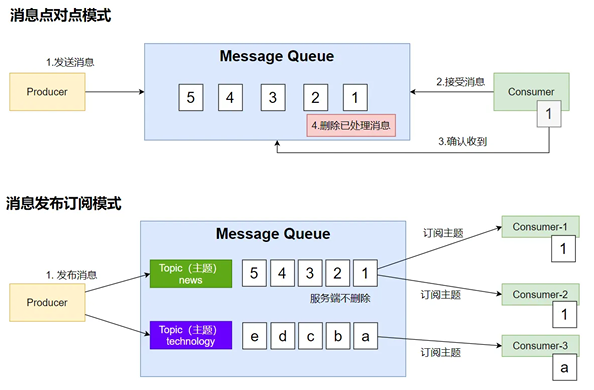
image-20251229013318736

点对点就是发微信一样:一对一发消息

消息发布订阅模式就是群发消息,在Kafka里面可以定制主题,类比报纸,有新华日报,人民日报等不同主题,然后人们可以订报纸,然后如果有报纸到了就发送给所有订阅的人手上,然后Kafka会记录每个订阅者的偏移量,记录每个人消费到哪了,利用广播订阅的话,服务端是不会删除消息的。(后续是否会删除消息可以具体配置规则)

2、Kafka工作原理
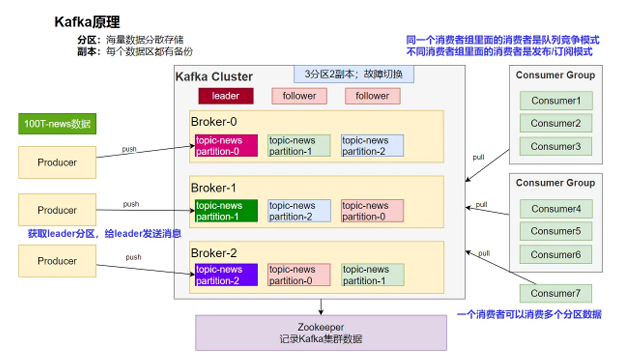
image-20251229015806660

Kafka想要真正的发消息他是这么做的:

首先有一个生产者一个消费者,未来可能都会有很多。

首先我们思考如果我们想要发消息,现在消息巨大,只启动一台服务器肯定是不够的,所以Kafka引入了两个概念:分区副本

分区:海量数据分散存储 Kafka可以为每个主题分区,然后根据数据的哈希计算比如,得到数据在哪个区。

副本:每个数据区都有备份 为了高可用,每个分区2个副本,图上显示的是3分区2副本,然后0号分区的副本在1号分区和2号分区里面这样保证额高可用

那么以后生产者想要发送消息,所有消息会先看发送给哪个分区,会先获取主分区称为leader分区,所有集群的信息都由Zookeeper进行管理,这个时候想给主分区发消息,如果主分区炸了,zookeeper会帮你在其他分区选一个作为主分区,然后给主分区发送就行。消费者也有很多,引入一个概念消费者组,如果很多消费者是同一组,同一个组里的消费者是竞争关系(c1消费了1分区,c2就不能消费1分区,去消费2分区去了),不同消费者组里面的消费者是发布/订阅模式,也就是会计算偏移量不影响。

3、SpringBoot整合
1
2
3
4
<dependency>
<groupId>org.springframework.kafka</groupId>
<artifactId>spring-kafka</artifactId>
</dependency>

新用一个中间件,可以看他的自动配置类,从而知道他需要的配置

自动配置原理

kafka ⾃动配置在 KafkaAutoConfiguration

  1. 容器中放了 KafkaTemplate 可以进⾏消息收发
  2. 容器中放了 KafkaAdmin 可以进⾏ Kafka 的管理,⽐如创建 topic 等
  3. kafka 的配置在 KafkaProperties中
  4. @EnableKafka可以开启基于注解的模式

然后配置

1
spring.kafka.bootstrap-servers=你的IP:9092

这里利用测试类进行测试整合

发送消息
1
2
3
4
5
6
7
8
9
10
11
12
13
14
15
16
17
18
19
20
21
22
23
24
25
26
27
28
29
@SpringBootTest
class Boot312MessageApplicationTests {

@Resource
KafkaTemplate kafkaTemplate;

@Test
void contextLoads() {

StopWatch stopWatch = new StopWatch();

CompletableFuture[] futures = new CompletableFuture[10000];
stopWatch.start();
for (int i = 0; i < 10000; i++) {
//JUC的知识
CompletableFuture send = kafkaTemplate.send("news", "Hello World");
futures[i] = send;
}

CompletableFuture.allOf(futures)
.join();
stopWatch.stop();

long millis = stopWatch.getTotalTimeMillis();
System.out.println("发送完成用了:"+millis+"毫秒");

}

}

一个坑:在本地访问kafka访问失败了说不知道这个kafka

1
2
3
4
5
6
7
我们之前配置了这个 spring.kafka.bootstrap-servers=服务器IP:9092
该配置只是客户端「初始连接」的入口,客户端连接成功后,Kafka 服务端会返回集群的完整节点信息(若为集群),后续客户端会直接与对应节点交互。
Kafka 有一个关键特性:客户端(你的本地应用)先通过 bootstrap-servers(47.107.236.146:9092)与 Kafka 建立初始连接;
初始连接成功后,Kafka 会把自己的「广告地址(advertised.listeners)」返回给客户端;
客户端后续发送 / 消费消息时,不会再使用 bootstrap-servers,而是会切换到 Kafka 返回的 advertised.listeners 地址进行通信;
当前的 Kafka 因配置问题,返回的广告地址是 Docker 内部的「服务名」(而非阿里云公网 IP),本地应用无法解析这个 Docker 内部服务名(相当于 “不认识这个地址”),导致连接中断 / 失败。
如果我们这个服务也部署到docker内部就不会有问题,但是现在没有,所以只能修改HOST文件,告诉电脑kafka对应的IP地址其实是服务器的IP地址。

修改 C:\Windows\System32\drivers\etc\hosts ⽂件,配置 服务器IP kafka

如果想要发送对象发送,会发现失败,因为序列化规则问题默认是字符串序列化器,所以需要配置为统一为JSON的序列化器。

1
2
#值的序列化器
spring.kafka.producer.value-serializer=org.springframework.kafka.support.serializer.JsonSerializer

或者把对象换成字符串也行,如果key也是对象,那么也要配置序列化器或者换成字符串。

监听消息

之前实现往kafka主题里面发送消息,现在需要从主题里面监听到新来的消息,再消费消息。

配置Topic

1
2
3
4
5
6
7
8
9
10
首先在主启动里启动Kafka的注解功能@EnableKafka
然后在配置里面,配置config,然后在里面添加一个Bean就能创建相关的topic了,然后启动就会有这个Topic
@Bean
public NewTopic topic1(){
return TopicBuilder.name("thing1")
.partitions(3)
.replicas(2)
.compact()
.build();
}

消息监听

1
2
3
4
5
6
7
8
9
10
11
12
13
14
15
@Component
public class OrderMsgListener {
@KafkaListener(topics = "order",groupId = "order-service")//消费者分组
public void listen(ConsumerRecord record){
System.out.println("收到消息:"+record); //可以监听到发给kafka的新消息,以前的拿不到
}
@KafkaListener(groupId = "order-service-2",topicPartitions = {
@TopicPartition(topic = "order",partitionOffsets = {
@PartitionOffset(partition = "0",initialOffset = "0")
})
})
public void listenAll(ConsumerRecord record){
System.out.println("收到partion-0消息:"+record);
}
}
小结
1
2
3
4
5
6
7
8
9
10
11
12
13
KafkaAutoConfiguration提供以下功能:
1、KafkaProperties:kafka的所有配置,以Spring.kafka开始
bootstrapServers: kafka集群的所有服务地址,一开始建立连接然后会返回kafka的地址,以后以后面的地址连接。
properties:参数设置
consumer:消费者
producer:生产者
2、@EnableKafka:开启Kafka的注解驱动功能
3、KafkaTemplate:收发消息
4、KafkaAdmin:维护主题等
5、@EnableKafka + @KafkaListener 接受消息
消费者来接受消息,需要有group-id 消费者分组
收消息使用@KafkaListener + ConsumerRecord
Spring.kafka开始配置所有配置

Web安全

Apache Shiro

Spring Security

⾃研:Filter

Spring Security

只要是安全框架就要关注三个方面

1、安全架构
1、认证:Authentication

who are you?

登录系统,⽤户系统

2、授权:Authorization

what are you allowed to do?

权限管理,⽤户授权

3、攻击防护

XSS(Cross-site scripting)

CSRF(Cross-site request forgery)

CORS(Cross-Origin Resource Sharing)

SQL注⼊ …

上面两个怎么实现的,是要设计一套完整的权限模型

扩展:权限模型

主流的权限模型有两个。

1、RBAC(Role Based Access Controll)

如果是RBAC一般有这些三张表,用户表,角色表,权限表,然后为了多对多,每个表之间也有中间表。

1
2
3
4
5
6
7
8
9
10
11
12
13
14
15
16
17
18
19
20
21
22
23
24
⽤户(t_user)
id,username,password,xxx
1,zhangsan
2,lisi
⽤户_⻆⾊(t_user_role)【N对N关系需要中间表】
zhangsan, admin
zhangsan,common_user
lisi, hr
lisi, common_user
⻆⾊(t_role)
id,role_name
admin
hr
common_user
⻆⾊_权限(t_role_perm)
admin, ⽂件r
admin, ⽂件w
admin, ⽂件执⾏
admin, 订单query,create,xxx
hr, ⽂件r
权限(t_permission)
id,perm_id
⽂件 r,w,x
订单 query,create,xxx

2、ACL(Access Controll List)

1
2
3
4
5
6
7
8
9
10
11
12
直接⽤户和权限挂钩
⽤户(t_user)
zhangsan
lisi
⽤户_权限(t_user_perm)
zhangsan,⽂件 r
zhangsan,⽂件 x
zhangsan,订单 query
权限(t_permission)
id,perm_id
⽂件 r,w,x
订单 query,create,xxx
1
2
3
4
@Secured("⽂件 r")
public void readFile(){
//读⽂件
}
2、Spring Security原理
1、过滤器链架构

Spring Security利⽤ FilterChainProxy 封装⼀系列拦截器链,实现各种安全拦截功能

Servlet三⼤组件:Servlet、Filter、Listener
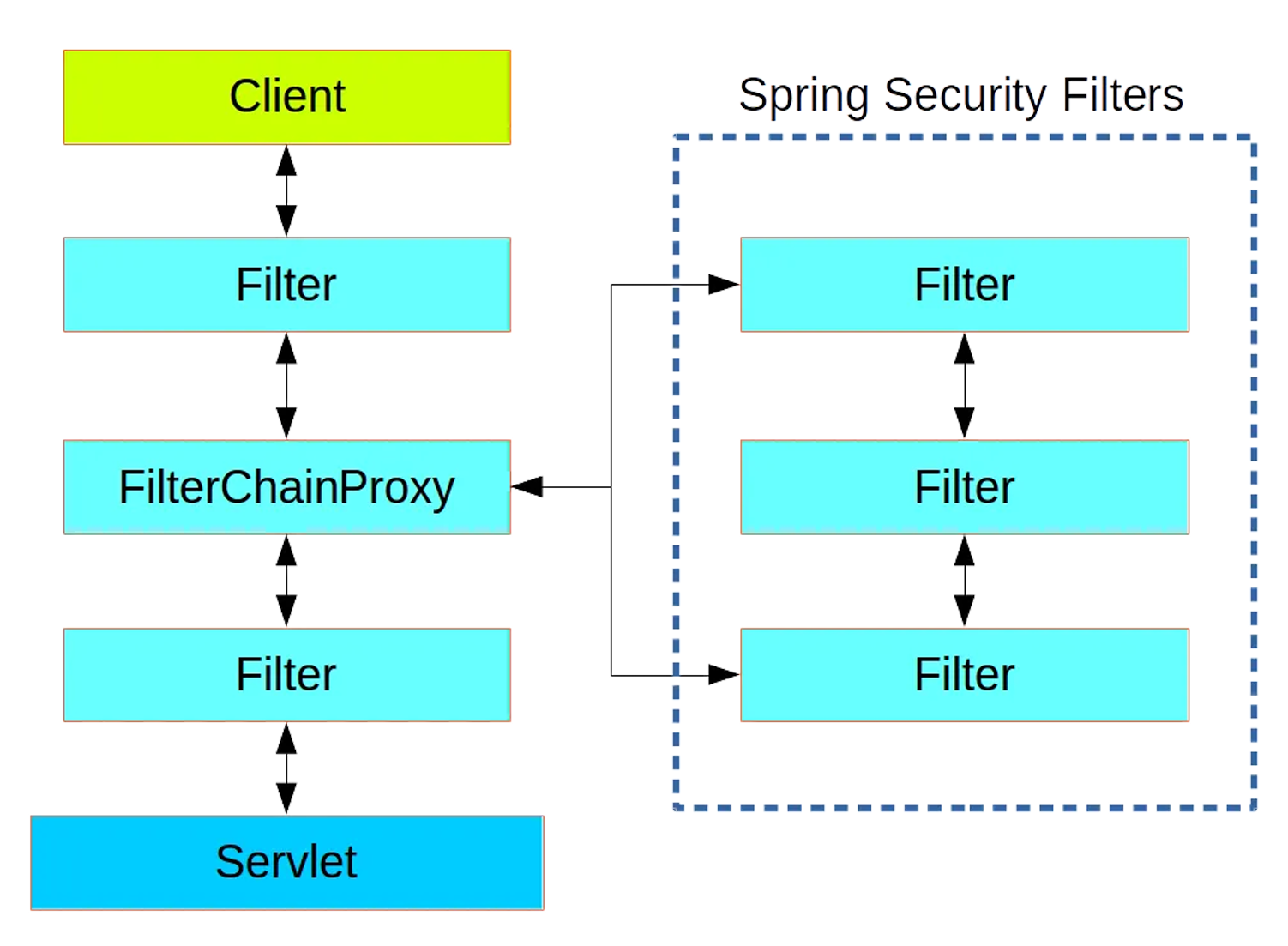
image-20251229142248403

2、FilterChainProxy

image-20251229142603771

3、SecurityFilterChain

image-20251229142625156

3、使用

所以SpringSecurity其实就是很多个过滤器,后面想要使用的话,需要用到两个配置类。

1、HttpSecurity
1
2
3
4
5
6
7
8
9
10
11
12
@Configuration
@Order(SecurityProperties.BASIC_AUTH_ORDER - 10)
public class ApplicationConfigurerAdapter extends WebSecurityConfigurerAdapter {
@Override
protected void configure(HttpSecurity http) throws Exception {
http.antMatcher("/match1/**")
.authorizeRequests()
.antMatchers("/match1/user").hasRole("USER")
.antMatchers("/match1/spam").hasRole("SPAM")
.anyRequest().isAuthenticated();
}
}
2、MethodSecurity
1
2
3
4
5
6
7
8
9
10
11
12
@SpringBootApplication
@EnableGlobalMethodSecurity(securedEnabled = true)
public class SampleSecureApplication {
}

@Service
public class MyService {
@Secured("ROLE_USER")
public String secure() {
return "Hello Security";
}
}

核心

1
2
3
4
5
6
WebSecurityConfigurerAdapter
@EnableGlobalMethodSecurity: 开启全局⽅法安全配置
@Secured
@PreAuthorize
@PostAuthorize
UserDetailService: 去数据库查询⽤户详细信息的service(⽤户基本信息、⽤户⻆⾊、⽤户权限)
4、实战
1、引入依赖
1
2
3
4
<dependency>
<groupId>org.springframework.boot</groupId>
<artifactId>spring-boot-starter-security</artifactId>
</dependency>
1
2
3
4
5
6
7
8
9
10
11
12
13
14
15
Sercurity场景的自动配置类引入了:
SecurityAutoConfiguration
SpringBootWebSecurityConfiguration
SecurityFilterAutoConfiguration

1、security的所有配置在 SercurityProperties:以spring.security开头
2、默认SecurityFilterChain组件
所有请求都需要认证(登录)
开启表单登录(框架提供表单页面)
httpbasic方式登录
3、@EnableWebSecurity 生效
注解生效 WebSecurityConfiguration生效:web安全配置生效了
HttpSecurityConfiguration生效:Http安全规则
@EnableGlobalAuthentication 全局认证生效
导入AuthenticationConfiguration 认证配置类

写一个index.html然后发现,开启了登录认证,也就是所有未登录的都需要经过登录页才能使用功能。

想要自定义这个规则就需要自定义配置类

1
2
3
4
5
6
7
8
9
10
11
12
13
14
15
16
17
@Configuration
public class AppSecurityConfiguration {
@Bean
SecurityFilterChain securityFilterChain(HttpSecurity http) throws Exception {
//请求授权
http.authorizeHttpRequests(registry -> {
registry.requestMatchers("/").permitAll() //1、首页所有人都能访问
.anyRequest().authenticated(); //2、剩下的任意请求都需要认证(登录),授权才是验证权限
});
//表单登录
//3、表单登录功能:开启默认表单登录功能
http.formLogin();

return http.build();
}
}

现在首页都能访问,然后其他任何功能都要使用默认的登录表单,现在不想用默认的登录表单。

1
2
3
4
5
6
7
8
9
10
11
12
13
14
15
16
17
18
19
<!DOCTYPE html>
<html xmlns="http://www.w3.org/1999/xhtml" xmlns:th="https://www.thymeleaf.org">
<head>
<title>Spring Security Example</title>
</head>
<body>
<div th:if="${param.error}">Invalid username and password.</div>
<div th:if="${param.logout}">You have been logged out.</div>
<form th:action="@{/login}" method="post">
<div>
<label> User Name : <input type="text" name="username" /> </label>
</div>
<div>
<label> Password: <input type="password" name="password" /> </label>
</div>
<div><input type="submit" value="登录" /></div>
</form>
</body>
</html>
1
2
3
4
5
6
7
8
@Controller
public class LoginController {

@GetMapping("/login")
public String login() {
return "login";
}
}
1
2
3
4
5
6
7
8
9
10
11
12
13
14
15
16
17
18
@Configuration
public class AppSecurityConfiguration {
@Bean
SecurityFilterChain securityFilterChain(HttpSecurity http) throws Exception {
//请求授权
http.authorizeHttpRequests(registry -> {
registry.requestMatchers("/").permitAll() //1、首页所有人都能访问
.anyRequest().authenticated(); //2、剩下的任意请求都需要认证(登录),授权才是验证权限
});
//表单登录
//3、表单登录功能:开启默认表单登录功能
http.formLogin(formLogin -> {
formLogin.loginPage("/login").permitAll();//自定义登录页位置,所有人都能访问
});

return http.build();
}
}

现在还有问题就是账号密码都是security提供的,这些都配置在了配置类里面

1
2
3
spring.security.user.name=zs
spring.security.user.password=123456
spring.security.user.roles=admin,common,hr

这个是写死的,但是我们可以用@Bean注解注入一个对应的UserDetailService就行了,然后这个可以自己写查询数据库即可。

1
2
3
4
5
6
7
8
9
10
11
12
13
14
//这里模拟很多用户,只是提供了用户放在内存里面,这里模拟一下,并且这里的密码都要加密
@Bean
public UserDetailsService userDetailsService(PasswordEncoder passwordEncoder) {
UserDetails user = User.withUsername("zs")
.password(passwordEncoder.encode("admin"))
.roles("USER")
.authorities("file_read")
.build();
return new InMemoryUserDetailsManager(user);
}
@Bean
PasswordEncoder passwordEncoder(){
return new BcryxxEncoder();//sercurity默认提供的加密器
}
1
2
3
4
5
@PreAuthorize("hasAuthority(file_read)")//配合注解实现权限授权
@GetMapping("/file")
public String file(){

}

也就是说我们使用SpringSecurity需要

1
2
3
4
1、自定义请求授权规则 http.authorizeHttpRequests
2、自定义登录规则 http.formLogin
3、自定义用户信息查询规则:UserDetailService
4、开启方法级别的精确权限控制@EnableMethodSecurity 配合注解实现控制

可观测性

可 观测性 Observability

对线上应⽤进⾏观测、监控、预警…

健康状况【组件状态、存活状态】Health

运⾏指标【cpu、内存、垃圾回收、吞吐量、响应成功率…】Metrics

链路追踪 …

1、SpringBoot Actuator

实战
1、场景引入
1
2
3
4
<dependency>
<groupId>org.springframework.boot</groupId>
<artifactId>spring-boot-starter-actuator</artifactId>
</dependency>

导入了这个场景,没有任何配置直接启动程序,然后访问任何一个应用的actuator,就会返回信息

1
2
3
4
5
6
7
8
9
10
11
12
13
14
15
16
17
18
访问 localhost:8080/actuator
返回这些
{
"_links": {
"self": {
"href": "http://localhost:8080/actuator",
"templated": false
},
"health-path": {
"href": "http://localhost:8080/actuator/health/{*path}",
"templated": true
},
"health": {
"href": "http://localhost:8080/actuator/health",
"templated": false
}
}
}

如果还想要观测更多的指标,我们需要暴露所有的观测端点

2、暴露指标
1
2
3
4
5
6
management:
endpoints:
enabled-by-default: true #暴露所有端点信息
web:
exposure:
include: '*' #以web⽅式暴露
3、访问数据
1
2
3
4
5
6
访问 http://localhost:8080/actuator;展示出所有可以⽤的监控端点
http://localhost:8080/actuator/beans:展示bean
http://localhost:8080/actuator/configprops:展示配置的属性
http://localhost:8080/actuator/metrics:打印所有指标
http://localhost:8080/actuator/metrics/jvm.gc.pause
http://localhost:8080/actuator/endpointName/detailPath
Endpoint

在springboot中有一个核心概念叫Endpoint也就是端点。只要把所有的观测端点暴露出来,就能看到所有的指标。

Actuator 端点(Endpoint)是 Spring Boot 提供的标准化接口(默认以 HTTP 接口形式暴露,也支持 JMX),用于监控应用运行状态、查询配置信息、执行管理操作(如线程 dump、堆 dump 等),通常访问路径为 http://{应用IP}:{应用端口}/{基础路径}/{端点名称}(默认基础路径为 /actuator,可通过 management.endpoints.web.base-path 自定义)。

1、常用端点
端点名称(Endpoint) 中文描述 核心功能 依赖 / 前置条件 访问形式(默认)
metrics 应用指标端点 暴露当前应用的所有「性能指标」信息,包括:1. 系统指标(CPU 使用率、内存占用、磁盘使用)2. 应用指标(QPS、响应时间、线程数、缓存命中率)3. 自定义指标(可通过 Spring Boot Metrics 自定义业务指标) 无额外依赖(Spring Boot 核心自带) GET http://ip:port/actuator/metrics(查看所有指标名称)GET http://ip:port/actuator/metrics/{指标名}(查看指定指标详情,如 actuator/metrics/jvm.memory.used
threaddump 线程转储端点 执行应用线程转储,返回所有线程的当前状态:1. 线程 ID、线程名称、线程状态(RUNNABLE/BLOCKED/WAITING 等)2. 线程堆栈信息(用于排查线程死锁、线程阻塞、CPU 飙高等问题) 无额外依赖 GET http://ip:port/actuator/threaddump
heapdump 堆转储端点 生成并返回应用的 hprof 格式堆转储文件(内存快照),用于排查:1. 内存泄漏问题2. 内存溢出(OOM)原因3. 大对象占用内存异常等问题

其他关键端点

端点名称(Endpoint) 中文描述 核心功能 依赖 / 前置条件
auditevents 审核事件端点 暴露应用的审核事件信息(如用户登录、权限变更等审计日志) 需要 AuditEventRepository 组件
beans Bean 列表端点 显示应用中所有 Spring 管理的 Bean 完整列表(含 Bean 名称、类型、依赖关系等) 无额外依赖
caches 缓存信息端点 暴露应用中所有可用的缓存(如 Redis/Caffeine 缓存)及缓存状态 无额外依赖(需应用配置了缓存组件)
conditions 自动配置条件端点 显示 Spring Boot 自动配置的所有条件信息,包括配置「匹配成功」或「匹配失败」的具体原因(用于排查自动配置不生效问题) 无额外依赖
configprops 配置属性端点 显示所有 @ConfigurationProperties 注解绑定的配置属性(如自定义配置、框架默认配置) 无额外依赖
env 环境变量端点 暴露 Spring 应用的 ConfigurableEnvironment 信息,包括:系统环境变量、JVM 系统属性、应用配置文件(application.yml/properties)中的配置等 无额外依赖
flyway Flyway 迁移端点 显示已应用的所有 Flyway 数据库版本迁移记录(如迁移脚本名称、执行时间、状态等) 需要 1 个或多个 Flyway 组件(需引入 Flyway 依赖)
health 健康检查端点 显示应用运行状况信息(核心监控端点),包括:应用自身状态、依赖组件状态(数据库、Redis、MQ 等是否可用),支持「简单模式」(仅返回 UP/DOWN)和「详细模式」(返回所有依赖状态详情) 无额外依赖(依赖组件需对应配置)
httptrace HTTP 跟踪端点 显示最近 100 条 HTTP 请求 - 响应的跟踪信息(如请求路径、请求方法、响应状态码、响应时间等) 需要 HttpTraceRepository 组件
info 应用信息端点 显示自定义的应用信息(如应用名称、版本、作者等,可通过 info.xxx 配置) 无额外依赖
integrationgraph Spring Integration 图端点 显示 Spring Integration 的组件拓扑图(用于可视化集成流程) 需要引入 spring-integration-core 依赖
loggers 日志配置端点 1. 查看应用中所有日志器(Logger)的当前日志级别(如 ROOT、指定包路径的日志级别)2. 动态修改日志级别(无需重启应用,即可调整日志输出粒度) 无额外依赖
liquibase Liquibase 迁移端点 显示已应用的所有 Liquibase 数据库版本迁移记录(功能同 Flyway,均为数据库版本管理) 需要 1 个或多个 Liquibase 组件(需引入 Liquibase 依赖)
mappings 请求映射端点 显示应用中所有 @RequestMapping 注解绑定的 HTTP 请求路径(含接口路径、请求方法、对应控制器方法等,用于快速查询接口映射关系) 无额外依赖(适用于 Spring MVC/WebFlux 应用)
scheduledtasks 定时任务端点 显示应用中所有通过 @Scheduled 注解配置的定时任务(含任务执行表达式、执行状态等) 无额外依赖(需应用配置了定时任务)
sessions 会话管理端点 检索和删除 Spring Session 支持的用户会话(如分布式会话) 1. 需为基于 Servlet 的 Web 应用2. 需引入 Spring Session 依赖并配置
shutdown 应用关闭端点 触发应用正常关闭(优雅停机),避免强制关闭导致的数据丢失 1. 默认禁用,需通过 management.endpoint.shutdown.enabled=true 开启2. 仅支持 POST 请求
startup 启动步骤端点 显示 ApplicationStartup 收集的应用启动步骤数据(如各组件启动耗时,用于排查应用启动缓慢问题) 需要配置 BufferingApplicationStartup(通过 SpringApplication 配置)
jolokia JMX 暴露端点 通过 HTTP 协议暴露应用的 JMX Bean(无需直接连接 JMX 端口,便于远程监控 JMX 指标) 1. 需引入 jolokia-core 依赖2. 不适用于 Spring WebFlux 应用
logfile 日志文件端点 返回应用日志文件的内容(支持分段下载,通过 HTTP Range 标头指定获取的日志片段) 需配置 logging.file.namelogging.file.path 属性(指定日志文件路径 / 名称)
prometheus Prometheus 指标端点 以 Prometheus 服务器可抓取的格式暴露应用指标(用于 Prometheus + Grafana 实现监控可视化和告警) 需要引入 micrometer-registry-prometheus 依赖
2、定制端点

健康监控:返回存活、死亡

指标监控:次数、率

1、HealthEndpoint

先创建了一个组件MyHahaComponent,然后要监控这个组件的组件MyHahaHealthIndicator只要后缀是Indicator的都是监控的,然后必须实现健康监控的接口HealthIndicator,只用重写一个方法health

第二种方法是继承抽象健康检查方法

1
2
3
4
5
6
7
8
@Component
public class MyHahaComponent {

public int check(){
//业务代码判断这个组件是否存活
return 1;
}
}
1
2
3
4
5
6
7
8
9
10
11
12
13
14
15
16
17
18
19
20
@Component
public class MyHahaHealthIndicator extends AbstractHealthIndicator {

@Resource
MyHahaComponent myHahaComponent;

@Override
protected void doHealthCheck(Health.Builder builder) throws Exception {
//自定义检查方法
int check = myHahaComponent.check();
if (check > 0) {
//存活
builder.up().withDetail("code","1000")
.withDetail("msg","获得很健康").build();
}else{
//下线
builder.down().build();
}
}
}

然后开启详细信息开启配置

1
2
3
4
management:
health:
enabled: true
show-details: always #总是显示详细信息。可显示每个模块的状态信息

自定义指标

上面是自定义监控,这里是自定义指标

2、MetricesEndpoint

假设有一个组件有个haha方法,然后我们想监控这个方法被调用多少遍

有一个 controller 调用 组件的haha方法

1
2
3
4
5
6
7
8
9
10
11
12
13
14
15
16
17
18
19
@Component
public class MyHahaComponent {

Counter counter = null;
//如果这个组件只有一个有参构造器,那么这个参数会从容器中拿.meterRegistry就是记录所有指标的组件
public MyHahaComponent(MeterRegistry meterRegistry) {
//然后注册进去,当然有不同的观测方法,counter只是计数还有很多其他方法
counter = meterRegistry.counter("myhaha.hello");
}

public int check(){
//业务代码判断这个组件是否存活
return 1;
}
public void haha(){
System.out.println("haha");
couter.increment();
}
}

2、监控案例落地

现在我们能暴露很多监控数据了,如果想要监控数据显示好看,要么就是前端写一套页面。

要么就是用企业常用的 基于 Prometheus + Grafana

原理如下
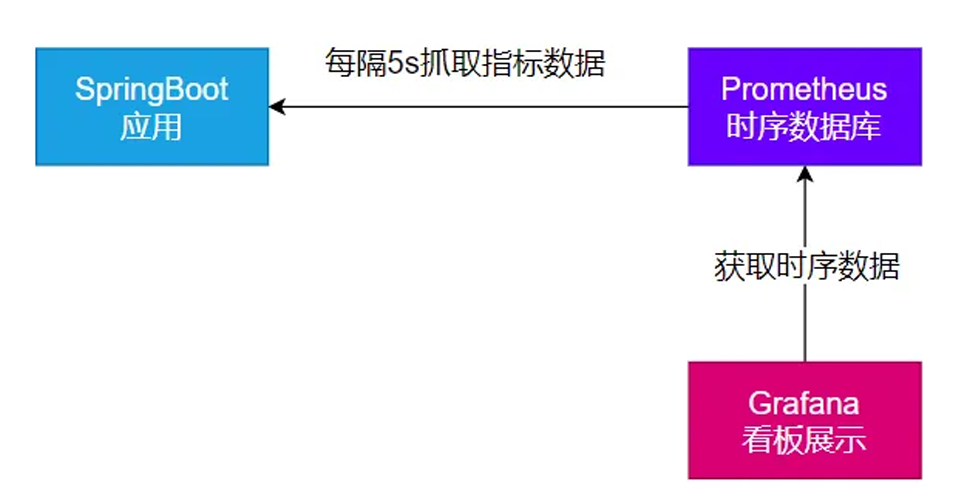
image-20251230024251613

1、安装 Prometheus + Grafana
1
2
3
4
5
#安装prometheus:时序数据库
docker run -p 9090:9090 -d \-v pc:/etc/prometheus \
prom/prometheus
#安装grafana;默认账号密码admin:admin
docker run -d --name=grafana -p 3000:3000 grafana/grafana
2、导入依赖

现在我们导入依赖,让SpringBoot产生prometheus需要的数据

1
2
3
4
<dependency>
<groupId>io.micrometer</groupId>
<artifactId>micrometer-registry-prometheus</artifactId>
</dependency>

导入之后就会直接把之前json的监控数据变成prometheus需要的sql写进数据库里面了

访问: http://localhost:8001/actuator/prometheus 验证,返回 prometheus 格式的所有指标

记得改端口,因为springboot的端口默认8080

然后把springboot应用打包,然后把Jar包安装到服务器里面

1
2
3
4
5
6
7
8
9
10
11
12
13
14
15
16
#安装上传⼯具,然后输入命令rz就能上传了
yum install lrzsz
#安装openjdk
# 下载openjdk
wget https://download.oracle.com/java/17/latest/jdk-17_linux-x64_bin.tar.gz

mkdir -p /opt/java
tar -xzf jdk-17_linux-x64_bin.tar.gz -C /opt/java/
sudo vi /etc/profile
#加⼊以下内容
export JAVA_HOME=/opt/java/jdk-17.0.7
export PATH=$PATH:$JAVA_HOME/bin
#环境变量⽣效
source /etc/profile
# 后台启动java应⽤
nohup java -jar boot3-14-actuator-0.0.1-SNAPSHOT.jar > output.log 2>&1 &

确认可以访问到:http://服务器公网IP:9999/actuator/prometheus

如果在同一个机器内,可以用之前自定义的私网IP

3、配置 Prometheus 拉取数据
1
2
3
4
5
6
7
8
# 修改prometheus.yml 配置⽂件
scrape_configs:
- job_name: 'spring-boot-actuator-exporter'
metrics_path: '/actuator/prometheus' #指定抓取的路径
static_configs:
- targets: ['私网IP:8001']
labels:
nodename: 'app-demo'
4、配置Grafana监控面板

添加数据源(Prometheus)

添加⾯板。可去 dashboard 市场找⼀个⾃⼰喜欢的⾯板,也可以⾃⼰开发⾯板;Dashboards | Grafana Labs
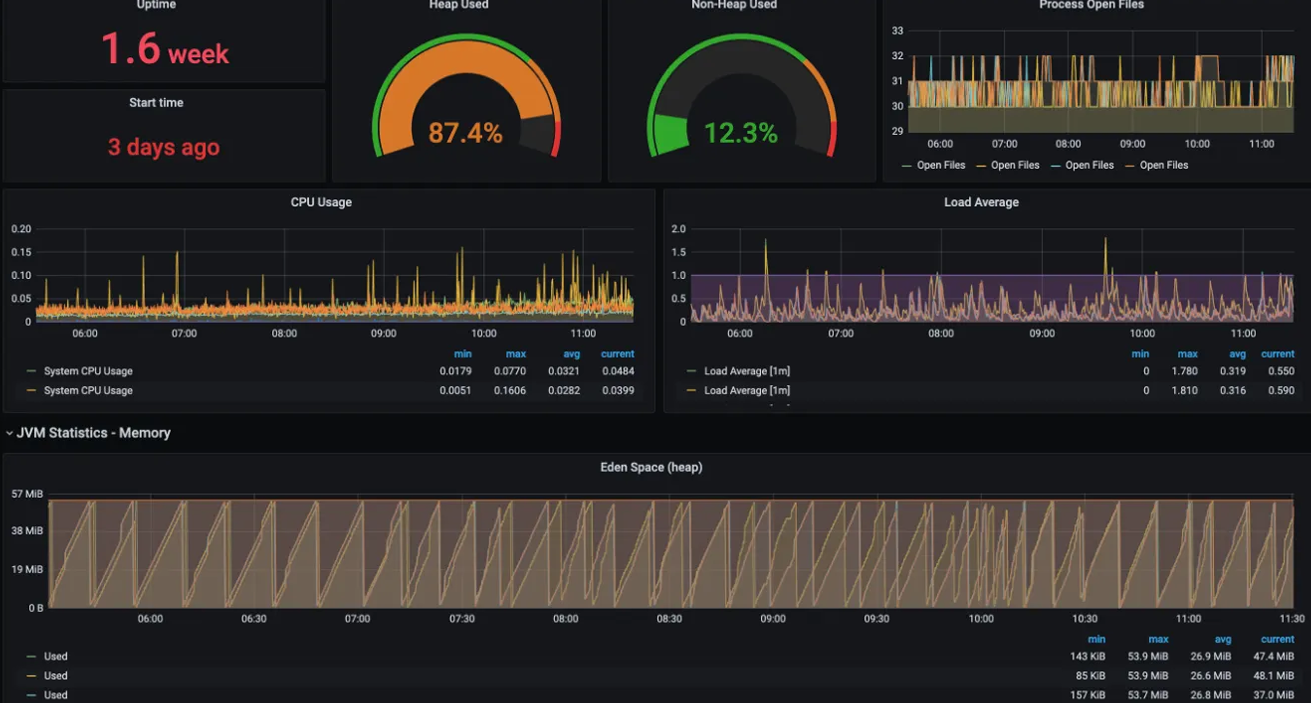
image-20251230032020123

AOT

AOT:Ahead-of-Time(提前编译):程序执⾏前,全部被编译成机器码

JIT:Just in Time(即时编译): 程序边编译,边运⾏;

AOT 与 JIT

语⾔:

​ 编译型语⾔:编译器

​ 解释型语⾔:解释器

1、Complier 与 Interpreter

Java:半编译半解释
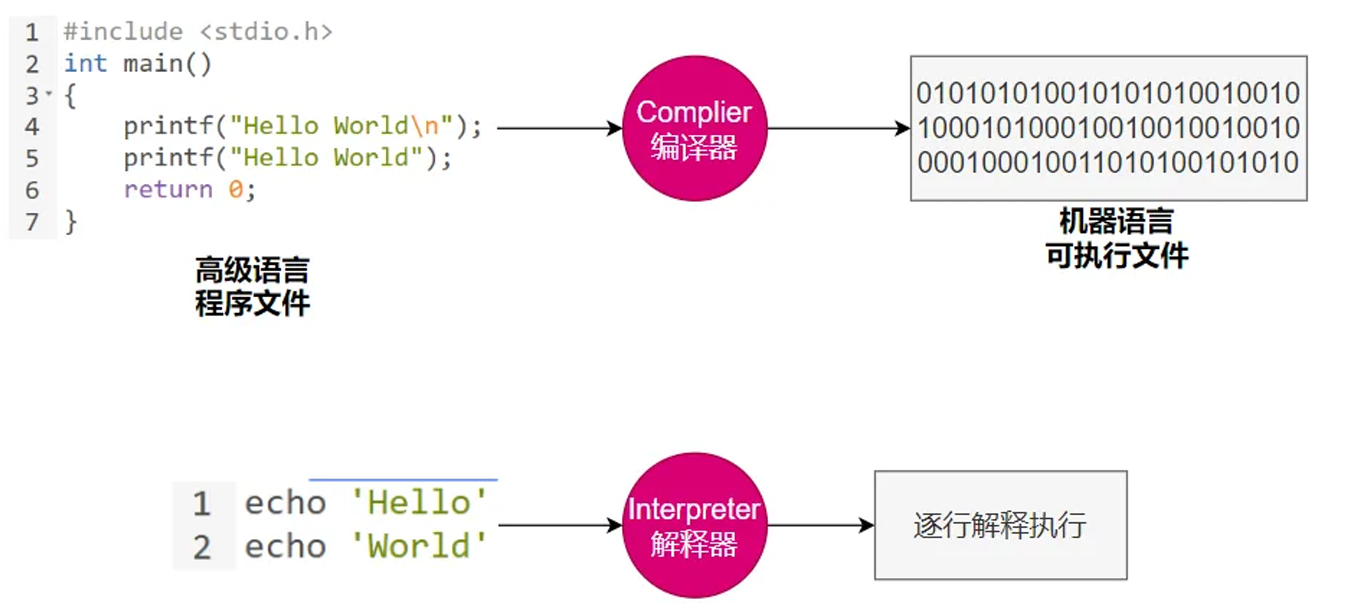
image-20251230032917766

2、AOT与JIT对比
JIT AOT
优点 1.具备实时调整能⼒
2.⽣成最优机器指令
3.根据代码运⾏情况优化内存占⽤
1.速度快,优化了运⾏时编译时间和内存消耗
2.程序初期就能达最⾼性能
3.加快程序启动速度
缺点 1.运⾏期边编译速度慢
2.初始编译不能达到最⾼性能
1.程序第⼀次编译占⽤时间⻓
2.牺牲⾼级语⾔⼀些特性

在 OpenJDK 的官⽅ Wiki 上,介绍了HotSpot 虚拟机⼀个相对⽐较全⾯的、即时编译器(JIT) 中采⽤的优化技术列表。也就是说Java中是都有。

3、JVM架构

JVM: 既有解释器,⼜有编辑器(JIT:即时编译);

.java 到 .class 到 机器码
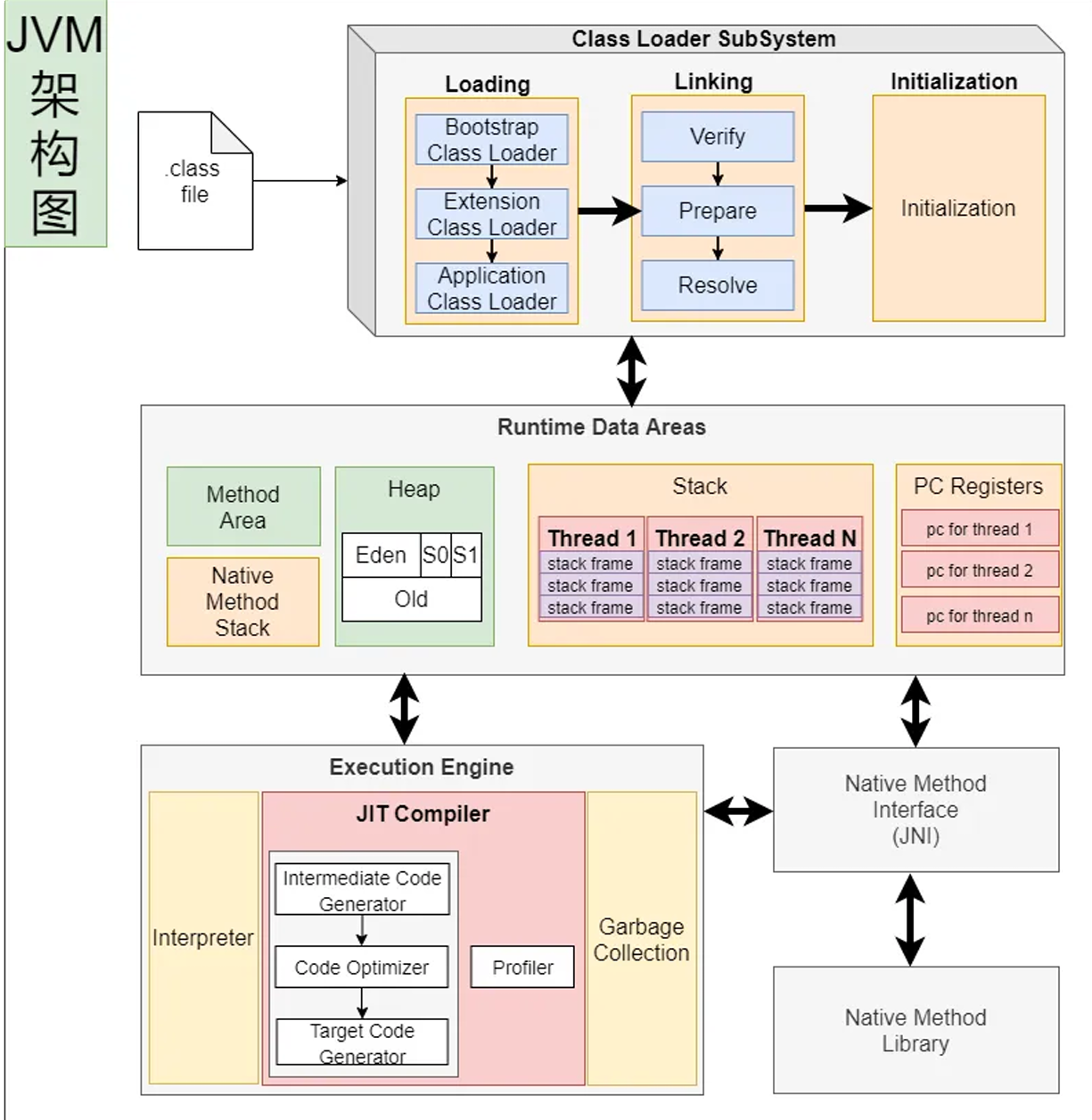
image-20251230041117065

第一步,我们写的 java 代码通过 javac 编译成 .class 文件,但这不算真正的编译。只是一个中间表示层。

第二步,.class文件会被JVM的类加载器加载进去,这里省略讲解类加载过程

第三步,整个数据会加载到运行时数据区,方法到方法区,new 的对象放到堆内存,然后每个线程有栈等,这里也不详细解释。

第四步,真正执行代码的是执行引擎里面有个 Interpreter解释器 JIT编译器

然后这里又涉及到什么时候把 .class编译什么时候不编译,引出下面的Java执行流程

4、Java的执行过程

建议阅读:

美团技术:https://tech.meituan.com/2020/10/22/java-jit-practice-in-meituan.html

openjdk官⽹:https://wiki.openjdk.org/display/HotSpot/Compiler

1、大概流程

IR 就是中间表示层

image-20251230041944032

2、详细流程

热点代码:调⽤次数⾮常多的代码

image-20251230042144747

5、JVM编译器

JVM中集成了两种编译器,Client Compiler 和 Server Compiler;

Client Compiler注重启动速度和局部的优化

Server Compiler更加关注全局优化,性能更好,但由于会进⾏更多的全局分析,所以启动速度会 慢。

Client Compiler:

​ HotSpot VM带有⼀个Client Compiler

​ 这种编译器 C1编译器 启动速度快 ,但是性能⽐较Server Compiler来说会差⼀些。

​ 编译后的机器码执⾏效率没有C2的⾼

Server Compiler:

​ Hotspot虚拟机中使⽤的Server Compiler有两种: C2 和 Graal 。

​ 在Hotspot VM中,默认的Server Compiler是 C2编译器。

6、分层编译

Java 7开始引⼊了分层编译(Tiered Compiler )的概念,它结合了C1和 C2 的优势,追求启动速度和峰值 性能的⼀个平衡。分层编译将JVM的执⾏状态分为了五个层次。 五个层级 分别是:

​ 解释执⾏。

​ 执⾏不带profiling的C1代码。

​ 执⾏仅带⽅法调⽤次数以及循环回边执⾏次数profiling的C1代码。

​ 执⾏带所有profiling的C1代码。

​ 执⾏C2代码。

profiling就是收集能够反映程序执⾏状态的数据 。其中最基本的统计数据就是⽅法的调⽤次数,以及循环回边的执⾏次数。
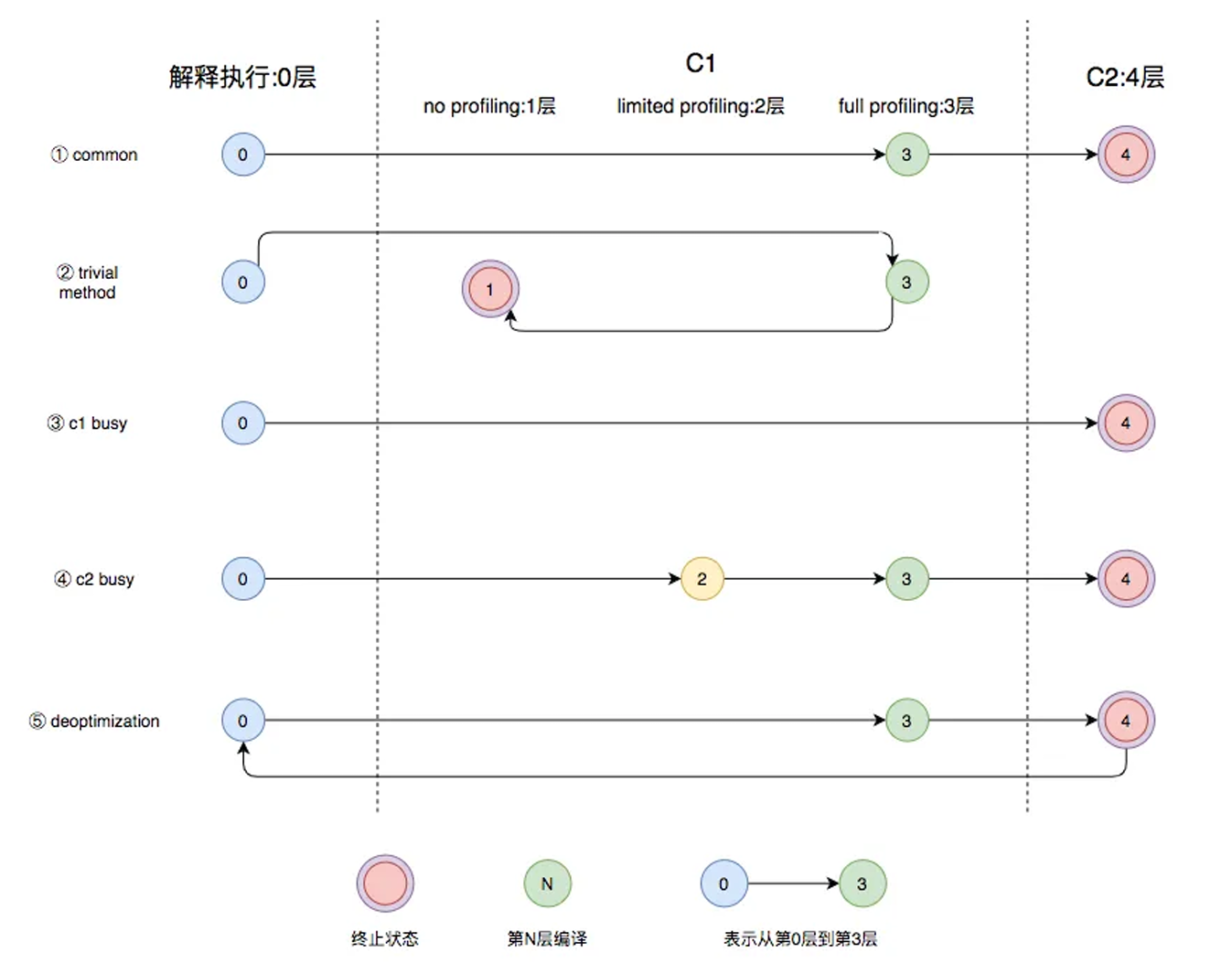
image-20251230043217979

图中第①条路径,代表编译的一般情况:热点方法从解释执行到被 3 层的 C1 编译,最后被 4 层的 C2 编译。

如果方法比较小(比如 Java 服务中常见的 getter/setter 方法),3 层的 profiling 没有收集到有价值的数据,JVM 就会断定该方法对于 C1 代码和 C2 代码的执行效率相同,就会执行图中第②条路径。在这种情况下,JVM 会在 3 层编译之后,放弃进入 C2 编译,直接选择用 1 层的 C1 编译运行。

在 C1 忙碌的情况下,执行图中第③条路径:在解释执行过程中对程序进行 profiling,根据收集到的信息直接由第 4 层的 C2 编译。

前文提到 C1 中的执行效率是 1 层 > 2 层 > 3 层,第 3 层一般要比第 2 层慢 35% 以上,所以在 C2 忙碌的情况下,执行图中第④条路径。这时方法会被 2 层的 C1 编译,然后再被 3 层的 C1 编译,以减少方法在 3 层的执行时间。

如果编译器做了一些比较激进的优化(比如分支预测),在实际运行时发现预测出错,这时就会进行反优化,重新进入解释执行,图中第⑤条执行路径代表的就是这一反优化过程。

总的来说,C1 的编译速度更快,C2 的编译质量更高。分层编译的不同编译路径,是 JVM 根据当前服务的运行情况,寻找服务最佳性能平衡点的过程。从 JDK 8 开始,JVM 默认开启分层编译。

但是现在也有个问题,也就是说 java 程序一开始都是解释运行,会很慢,后面稳定了调用次数多了之后,才会越来越快。

现在云原生,不是一直在一台机器上跑了,就有可能之前的那些热点数据白弄了。

那么为了应对这个我们就需要对 java 进行小改版

最好的效果:

存在的问题:java应⽤如果⽤jar,解释执⾏,热点代码才编译成机器码;初始启动速度慢,初始处理请求数量 少。⼤型云平台,要求每⼀种应⽤都必须秒级启动。每个应⽤都要求效率⾼。

希望的效果:

​ java应⽤也能提前被编译成机器码,随时急速启动,⼀启动就急速运⾏,最⾼性能

​ 编译成机器码的好处:

​ 另外的服务器还需要安装Java环境

​ 编译成机器码的,可以在这个平台 Windows X64 直接运⾏。

下面就讲解利用 GraalVM 把 java 文件打包成原生镜像

那么我们还要先了解原生镜像:native-image(机器码、本地镜像)

把应⽤打包成能适配本机平台 的可执⾏⽂件(机器码、本地镜像)

GraalVM

GraalVM是⼀个⾼性能的JDK,旨在加速⽤Java和其他JVM语⾔编写的应⽤程序的执⾏,同时还提供 JavaScript、Python和许多其他流⾏语⾔的运⾏时。

GraalVM提供了两种运⾏Java应⽤程序的⽅式:

  1. 在HotSpot JVM上使⽤Graal即时(JIT)编译器
  2. 作为预先编译(AOT)的本机可执⾏⽂件运⾏(本地镜像)。

    GraalVM的多语⾔能⼒使得在单个应⽤程序中混合多种编程语⾔成为可能,同时消除了外部语⾔调⽤的成本。

1、架构
image-20251230045202624

2、安装

跨 平台提供原⽣镜像原理:

image-20251230045240304

1、安装MicrosoftVisualStudio

image-20251230050924222

选英文

image-20251230050941968

记住你安装的地址;

2、安装GraalVM

下载 GraalVM + native-image
image-20251230051304905

image-20251230051327620

graalvm/graalvm-ce-builds: GraalVM CE binaires built by the GraalVM community

3、配置
1
2
3
4
5
6
7
8
9
10
11
12
13
原来
JAVA_HOME
D:\Study4It\SoftWare\jdk\jdk\jdk17
现在
JAVA_HOME
D:\Study4It\SoftWare\jdk\graalvm-ce-java17-22.3.3
验证 java -version

安装 native image 依赖
1、网络环境好: gu install native-image
2、⽹络不好,使⽤我们下载的离线jar gu install --file native-image-installable-svm-java17-windows-amd64-22.3.3.jar

验证 native-image
3、测试
1、创建项目

创建普通java项⽬。编写HelloWorld类;

​ 使⽤ mvn clean package 进⾏打包

​ 确认jar包是否可以执⾏ java -jar xxx.jar

​ 可能需要给 MANIFEST.MF 添加 Main-Class: 你的主类

image-20251231012220954

遇到这种情况就用压缩文件打开jar包然后在 MANIFEST.MF 添加 Main-Class: 你的主类 然后就好了。

以前没有选择,只能打成 jar 包

现在有 graalVM 我们可以打包成本地镜像(可执行文件):exe或者别的

2、编译镜像

编译为原⽣镜像(native-image):使⽤ native-tools 终端

1
2
3
4
#从⼊⼝开始,编译整个jar
native-image -cp boot3-15-aot-common-1.0-SNAPSHOT.jar com.bitzh.Main -o Haha
#编译某个类【必须有main⼊⼝⽅法,否则⽆法编译】
native-image -cp .\classes org.example.App
3、Linux平台测试
1
2
3
4
5
6
7
8
9
10
11
12
13
14
15
16
17
1、安装gcc等环境
yum install lrzsz
sudo yum install gcc glibc-devel zlib-devel
2、下载安装配置Linux下的GraalVM、native-image
下载:https://www.graalvm.org/downloads/
安装:GraalVM、native-image
配置:JAVA环境变量为GraalVM
tar -zxvf graalvm-ce-java17-linux-amd64-22.3.2.tar.gz -C /opt/java/
sudo vim /etc/profile
#修改以下内容
export JAVA_HOME=/opt/java/graalvm-ce-java17-22.3.2
export PATH=$PATH:$JAVA_HOME/bin
source /etc/profile
3、安装native-image
gu install --file native-image-installable-svm-java17-linux-amd64-22.3.2.jar
4、使⽤native-image编译jar为原⽣程序
native-image -cp xxx.jar org.example.App -o 输出的文件名

并不是所有的Java代码都能支持本地打包

比如反射代码:动态获取构造器,反射创建对象,反射调用方法,这些都不行。因为AOT会损失动态能力。

需要额外处理,要明确提前告知graalvm反射会用到哪些方法、构造器

解决方案:SpringBoot提供了一些注解,提前告知GraalVM。

配置文件也会有问题,因为 jar 包的话里面有配置文件的,但是这个也要额外处理(从相对路径读取)主要是告知GraalVM配置文件需要怎么处理,也可以加配置中心。

一句话:二进制里面不能包含的,不能动态的都得提前处理。

不是所有框架都适配了AOT特性,Spring全系列栈适配OK

4、SpringBoot整合
1、依赖导入
1
2
3
4
5
6
7
8
9
10
11
12
<build>
<plugins>
<plugin>
<groupId>org.graalvm.buildtools</groupId>
<artifactId>native-maven-plugin</artifactId>
</plugin>
<plugin>
<groupId>org.springframework.boot</groupId>
<artifactId>spring-boot-maven-plugin</artifactId>
</plugin>
</plugins>
</build>
2、 ⽣成native-image

1、运⾏aot提前处理命令: mvn springboot:process-aot

2、运⾏native打包: mvn -Pnative native:build

1
2
# 推荐加上-Pnative
mvn -Pnative native:build -f pom.xml
3、常见问题
1
2
3
4
5
6
7
8
9
10
11
12
13
14
15
16
17
18
19
20
21
22
可能提示如下各种错误,⽆法构建原⽣镜像,需要配置环境变量;

出现cl.exe 找不到错误
出现乱码
提示 no include path set
提示fatal error LNK1104: cannot open file 'LIBCMT.lib'
提示 LINK : fatal error LNK1104: cannot open file 'kernel32.lib'
提示各种其他找不到
需要修改三个环境变量:Path 、INCLUDE 、lib
1、 Path:添加如下值
C:\Program Files\Microsoft Visual Studio\2022\Community\VC\Tools\MSV
C\14.33.31629\bin\Hostx64\x64
2、新建INCLUDE 环境变量:值为
C:\Program Files\Microsoft Visual Studio\2022\Community\VC\Tools\MSVC\14.3
3.31629\include;C:\Program Files (x86)\Windows Kits\10\Include\10.0.19041.0
\shared;C:\Program Files (x86)\Windows Kits\10\Include\10.0.19041.0\ucrt;
C:\Program Files (x86)\Windows Kits\10\Include\10.0.19041.0\um;C:\Program F
iles (x86)\Windows Kits\10\Include\10.0.19041.0\winrt
3、新建lib 环境变量:值为
C:\Program Files\Microsoft Visual Studio\2022\Community\VC\Tools\MSVC\14.3
3.31629\lib\x64;C:\Program Files (x86)\Windows Kits\10\Lib\10.0.19041.0\um
\x64;C:\Program Files (x86)\Windows Kits\10\Lib\10.0.19041.0\ucrt\x64

SpringBoot3 改变和新特性

1、⾃动配置包位置变化

META-INF/spring/org.springframework.boot.autoconfigure.AutoConfiguration.im ports

2、jakata api迁移

druid 有问题

3、新特性 - 函数式Web、ProblemDetails

4、GraalVM 与 AOT

5、响应式编程全套

6、剩下变化都是版本升级,意义不⼤

SpringBoot3响应式编程

前置 java8新特性

1、Lambda

Lambda表达式是Java 8 引入的一个重要特性

Lambda表达式可以被视为匿名函数

允许在需要函数的地方以更简洁的方式定义功能

1
2
3
4
5
6
7
8
9
10
11
12
13
14
15
16
17
18
19
20
21
22
23
24
25
26
27
28
29
30
31
32
33
34
35
36
37
38
39
40
41
42
43
44
45
46
47
48
49
50
51
52
53
54
55
56
57
58
59
60
61
62
63
64
65
66
67
68
69
// 函数式接口,只要是函数式接口就能用Lambda简化
// 接口中只有一个为实现的方法,这个接口就是函数式接口

@FunctionalInterface //检查注解,帮我们快速检查我们写的接口是否函数式接口
interface MyInterface {
int sum(int a, int b);

default int sum() {
return 2;
}// 默认实现


}

// 1、自己写实现类
class MyInterfaceImpl implements MyInterface {

@Override
public int sum(int a, int b) {
return a + b;
}
}

public class Lambda {
// 这是一个main方法,程序的入口
public static void main(String[] args) {
// 1、自己创建实现类对象
MyInterfaceImpl myInterface = new MyInterfaceImpl();
System.out.println(myInterface.sum(1, 2));

// 2、创建匿名实现类
MyInterface myInterface1 = new MyInterfaceImpl() {
@Override
public int sum(int a, int b) {
return a * a + b * b;
}
};
System.out.println(myInterface1.sum(1, 2));
// 冗余写法

// 3、Lambda表达式
MyInterface myInterface2 = (int a, int b) -> {
return a * a + b * b;
};
System.out.println(myInterface2.sum(1, 2));
// 完整写法

// 简化写法
// 1 参数类型可以不写,只写(参数名),参数变量名,参数表最少一个空的(),或者只有一个参数名
// 2 方法体如果只有一句话,{} 可以省略

// 以上Lambda表达式简化了实例创建


var list = new ArrayList<String>();
list.add("aA");
list.add("dB");
list.add("sC");

list.add("bD");
Collections.sort(list, (o1, o2) -> o1.compareTo(o2));
// 类::方法,引用类中的实例方法
Collections.sort(list, String::compareTo);
System.out.println(list);
new Thread(() ->
System.out.println("haha")
).start();
}
}

总结一下:如果不熟悉接口可以先冗余写法,然后再点进接口看能不能简化写法,如果熟悉可以直接用简化写法。

2、Function

在Java中,函数式接口是只包含一个抽象方法的接口,他们是支持Lambda表达式的基础,因为Lambda表达式需要一个 目标类型,这个目标类型必须是一个函数式接口

当我们看一个函数式接口,关注他们的出入参定义,底层的Funtion,定义了两个参数一个T一个R,然后底层能接受一个参数,返回一个参数。

那么根据这个参数的位置就分为了四种

1、有⼊参,⽆出参【消费者】

2、有⼊参,有出参【多功能函数】

3、⽆⼊参,⽆出参【普通函数】

4、⽆⼊参 ,有出参【提供者】

java.util.function包下的所有function定义:

Consumer: 消费者

Supplier: 提供者

Predicate: 断⾔

get/test/apply/accept调⽤的函数⽅法;

3、StreamAPI

最佳实战:以后凡是你写for循环处理数据的统⼀全部⽤StreamAPI进⾏替换;

流是并发还是不并发的?流也是用for循环挨个处理的但是可以用 parallel 变成并发

但是并发后要自行解决并发安全问题。

推荐流的所有操作都是无状态数据。

1
2
无状态(Stateless) 每次请求都独立处理,不依赖也不保存之前的请求信息。
有状态(Stateful) 系统需要记住之前交互的历史信息(状态),才能正确处理当前请求。

Stream所有数据和操作被组合成流管道流管道组成:

​ ⼀个数据源(可以是⼀个数组、集合、⽣成器函数、I/O管道)

​ 零或多个中间操作(将⼀个流变形成另⼀个流)

​ ⼀个终⽌操作(产⽣最终结果)

image-20251231175031198

创建流

1
of builder empty ofNullable generate concat 集合.stream

常用中间操作

1
2
3
4
5
6
7
8
9
filter:过滤;  挑出我们⽤的元素
map: 映射: ⼀⼀映射,a 变成 b
mapToInt、mapToLong、mapToDouble
flatMap:打散、散列、展开、扩维:⼀对多映射
filtermap、mapToInt、mapToLong、mapToDouble
flatMap、flatMapToInt、flatMapToLong、flatMapToDouble
mapMulti、mapMultiToInt、mapMultiToLong、mapMultiToDouble
parallel、unordered、onClose、sequential
distinct、sorted、peek、limit、skip、takeWhile(当满足条件,拿到这个元素,不满足,直接结束流操作)、dropWhile

案例有个Person类,然后过滤出年龄大于18的,这个就是在Filter里面过滤出有用的Person。

然后想要打印每个人的名字,那么就用map,把Person类的流变成名字流,王五,李四等。

然后filtermap,就是把王五拆成王和五等。拿到的其实是元素的深拷贝。

顺序是第一个元素流进所有管道处理后,才会到下一个元素。

终止操作

1
2
forEach、forEachOrdered、toArray、reduce、collect、toList、
min、max、count、anyMatch、allMatch、noneMatch、findFirst、findAny、iterator
1
2
3
4
5
6
7
8
9
10
11
12
13
14
15
16
17
18
19
20
21
22
23
24
25
26
27
28
29
30
31
public class StreamDemo {
public static void main(String[] args) {
// 1、调出最大偶数
List<Integer> integers = List.of(1, 2, 3, 4, 5, 6, 7, 8, 9, 10);

// for 循环,挨个遍历找到偶数,temp = i ,下次找到偶数和临时变量比较
int max = 0;
for (Integer integer : integers) {
if (integer % 2 == 0) {
max = Math.max(max, integer);
}
}
System.out.println("最大偶数" + max);

//流特性:流是lazy,不用方法就不会被调用

//2、使用StreamAPI
//1)把数据封装成流,要到数据流,集合类.stream
//2)定义流式操作
//3)获取最终结果
integers.stream()
.filter(element -> {
System.out.println("正在filter" + element);//过滤出我们想要的值,如果断言返回true,就是我们想要的
return element % 2 == 0;
})
.max(Integer::compareTo)
.ifPresent(System.out::println);


}
}

声明式:基于事件机制的回调

回调:程序员不是自己调用,而是JVM当发生这个时间系统调用

1、Reactor核心

1、Reactor-Stream

1
2
3
4
5
6
7
Reactive Streams是JVM面向流的库的 标准和规范
1、处理可能无限数量的元素
2、有序
3、在组件之间异步传递元素
4、强制性 非阻塞 背压模式(流有发布者,订阅者)
正压:正向压力,数据的生产者给消费者压力,生产了1000w请求,消费者被压垮
背压:加了一个队列缓冲,消费者根据自己的能力逐个处理,生产者压力

image-20260101145150829

线程是越多好还是越少好?

现在有4核的CPU,现在有100个线程,那么现在每个核心都有25个线程,线程就要切换,切换保留现场(浪费内存,浪费时间),越多的线程只会产生激烈竞争。
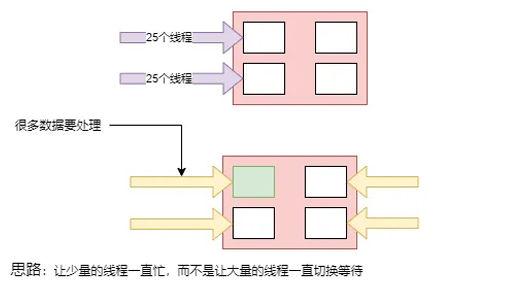
image-20260101145351532

现在只有四个线程,但是都很忙,而不是让大量的线程一直切换。

现在Tomcat学聪明了,里面专门有一个线程用来监听的监听8080,然后每一个请求来了都放在缓冲区,学了Netty,这个监听的其实是boss线程,然后后面有几个核心有几个worker线程,然后在缓冲区拿线程,但是拿到了数据1然后再去数据库远程调用,如果失败了就阻塞了,所以调用数据库也有缓冲区,远程调用肯定是TCP,只要数据到达后自动放到缓冲区,worker闲了就去缓冲区拿数据继续处理。
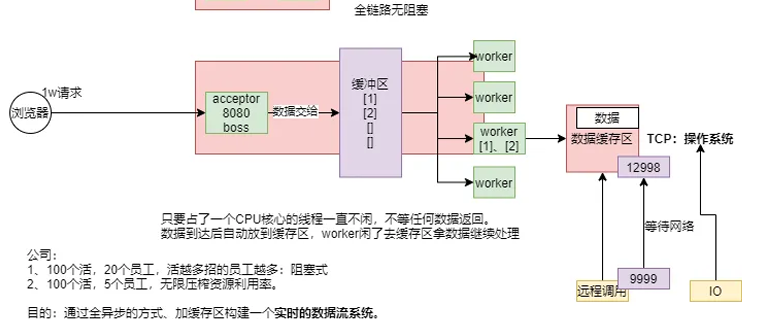
image-20260101150311773

Kafka、MQ能构建出大型分布式响应系统。

缺本地化的消息系统解决方案。

1、让所有的异步线程能互相监听消息,处理消息, 构建实时消息处理流。

那么Java就提供了Reactive Stream

然后在JAVA 9之后在 java.util.concurrent包里面添加了个Flow类,里面就提供了这个方案。

以前是命令式编程:全自定义

现在是响应式编程/声明式编程:声明流、说清楚要干什么、最终结果是要怎么样

1
2
3
4
5
6
7
API 组件:
1、Publisher:发布者:产生数据流
2、Subscriber:订阅者:消费数据流
3、Subscription:订阅关系
订阅关系是发布者和订阅者之间的关键接口。订阅者通过订阅来表示对发布者产生的数据的兴趣。订阅者可以请求一定数量的元素,也可以取消订阅。
4、Processor:处理器
处理器是同事实现了发布者和订阅者接口的组件。他可以接受一个来自一个发布者的数据,进行处理,并将结果发布给下一个订阅者。处理器在Reactor中充当中间环节,代表一个处理阶段,允许你在数据流中进行转换、过滤和其他操作。

image-20260101154740981

案例一:发布者+订阅者

image-20260101171612898

1
2
3
4
5
6
7
8
9
10
11
12
13
14
15
16
17
18
19
20
21
22
23
24
25
26
27
28
29
30
31
32
33
34
35
36
37
38
39
40
41
42
43
44
45
46
47
48
49
50
51
52
53
54
55
56
57
58
59
60
61
62
public class FlowDemo {
// 这是一个main方法,程序的入口
public static void main(String[] args) throws InterruptedException {

// 1、 定义一个发布者,发布数据
SubmissionPublisher<String> publisher = new SubmissionPublisher<>();


// 2、定义一个订阅者,订阅者感兴趣发布者的数据
// 定义订阅者需要实现四个方法
Flow.Subscriber<String> subscriber = new Flow.Subscriber<>() {

private Flow.Subscription subscription;

@Override// 在订阅时 onXXX:在xxx时间发生时,执行这个回调
public void onSubscribe(Flow.Subscription subscription) {
System.out.println(Thread.currentThread() + "订阅开始了" + subscription);
this.subscription = subscription;

//从上游请求一个数据
subscription.request(1);
}

@Override// 在下一个元素到达时,执行这个回调, 接收到新数据
public void onNext(String item) {
System.out.println(Thread.currentThread() + "订阅者,接收到数据" + item);

//从上游请求一个数据
subscription.request(1);
}

@Override// 在错误发生时
public void onError(Throwable throwable) {
System.out.println(Thread.currentThread() + "订阅者,接收到错误" + throwable);
}

@Override// 在完成时
public void onComplete() {
System.out.println(Thread.currentThread() + "订阅者,接收到完成信号" );
}
};

//3、绑定发布者和订阅者,要先绑定再发数据
publisher.subscribe(subscriber);

for (int i = 0; i < 10; i++) {
publisher.submit("p-" + i);
// publisher发布的数据在他的buffer区
}
//jvm底层对于整个发布订阅关系做好了 异步+缓存区处理 = 响应式系统


publisher.close();


//发布者有数据,订阅者就会拿到


Thread.sleep(20000);

}
}

案例二:发布者+订阅者+Processor

image-20260101173857931

1
2
3
4
5
6
7
8
9
10
11
12
13
14
15
16
17
18
19
20
21
22
23
24
25
26
27
28
29
30
31
32
33
34
35
36
37
38
39
40
41
42
43
44
45
46
47
48
49
50
51
52
53
54
55
56
57
58
59
60
61
62
63
64
65
66
67
68
69
70
71
72
73
74
75
76
77
78
79
80
81
82
83
84
85
86
87
88
89
90
91
92
93
94
95
96
97
98
99
public class FlowDemo {

//定义中间操作处理器,现在我们继承了发布者,所以发布者的接口就不用写了,只用写订阅者
static class MyProcessor extends SubmissionPublisher<String> implements Flow.Processor<String, String>{

private Flow.Subscription subscription;//保存绑定关系

@Override
public void onSubscribe(Flow.Subscription subscription) {
System.out.println("processor订阅绑定完成");
this.subscription = subscription;
subscription.request(1);//找上游一个数据
}

@Override //数据到达,触发onNext
public void onNext(String item) {
System.out.println("processor拿到数据" + item);
//再加工
item += "哈哈";
submit(item);
subscription.request(1);
}

@Override
public void onError(Throwable throwable) {

}

@Override
public void onComplete() {

}
}

// 这是一个main方法,程序的入口
public static void main(String[] args) throws InterruptedException {

// 1、 定义一个发布者,发布数据
SubmissionPublisher<String> publisher = new SubmissionPublisher<>();

// 定义一个中间操作
MyProcessor processor = new MyProcessor();

// 2、定义一个订阅者,订阅者感兴趣发布者的数据
// 定义订阅者需要实现四个方法
Flow.Subscriber<String> subscriber = new Flow.Subscriber<>() {

private Flow.Subscription subscription;

@Override// 在订阅时 onXXX:在xxx时间发生时,执行这个回调
public void onSubscribe(Flow.Subscription subscription) {
System.out.println(Thread.currentThread() + "订阅开始了" + subscription);
this.subscription = subscription;

//从上游请求一个数据
subscription.request(1);
}

@Override// 在下一个元素到达时,执行这个回调, 接收到新数据
public void onNext(String item) {
System.out.println(Thread.currentThread() + "订阅者,接收到数据" + item);

//从上游请求一个数据
subscription.request(1);
}

@Override// 在错误发生时
public void onError(Throwable throwable) {
System.out.println(Thread.currentThread() + "订阅者,接收到错误" + throwable);
}

@Override// 在完成时
public void onComplete() {
System.out.println(Thread.currentThread() + "订阅者,接收到完成信号" );
}
};

//3、绑定发布者和订阅者,要先绑定再发数据
publisher.subscribe(processor);
processor.subscribe(subscriber);

for (int i = 0; i < 10; i++) {
publisher.submit("p-" + i);
// publisher发布的数据在他的buffer区
}
//jvm底层对于整个发布订阅关系做好了 异步+缓存区处理 = 响应式系统


publisher.close();


//发布者有数据,订阅者就会拿到


Thread.sleep(20000);

}
}

响应式编程是不是只是异步回调但是流数据是有顺序

1
2
3
4
5
响应式编程:
1、底层:基于数据缓冲队列 + 消息驱动模型 + 异步回调机制
2、编码:流式编程 + 链式调用 + 声明式API
3、效果:优雅全一部 + 消息实时处理 + 高吞吐量 + 占用少量资源
底层帮你搭建好了,现在只用理解思想就能实现异步

万物皆数据

高并发有三宝:缓存、异步、队排好。以前全是手动控制,程序员水平不高很难开发高并发系统,但是后面响应式编程天生高并发,不需要你考虑缓存、异步、队排好,只需要关注如何

高可用有三宝:分片、复制、选领导。

万物皆数据,那么就有两种:单个和多个。单个就是Mono[0 | 1],多个就是Flux

非阻塞的原理就是缓存(用来调速的)+回调

少量线程一直运行 》 大量线程切换等待。

单个就是Mono[0 | 1],多个就是Flux,通过这两个定义响应式数据流,也就是数据。

2、Reactor

要学好响应式编程,先学好两个东西,一个叫Flux,一个叫Mono。然后认清楚一个图,弹珠图
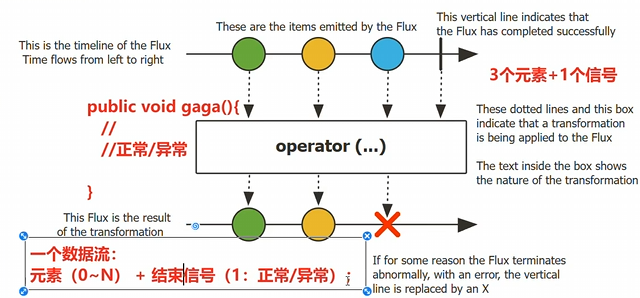
image-20260101221354662

有一个flux,然后发送了三个元素,然后追加一系列操作符,然后变成一个新流。

也就是说一个流数据,包含元素 + 结束信号,现在开始体验如何写。

1、导入依赖
1
2
3
4
5
6
7
8
9
10
11
12
13
14
15
16
17
18
19
20
21
22
23
24
25
26
27
<dependencyManagement>
<dependencies>
<!-- 引入 Reactor BOM,统一管理 Reactor 相关组件版本 -->
<dependency>
<groupId>io.projectreactor</groupId>
<artifactId>reactor-bom</artifactId>
<version>2022.0.3</version> <!-- 注意:2.0.3.RELEASE 是旧版,已废弃 -->
<type>pom</type>
<scope>import</scope>
</dependency>
</dependencies>
</dependencyManagement>

<dependencies>
<!-- 使用 reactor-core,版本由 BOM 自动管理 -->
<dependency>
<groupId>io.projectreactor</groupId>
<artifactId>reactor-core</artifactId>
</dependency>

<!-- 如果需要测试支持 -->
<dependency>
<groupId>io.projectreactor</groupId>
<artifactId>reactor-test</artifactId>
<scope>test</scope>
</dependency>
</dependencies>
2、响应式入门,基础API

下面测试一下Flux基础用法

1
2
3
4
5
6
7
8
9
10
11
12
13
14
15
16
17
18
19
20
21
22
23
24
25
26
public class FluxDemo {
public static void main(String[] args) throws IOException {
// Mono 0|1个元素的流
// Flux: N个元素的流
// 发布者发布数据流:源头

// 1、多元素的流
Flux<Integer> just = Flux.just(1, 2, 3, 4, 5);

// 流不消费就没用: 消费:订阅
just.subscribe(e -> System.out.println("e1 = " + e));
// 一个数据流可以有很多消费者
just.subscribe(e -> System.out.println("e2 = " + e));

// 对于每个消费者来说流都是一样的:广播模式
//多个消费是在一个线程内吗?下面这个例子就说明,不是一个线程内,因为是每秒产生一个数据,然后打印数据,而不是产生完然后读取。
System.out.println("===========");
Flux<Long> flux = Flux.interval(Duration.ofSeconds(1));// 每秒产生一个从0开始的递增数据
flux.subscribe(System.out::println);//打印数字

System.in.read();//这个是让主线程不结束,知道在控制台输入了一个数


}

}

下面测试一下Mono基础用法

1
2
3
4
5
6
7
8
9
public class FluxDemo {
// 这是一个main方法,程序的入口
public static void main(String[] args) {
//Mono 只有一个元素
//Flux 有很多元素
Mono<String> just = Mono.just("1");
just.subscribe(System.out::println);
}
}

image-20260102025519781

1
2
3
4
5
6
7
8
9
10
11
12
13
14
15
16
17
18
19
20
21
22
23
24
25
26
27
public class FluxDemo {
// 这是一个main方法,程序的入口
public static void main(String[] args) throws IOException {
// Mono 只有一个元素
// Flux 有很多元素
Mono<String> just = Mono.just("1");
just.subscribe(System.out::println);

// 空流
Flux<Object> empty = Flux.empty();// 有一个信号:此时代表完成信号
empty.subscribe(System.out::println);

// 回忆上面消费者有四个操作,onNext,onComplete,onError,onSub
Flux<Object> empty2 = Flux.empty()
.doOnComplete(() -> {
System.out.println("流结束了");
});
empty2.subscribe(System.out::println);
//这个doOnXxx是事件感知API,当流发生什么事的时候,触发一个回调,系统调用提前定义好的钩子
//Hook钩子函数:doOnXxx
//doOnComplete 流正常结束
//doOnCancel 流被取消后

System.in.read();

}
}

小总结

1
2
3
4
5
6
7
8
9
10
11
12
13
doOnXxx API触发时机
doOnNext:每个元素(流的数据)到的时候触发
doOnEach:每个数据(数据+信号)到达的时候触发
doOnRequest:消费者请求流数据的时候
doOnError:流发生错误
doOnSubscribe:流被订阅的时候
doOnTerminate:发送取消/异常信号中断了流
doOnCancle:流被取消
doOnDiscard:流中元素被忽略的时候

看懂文档的弹珠图即可,信号有两种 正常/异常 具体的有很多
首先创建流用FLUX或者Mono,flux.just,或者其他。
然后在流里面利用API,进行流式操作, .doOnXxx进行流式操作然后这些底层是异步并且无阻塞的,并且是按照时间顺序的,然后接受对象就是消费者,在期间没有subscribe之前都是流,最后需要subscibe来进行消费。期间可以利用函数式接口,进行流式操作。
3、subscribe

订阅流,流没订阅之前什么都不发生。

1
2
3
4
5
6
7
8
9
10
11
12
13
14
15
16
17
18
19
20
21
22
23
24
25
26
27
28
29
30
31
32
33
34
35
36
37
38
39
40
41
42
43
44
45
46
47
48
49
50
51
52
53
54
55
public class FluxDemo {

// 这是一个main方法,程序的入口
public static void main(String[] args) {
Flux<String> flux = Flux.range(1, 10).map(i -> "哈哈:" + i);
flux.subscribe(); // 流被订阅,流动起来了,默认订阅,没有订阅者,flux是发布者,然后subscribe可以传消费者
flux.subscribe(v -> System.out.println("v:" + v));//只消费正常元素
flux.subscribe(v -> System.out.println("v:" + v),throwable ->
System.out.println("throwable:" + throwable));//第一个正常消费者,第二个是异常消费者,用来消费异常
//第三个是感知正常结束

//onXxx:发生这个时间后执行一个动作,可以改变元素,信号
//doOnXxx:发生这个时间的时候产生一个回调,通知你(不能改变)

//自定义消费者
flux.subscribe(new BaseSubscriber<String>(){

//生命周期钩子1:订阅关系绑定的时候触发
@Override
protected void hookOnSubscribe(Subscription subscription) {
subscription = subscription;
//流被订阅的时候触发,钩子函数
System.out.println("绑定了"+subscription);
//找发布者要数据
request(1);
//requestUnbounded();//要无线数据
}

@Override
protected void hookOnNext(String value) {
System.out.println("数据到达,正在处理"+value);
}

@Override
protected void hookOnComplete() {
System.out.println("流正常结束");
}

@Override
protected void hookOnError(Throwable throwable) {
System.out.println("流异常"+throwable);
}

@Override
protected void hookOnCancel() {
System.out.println("流被取消");
}

@Override
protected void hookFinally(SignalType type) {
System.out.println("最终回调");
}
});
}
}
4、流的取消

消费者调用cancle() 取消流的订阅

Disposable接口

1
2
3
4
5
6
7
8
@Override
protected void hookOnNext(String value) {
System.out.println("数据到达,正在处理:"+value);
if(value.equals("哈哈:5")){
cancel(); //取消流
}
request(1); //要1个数据
}
5、背压(Backpressure )和请求重塑(Reshape Requests)
1、buffer:缓冲
1
2
3
4
5
Flux<List<Integer>> flux = Flux.range(1, 10)  //原始流10个
.buffer(3)
.log();//缓冲区:缓冲3个元素: 消费⼀次最多可以拿到三个元素;凑满数批量发给消费者
//⼀次发⼀个,⼀个⼀个发;
// 10元素,buffer(3);消费者请求4次,数据消费完成
2、limit:限流
1
2
3
4
Flux.range(1, 1000)
.log()//限流触发,看上游是怎么限流获取数据的
.limitRate(100) //⼀次预取30个元素;第⼀次request(100),以后request(75)75%策略,消费到25的时候,请求75.
.subscribe();
  • limitRate(n):控制下游向上游“要数据的速度”(背压限流)
  • buffer(n):把上游的数据“攒成一批”再发给下游(数据聚合)
6、编程方式创建序列Sink

Sink.next 接收器或者水槽,通道

Sink.complete

1
2
3
4
5
6
7
8
9
10
11
12
13
14
15
16
17
18
19
20
21
22
23
24
25
26
27
28
29
30
31
32
33
34
35
36
37
38
39
40
41
42
43
44
45
46
47
//同步环境-gennerate
//多线程-create
public class FluxGenerateAndMultiThreadDemo {

/**
* 同步环境 - generate 生成数据流
* 特点:单线程、同步执行、按需生成、每次只能生成一个元素
*/
public void generate() {
// Flux.generate:同步生成数据流的核心方法
Flux<String> stringFlux = Flux.generate(
// 1. 状态初始化(可选参数,此处以"计数器"为例,记录生成元素的序号)
() -> 0, // 初始化状态:计数器从0开始
// 2. 生成逻辑:(当前状态, 同步Sink) -> 新状态
(counter, sink) -> {
// sink.next():传递单个数据(同步环境下,每次只能调用1次,多次调用会报错)
// 此处拼接计数器,演示按需生成有序数据
sink.next("哈哈" + counter); // 传递数据,每次仅能生成一个元素

// 3. 终止条件:当计数器达到4时,调用sink.complete()结束数据流
if (counter >= 4) {
sink.complete(); // 标记数据流结束,不再生成新元素
}

// 4. 更新状态:计数器+1,作为下一次生成的初始状态
return counter + 1;
}
);

// 订阅数据流(触发生成逻辑,因为Flux是冷数据流,订阅才会执行)
stringFlux.subscribe(
// 消费正常元素
data -> System.out.println("【同步generate】消费数据:" + data + ",当前线程:" + Thread.currentThread().getName()),
// 消费异常(此处无异常,仅做演示)
error -> System.err.println("【同步generate】发生异常:" + error.getMessage()),
// 数据流结束回调
() -> System.out.println("【同步generate】数据流消费完毕\n")
);
}
}
//特点:消费驱动生产,逐个生产、逐个消费,同步串行,互相阻塞。
/*
main线程(单线程):
消费者请求数据 → generate生产1条(哈哈0)→ 推送消费者 → 消费者消费哈哈0 →
消费者再请求数据 → generate生产1条(哈哈1)→ 推送消费者 → 消费者消费哈哈1 →
... 重复直到计数器≥4 → 数据流结束
*/
1
2
3
4
5
6
7
8
9
10
11
12
13
14
15
16
17
18
19
20
21
22
23
24
25
26
27
28
29
30
31
32
33
34
35
36
37
38
39
40
41
42
43
44
45
46
47
48
49
50
51
52
53
54
55
56
57
58
59
60
61
62
63
64
65
66
67
68
69
70
71
72
73
74
75
76
77
78
79
80
81
82
83
84
85
86
87
88
89
90
91
92
93
94
95
96
97
public class FluxCreateEnhancedAsyncDemo {
public static void main(String[] args) {
// ==================== 1. 构建异步数据流(核心增强:线程分离) ====================
Flux<String> enhancedAsyncFlux = Flux.create(
// Sink:数据推送载体,支持多线程环境下灵活推送
(Sink<String> sink) -> {
// ① 生产者运行在独立线程(手动创建异步线程,模拟IO/异步任务)
new Thread(() -> {
try {
// 模拟业务数据生成(如读取文件、调用远程接口)
for (int i = 0; i < 8; i++) {
// 模拟异步耗时操作(每次生成数据耗时300ms,不阻塞主线程)
Thread.sleep(300);

// 显式业务条件:只推送偶数索引的数据(过滤奇数索引)
if (i % 2 == 0) {
String data = "异步生产的第 " + (i + 1) + " 条数据(偶数索引)";
// 主动推送数据(可多次调用,无次数限制)
sink.next(data);
// 打印生产者日志,标记当前线程
System.out.println("【生产者】推送数据:" + data + " | 线程:" + Thread.currentThread().getName());
} else {
System.out.println("【生产者】不满足条件,跳过第 " + (i + 1) + " 条数据(奇数索引) | 线程:" + Thread.currentThread().getName());
}
}

// 所有数据推送完成后,标记数据流结束
sink.complete();
System.out.println("【生产者】所有数据推送完毕 | 线程:" + Thread.currentThread().getName());

} catch (InterruptedException e) {
// 异常时推送错误信息
sink.error(e);
System.err.println("【生产者】推送数据异常:" + e.getMessage() + " | 线程:" + Thread.currentThread().getName());
}
}, "生产者-异步线程").start(); // 给异步线程命名,便于观察
}
)
// ② 指定消费者运行的线程池(与生产者线程分离)
.publishOn(Schedulers.boundedElastic())
// ③ 指定生产者(Flux.create内部逻辑)的线程池(也可替代手动创建线程,二选一即可)
// .subscribeOn(Schedulers.io())

// ==================== 2. 数据预处理(可选,演示消费者线程内的处理) ====================
.map(data -> data + " - 消费者预处理完成");

// ==================== 3. 订阅消费数据流(主线程仅负责订阅,不阻塞) ====================
System.out.println("【主线程】开始订阅数据流,不阻塞后续逻辑执行");
enhancedAsyncFlux.subscribe(
// 消费正常数据(来一个消费一个)
data -> System.out.println("【消费者】接收并消费数据:" + data + " | 线程:" + Thread.currentThread().getName()),
// 消费异常数据
error -> System.err.println("【消费者】接收异常:" + error.getMessage() + " | 线程:" + Thread.currentThread().getName()),
// 数据流结束回调
() -> System.out.println("【消费者】所有数据消费完毕 | 线程:" + Thread.currentThread().getName())
);

// ==================== 4. 主线程继续执行其他逻辑(体现非阻塞特性) ====================
System.out.println("【主线程】订阅后立即执行其他业务逻辑,无需等待生产者/消费者完成");
for (int i = 0; i < 3; i++) {
try {
Thread.sleep(500);
System.out.println("【主线程】执行其他任务:" + (i + 1) + " | 线程:" + Thread.currentThread().getName());
} catch (InterruptedException e) {
throw new RuntimeException(e);
}
}

// 主线程休眠3秒,确保异步线程(生产者/消费者)执行完成(仅为观察日志,实际业务无需此休眠)
try {
Thread.sleep(3000);
} catch (InterruptedException e) {
throw new RuntimeException(e);
}
}
}
/*
【主线程】开始订阅数据流,不阻塞后续逻辑执行
【主线程】订阅后立即执行其他业务逻辑,无需等待生产者/消费者完成
【生产者】不满足条件,跳过第 2 条数据(奇数索引) | 线程:生产者-异步线程
【生产者】推送数据:异步生产的第 1 条数据(偶数索引) | 线程:生产者-异步线程
【消费者】接收并消费数据:异步生产的第 1 条数据(偶数索引) - 消费者预处理完成 | 线程:boundedElastic-1
【主线程】执行其他任务:1 | 线程:main
【生产者】推送数据:异步生产的第 3 条数据(偶数索引) | 线程:生产者-异步线程
【生产者】不满足条件,跳过第 4 条数据(奇数索引) | 线程:生产者-异步线程
【消费者】接收并消费数据:异步生产的第 3 条数据(偶数索引) - 消费者预处理完成 | 线程:boundedElastic-1
【主线程】执行其他任务:2 | 线程:main
【生产者】推送数据:异步生产的第 5 条数据(偶数索引) | 线程:生产者-异步线程
【生产者】不满足条件,跳过第 6 条数据(奇数索引) | 线程:生产者-异步线程
【消费者】接收并消费数据:异步生产的第 5 条数据(偶数索引) - 消费者预处理完成 | 线程:boundedElastic-1
【主线程】执行其他任务:3 | 线程:main
【生产者】推送数据:异步生产的第 7 条数据(偶数索引) | 线程:生产者-异步线程
【生产者】不满足条件,跳过第 8 条数据(奇数索引) | 线程:生产者-异步线程
【消费者】接收并消费数据:异步生产的第 7 条数据(偶数索引) - 消费者预处理完成 | 线程:boundedElastic-1
【生产者】所有数据推送完毕 | 线程:生产者-异步线程
【消费者】所有数据消费完毕 | 线程:boundedElastic-1
*/

小总结

同步generate和异步create的区别

同步是按顺序执行有个初始化状态,当前状态和同步流程sink来维护顺序

异步就是没有了内置的初始状态和当前状态,当然如果想要线程安全需要手动维护状态,但是需要定义回调函数条件设置,如果满足了某个条件就会由系统主动推送,以及用sink来定义处理流程即可。

7、handle()

⾃ 定义流中元素处理规则

1
2
3
4
5
6
7
Flux.range(1,10)
.handle((value,sink)->{
System.out.println("拿到的值:"+value);
sink.next("张三:"+value); //可以向下发送数据的通道
})
.log() //⽇志
.subscribe();
8、自定义线程调度

响应式:响应式编程:全异步、消息、事件回调

默认还是用当前线程,生成整个流,发布流,流操作

调度器其实就是线程池。

1
2
3
4
5
6
7
8
9
10
11
12
13
14
15
16
17
18
19
20
21
22
23
24
25
26
27
28
29
30
31
32
33
34
35
36
37
38
39
40
41
42
43
44
45
46
47
48
49
50
51
52
53
54
55
56
57
58
59
60
61
62
63
64
65
66
67
public class ReactorPublishOnDemo {

// 案例核心方法
public void thread1() {
// 1. 创建一个并行线程池:名称为parallel-scheduler,核心线程数4
Schedulers s = Schedulers.newParallel("parallel-scheduler", 4);

// 2. 构建Flux数据流,包含两次map转换 + publishOn线程切换 + log日志(便于观察线程)
final Flux<String> flux = Flux
.range(1, 2) // 生成两个元素:1、2
.map(i -> {
// 第一个map:10 + 元素值(打印当前线程,便于观察)
System.out.println("【第一个map】处理元素:" + i + ",当前线程:" + Thread.currentThread().getName());
return 10 + i; // 1→11,2→12
})
.log() // 打印数据流执行日志,辅助观察线程变化
.publishOn(s) // 关键:切换后续操作的执行线程池为s
.map(i -> {
// 第二个map:拼接字符串(打印当前线程,便于观察)
System.out.println("【第二个map】处理元素:" + i + ",当前线程:" + Thread.currentThread().getName());
return "value " + i; // 11→"value 11",12→"value 12"
});

// 3. 新建一个匿名线程,在该线程中执行订阅动作(订阅者运行在匿名线程)
new Thread(() -> {
System.out.println("【订阅动作】执行订阅的线程:" + Thread.currentThread().getName());
// 订阅数据流,消费数据并打印
flux.subscribe(data -> System.out.println("【消费者】消费数据:" + data + ",当前线程:" + Thread.currentThread().getName()));
}, "自定义订阅线程").start(); // 给匿名线程命名,更易观察
}

// 主方法:执行测试
public static void main(String[] args) {
ReactorPublishOnDemo demo = new ReactorPublishOnDemo();
demo.thread1();

// 主线程休眠2秒,确保异步线程执行完成,能看到完整日志
try {
Thread.sleep(2000);
} catch (InterruptedException e) {
throw new RuntimeException(e);
}
}
}
/*
【订阅动作】执行订阅的线程:自定义订阅线程
【第一个map】处理元素:1,当前线程:自定义订阅线程
【第一个map】处理元素:2,当前线程:自定义订阅线程
【第二个map】处理元素:11,当前线程:parallel-scheduler-1
【消费者】消费数据:value 11,当前线程:parallel-scheduler-1
【第二个map】处理元素:12,当前线程:parallel-scheduler-1
【消费者】消费数据:value 12,当前线程:parallel-scheduler-1
*/
//publishOn改变发布者所在线程池
//subscribeOn改变订阅者所在线程池
//只要不指定线程,默认发布者的线程就是订阅者的线程
public void thread1(){
Scheduler s = Schedulers.newParallel("parallel-scheduler", 4);
final Flux<String> flux = Flux
.range(1, 2)
.map(i -> 10 + i)
.log()
.publishOn(s)
.map(i -> "value " + i);
//只要不指定线程池,默认发布者⽤的线程就是订阅者的线程;
new Thread(() -> flux.subscribe(System.out::println)).start();
}
9、错误处理

命令式编程:常见的错误处理方式

1、Catch and return a static defalut value

捕获异常返回一个静态默认值

1
2
3
4
5
try {
return doSomethingDangerous(10);
}catch (Throwable error) {
return "RECOVERED";
}

onErrorReturn: 实现上⾯效果,错误的时候返回⼀个值

1、吃掉异常,消费者⽆异常感知

2、返回⼀个兜底默认值

3、流正常完成;

1
2
3
4
5
6
Flux.just(1, 2, 0, 4)
.map(i -> "100 / " + i + " = " + (100 / i))
.onErrorReturn(NullPointerException.class,"哈哈-6666")
.subscribe(v-> System.out.println("v = " + v),
err -> System.out.println("err = " + err),
()-> System.out.println("流结束")); // error handling example
2、Catch and execute an alternative path with fallback method

吃掉异常,执⾏⼀个兜底⽅法;

1
2
3
4
5
try {
return doSomethingDangerous(10);
}catch (Throwable error) {
return doOtherthing(10);
}

onErrorResume

1、吃掉异常,消费者⽆异常感知

2、调⽤⼀个兜底⽅法

3、流正常完成

1
2
3
4
5
6
Flux.just(1, 2, 0, 4)
.map(i -> "100 / " + i + " = " + (100 / i))
.onErrorResume(err -> Mono.just("哈哈-777"))
.subscribe(v -> System.out.println("v = " + v),
err -> System.out.println("err = " + err),
() -> System.out.println("流结束"));
3、Catch and dynamically compute a fallback value

捕获并动态计算⼀个返回值

根据错误返回一个新值。

1
2
3
4
5
6
try {
Value v = erroringMethod();
return MyWrapper.fromValue(v);
}catch (Throwable error) {
return MyWrapper.fromError(error);
}
1
2
3
4
.onErrorResume(err -> Flux.error(new BusinessException(err.getMessage()+":炸了")))
/*1、吃掉异常,消费者有感知
2、调⽤⼀个⾃定义⽅法
3、流异常完成*/
4、Catch,wrap to a BussinessException,and re-throw

捕获并包装成⼀个业务异常,并重新抛出

1
2
3
4
5
try {
return callExternalService(k);
}catch (Throwable error) {
throw new BusinessException("oops, SLA exceeded", error);
}

包装重新抛出异常: 推荐⽤ .onErrorMap

1、吃掉异常,消费者有感知

2、抛新异常

3、流异常完成

1
2
3
4
5
6
7
.onErrorResume(err -> Flux.error(new BusinessException(err.getMessage()+":炸了")))
Flux.just(1, 2, 0, 4)
.map(i -> "100 / " + i + " = " + (100 / i))
.onErrorMap(err-> new BusinessException(err.getMessage()+": ⼜炸了..."))
.subscribe(v -> System.out.println("v = " + v),
err -> System.out.println("err = " + err),
() -> System.out.println("流结束"));
5、Catch, log an error-specific message, and re-throw.

捕获异常,记录特殊的错误⽇志,重新抛出

1
2
3
4
5
6
7
try {
return callExternalService(k);
}catch (RuntimeException error) {
//make a record of the error
log("uh oh, falling back, service failed for key " + k);
throw error;
}
1
2
3
4
5
6
7
Flux.just(1, 2, 0, 4)
.map(i -> "100 / " + i + " = " + (100 / i))
.doOnError(err -> {
System.out.println("err已被记录 = " + err);
}).subscribe(v -> System.out.println("v = " + v),
err -> System.out.println("err = " + err),
() -> System.out.println("流结束"));
1
2
3
异常被捕获、做⾃⼰的事情
不影响异常继续顺着流⽔线传播
1、不吃掉异常,只在异常发⽣的时候做⼀件事,消费者有感知
6、Use the finally block to clean up resources or a Java 7 “ try-with-resource” construct.
1
2
3
4
5
6
7
8
Flux.just(1, 2, 3, 4)
.map(i -> "100 / " + i + " = " + (100 / i))
.doOnError(err -> {
System.out.println("err已被记录= " + err);
})
.doFinally(signalType -> {
System.out.println("流信号:"+signalType);
})
7、忽略当前异常,仅通知记录,继续推进
1
2
3
4
5
6
7
8
9
Flux.just(1,2,3,0,5)
.map(i->10/i)
.onErrorContinue((err,val)->{
System.out.println("err = " + err);
System.out.println("val = " + val);问题");
System.out.println("发现"+val+"有问题了,继续执⾏其他的,我会记录这个
}) //发⽣
.subscribe(v-> System.out.println("v = " + v),
err-> System.out.println("err = " + err));

小总结

场景 命令式写法 Reactor 操作符 是否“吃掉”异常 消费者是否感知异常 流最终状态 典型用途
1. 返回静态默认值 catch { return "DEFAULT"; } .onErrorReturn(value).onErrorReturn(Class, value) ✅ 是 ❌ 否 正常完成 快速兜底,如返回空列表、默认文案
2. 执行兜底方法(替代流) catch { return fallback(); } .onErrorResume(err → Flux/Mono.just(...)) ✅ 是 ❌ 否 正常完成 调用备用服务、本地缓存、降级逻辑
3. 动态计算新值(含异常信息) catch { return Wrapper.fromError(err); } .onErrorResume(err → Mono.just(new Wrapper(err))) ✅ 是 ❌ 否(除非返回 error) 正常完成 将异常封装为业务对象(如 Result.error(err))
4. 包装并重新抛出异常 catch { throw new BizEx("msg", err); } .onErrorMap(err → new BusinessException(...)) ❌ 否 ✅ 是 异常终止 统一异常类型、添加上下文、屏蔽底层细节
5. 记录日志但不处理异常 catch { log(); throw err; } .doOnError(err → log(err)) ❌ 否 ✅ 是 异常终止 监控、审计、调试,不影响异常传播
6. 清理资源(finally) try { ... } finally { cleanup(); } .doFinally(signalType → cleanup()) ❌ 不处理异常 取决于是否有其他处理 正常 or 异常 关闭连接、释放锁、统计耗时
7. 忽略当前错误,继续处理后续元素 (命令式难以实现) .onErrorContinue((err, item) → {...}) ✅ 局部吃掉 ❌ 后续元素仍可发出 正常完成(跳过失败项) 批处理中容忍个别失败(如导入1000条,998成功)
10、常用操作
1
filter、flatMap、concatMap、flatMapMany、transform、defaultIfEmpty、switchIfEmpty、concat、concatWith、merge、mergeWith、mergeSequential、zip、zipWith...
1
2
3
4
5
6
7
8
9
10
11
12
13
常⽤操作
错误处理
超时与重试
Sinks⼯具类
单播
多播
重放
背压
缓存
阻塞式API
block
Context-API:响应式中的ThreadLocal
ThreadLocal机制失效
filter
1
2
3
4
5
6
7
8
9
10
11
12
13
14
15
16
17
18
19
20
21
22
23
24
25
26
27
28
29
30
//这里直接使用API演示使用方法
//filter、flatMap、concatMap、flatMapMany、transform、defaultIfEmpty、switchIfEmpty、concat、concatWith、merge、mergeWith、mergeSequential、zip、zipWith
//filter
Flux.just(1,2,3,4)
.log()
.filter(s -> s%2==0)
.subscribe();
/*
[ INFO] (main) | onSubscribe([Synchronous Fuseable] FluxArray.ArrayConditionalSubscription)
[ INFO] (main) | request(unbounded)
[ INFO] (main) | onNext(1)
[ INFO] (main) | request(1)
[ INFO] (main) | onNext(2)
[ INFO] (main) | onNext(3)
[ INFO] (main) | request(1)
[ INFO] (main) | onNext(4)
[ INFO] (main) | onComplete()
*/

/* 日志解析
第一行:下游Filter,成功订阅了上游Just流
第二行:下游Filter,向上游Just发起了 无界数量 的数据请求,Filter作为中游可以把下游subscribe转发给上游。
第三行:Just 流响应 Filter 流的 unbounded 请求,推送第一个元素 1 给 Filter 流。onNext(X) 是上游向下游传递「数据元素」的信号。
第四行:Just 流推送的元素 1,不满足偶数条件,因此 Filter 流不会把 1 转发给最下游的 Subscribe 流,而最下游的 Subscribe 流需要接收数据,Filter 流为了满足下游的需求,会主动向上游 Just 流补充请求 1 个数据(即 request(1)),继续寻找满足过滤条件的元素。
第五行:Just 流响应 Filter 流的 request(1) 请求,推送第二个元素 2 给 Filter 流。
第六行:Just 流基于之前的 unbounded 无界请求,继续推送第三个元素 3 给 Filter 流(因为无界请求意味着 “一次性推送所有数据”,所以会连续推送)。
第七行:和第四行一样
第八行:Just 流响应 Filter 流的 request(1) 请求,推送第四个元素 4 给 Filter 流。
第九行:Just 流推送完所有 4 个元素后,向下游 Filter 流传递「数据流结束」的信号,表示 “我没有更多数据了,数据流结束”。
*/
filterMap
1
2
3
4
5
6
7
8
@Test
public void filterMap() {
Flux.just("zhang san", "li si").flatMap(i -> {
String[] s = i.split(" ");
return Flux.fromArray(s);// 把数据包装成多元素流
}).log().subscribe();
}
//这里打印日志就只有第一次的无界数据请求,其他都是onNext了
concatMap
1
2
3
4
5
6
7
8
9
10
11
@Test
public void concatMap() {
Flux.just(1,2)
.concatMap(s -> {
return Flux.just(s + "-a"1);
})
.log()
.subscribe();
Flux.concat(Flux.just(1, 2, 3), Flux.just(4, 5, 6)).log().subscribe();
Flux.just(1, 2, 3).concatWith(Flux.just(4, 5, 6)).log().subscribe();//这个要跟前一个流的类型保持一致
}
transform
1
2
3
4
5
6
7
8
9
10
11
12
13
14
15
16
17
18
19
20
21
22
23
24
25
26
27
28
29
30
31
32
33
34
35
36
37
38
39
@Test
public void transform(){
AtomicInteger atomic = new AtomicInteger(0);

Flux<String> flux = Flux.just("a", "b", "c")
.transform(v -> {
//++atomic
if (atomic.incrementAndGet() == 1) {
//第一次调用
return v.map(String::toUpperCase);
} else {
return v;
}
});
//transform无defer,不会共享外部变量,无状态转换,
flux.subscribe(v -> System.out.println("订阅者1:v = " + v));
flux.subscribe(v -> System.out.println("订阅者2:v = " + v));
}
//两个订阅者都是A B C
@Test
public void transform(){
AtomicInteger atomic = new AtomicInteger(0);

Flux<String> flux = Flux.just("a", "b", "c")
.transformDeferred(v -> {
//++atomic
if (atomic.incrementAndGet() == 1) {
//第一次调用
return v.map(String::toUpperCase);
} else {
return v;
}
});
//transform无defer,不会共享外部变量,有状态转换
flux.subscribe(v -> System.out.println("订阅者1:v = " + v));
flux.subscribe(v -> System.out.println("订阅者2:v = " + v));
}
//transformDeferred是每个订阅者执行一次,所以有外部变量控制的时候执行结果不一样
//transform是无论多少个订阅者只执行一次
empty
1
2
3
4
5
6
7
8
9
10
11
12
13
14
15
@Test
public void empty(){
haha()
.defaultIfEmpty("x")//如果发布者为空指定默认值
.subscribe(System.out::println);
haha()
.switchIfEmpty(hehe())
.subscribe(System.out::println);
}
Mono<String> haha(){
return Mono.just("haha");
}
Mono<String> hehe(){
return Mono.just("hehe");
}
merge
1
2
3
4
5
6
7
8
9
10
11
12
13
/*
merge:按照实现顺序,增加流
mergeWith:在原有的流上增加,也是按照时间顺序增加
mergeSequential:按照哪个流先到,先把流全增加了,再增加下一个流
*/
@Test
public void merge() throws IOException {
Flux.merge(
Flux.just(1,2,3).delayElements(Duration.ofSeconds(1)),
Flux.just("a","b").delayElements(Duration.ofMillis(1500))
).log().subscribe();
System.in.read();
}
zip
1
2
3
4
5
6
7
8
9
10
11
12
13
14
15
16
17
/*
* zip:无法结对的元素会被忽略
* zip最多支持8元祖
* */
@Test
void zip() {
// Tuple:元祖
// Tuple2:<Integer,String>

Flux.just(1, 2, 3)
.zipWith(Flux.just("a", "b", "c"))
.map(tuple -> {
Integer t1 = tuple.getT1();
String t2 = tuple.getT2();
return t1 + "==" + t2;
}).log().subscribe(v -> System.out.println("v-" + v));
}
11、sinks、重试、Context、阻塞API

retry 重试

1
2
3
4
5
6
7
8
9
10
@Test
void retry() {
Flux.just(1,2,3)
.delayElements(Duration.ofSeconds(3))
.log()
.timeout(Duration.ofSeconds(2))
.retry(3)
.map(i -> i+"haha")
.subscribe();
}

sinks 管道工具

1
2
3
4
5
6
7
8
9
10
11
12
13
14
15
16
17
18
19
20
21
22
23
24
25
26
27
28
29
30
31
32
@Test
public void sinks() throws InterruptedException, IOException {
// Flux.create(fluxSink -> {
// fluxSink.next("haha");
// }).log().subscribe();
// Sinks.many();//发送Flux数据
// Sinks.one();//发送Mono数据
//
// //Sinks:接收器,数据管道,所有数据都顺着这个管道往下走的。
// Sinks.many().unicast();//单播,只能绑定单个消费者
// Sinks.many().multicast();//多播,这个管道能绑定多个订阅者
// Sinks.many().replay();//重放,这个管道能重放元素。是否给后来的订阅者把之前的元素依然发给他。
// //从头消费还是从订阅那一刻消费

Sinks.Many<Object> many = Sinks.many()
.unicast().onBackpressureBuffer(new LinkedBlockingQueue<>(5));//背压队列
new Thread(() -> {
for(int i = 0 ; i< 10 ; i++){
many.tryEmitNext("a-" + i);
try {
Thread.sleep(1000);
} catch (InterruptedException e) {
throw new RuntimeException(e);
}
}
}).start();
many.asFlux().subscribe(v -> System.out.println("v = " + v));

System.in.read();


}

cache 缓存

1
2
3
4
5
6
7
8
9
10
11
12
13
14
15
16
17
@Test
public void cache() throws IOException {
Flux<Integer> cache = Flux.range(1, 10)
.delayElements(Duration.ofSeconds(1));//默认不缓存任何数据,每一次新的订阅都是一个全新的流,所有数据都会重新发送
//.cache(3);//缓存3个最新元素
cache.subscribe();
new Thread(() -> {
try {
Thread.sleep(5000);
} catch (InterruptedException e) {
throw new RuntimeException(e);
}
cache.subscribe(v -> System.out.println("v = " + v));
}).start();
System.in.read();

}

Context-API 上下文切换

1
2
3
4
5
6
7
8
9
10
11
@Test
void parallelFlux() throws IOException {
Flux.range(1, 10000000)
.buffer(100)
.parallel(8)
.runOn(Schedulers.newParallel("xx"))
.log()
.subscribe(v -> System.out.println("v = " + v));

System.in.read();
}
1
2
3
4
5
6
7
8
9
10
11
12
13
14
15
16
17
//Context-API
@Test //ThreadLocal在响应式编程中无法使用
//响应式中,数据流期间共享数据,Context API ,Context 读写,ContextView 只读
//中间操作要支持Context,也就是支持上下文切换的
void threadLocal() {
Flux.just(1, 2, 3)
.transformDeferredContextual((flux,context) ->{
System.out.println("flux = " + flux);
System.out.println("context = " + context);
return flux.map(i -> i+"==>"+context.get("prefix"));
})
.contextWrite(Context.of("prefix","哈哈"))
//ThreadLocal共享了数据,上游所有的人都能看到,Context由下游传播给上游
.subscribe(v -> System.out.println("v = " + v));
}
//以前命令式变成,controller -> service -> dao
// 响应式编程 dao -> service -> controller ,从下游反向传播,也就是下游的速度决定上游的速度,背压式

2、Spring Webflux

WebFlux:底层完全基于netty+reactor+springweb 完成⼀个全异步⾮阻塞的web响应式框架

底层:异步 + 消息队列(内存) + 事件回调机制 = 整套系统

优点:能使⽤少量资源处理⼤量请求;

0、组件对比
功能类别 Servlet(阻塞式 Web) WebFlux(响应式 Web)
核心 API 功能定位 阻塞式 Web 开发标准,基于同步阻塞模型 响应式 Web 开发框架,基于异步非阻塞响应式模型
前端控制器 DispatcherServlet DispatcherHandler
处理器 Controller(注解式 / 接口式) WebHandler / Controller(兼容 Servlet 的Controller注解)
请求 & 响应对象 ServletRequestServletResponse ServerWebExchange(封装请求响应)├─ ServerHttpRequest(请求对象)└─ ServerHttpResponse(响应对象)
过滤器 Filter(常用HttpFilter实现类) WebFilter
异常处理器 HandlerExceptionResolver DispatcherExceptionHandler
Web 配置注解 @EnableWebMvc @EnableWebFlux
自定义配置接口 WebMvcConfigurer(用于扩展 Spring MVC 配置) WebFluxConfigurer(用于扩展 Spring WebFlux 配置)
接口返回结果 任意 Java 对象(如 POJO、String、void 等) Mono(单个结果)、Flux(多个结果)、任意 Java 对象(兼容传统返回类型)
发送 REST 请求工具 RestTemplate(阻塞式 REST 客户端) WebClient(响应式非阻塞 REST 客户端,可兼容同步调用)
1、WebFlux

底层基于Netty实现的Web容器与请求/响应处理机制

1、引入
1
2
3
4
5
6
7
8
9
10
11
<parent>
<groupId>org.springframework.boot</groupId>
<artifactId>spring-boot-starter-parent</artifactId>
<version>3.1.6</version>
</parent>
<dependencies>
<dependency>
<groupId>org.springframework.boot</groupId>
<artifactId>spring-boot-starter-webflux</artifactId>
</dependency>
</dependencies>

Context 响应式上下⽂数据传递; 由下游传播给上游;

以前: 浏览器 —> Controller —> Service —> Dao: 阻塞式编程 XML

现在: Dao(数据源查询对象【数据发布者】) —> Service —> Controller —> 浏览器: 响应式

⼤数据流程: 从⼀个数据源拿到⼤量数据进⾏分析计算;

ProductVistorDao.loadData()

​ .distinct()

​ .map()

​ .filter()

​ .handle()

​ .subscribe();

这种响应式的编写就是从Dao开始了

2、Reactor核心

最原生写法理解底层行为

1
2
3
4
5
6
7
8
9
10
11
12
13
14
15
16
17
18
19
20
21
22
23
24
25
26
27
28
29
30
31
32
33
34
35
36
37
38
39
40
41
42
43
44
45
46
public class Chapter03WebfluxApplication {

public static void main(String[] args) throws IOException {

// 快速自己编写一个能处理请求的服务器
// 1、创建一个能处理Http请求的处理器 参数:请求、响应,返回值:Mono<void> 代表请求完成的信号
HttpHandler handler = (ServerHttpRequest request, ServerHttpResponse response) -> {
System.out.println("请求进来了");
// 编写请求处理的业务,给浏览器写一个内容 URL + “Hello~!"

// response.getHeaders();
// response.getCookies();
// response.getStatusCode();
// response.bufferFactory();
// response.writeWith();
// response.setComplete();

//数据的发布者:Mono<DataBuffer>、Flux<DataBuffer>

//创建 响应数据的 DataBuffer
DataBufferFactory factory = response.bufferFactory();
DataBuffer buffer = factory.wrap(new String(request.getURI() + "Hello!").getBytes());


//需要一个DataBuffer 的发布者


return response.writeWith(Mono.just(buffer));
};

// 2、启动一个服务器,监听8080端口,接受数据,拿到数据交给 HttpHandler 进行请求处理
ReactorHttpHandlerAdapter adapter = new ReactorHttpHandlerAdapter(handler);

// 3、启动Netty服务器
HttpServer.create()
.host("localhost")
.port(8080)
.handle(adapter)
.bindNow();// 现在就绑定

System.out.println("服务器启动");
System.in.read();
System.out.println("服务器停止");
}

}

案例实战

1
2
3
4
5
6
7
8
9
10
11
12
13
14
15
16
17
18
19
20
21
22
23
24
25
26
27
28
29
30
31
32
33
34
35
36
37
38
39
40
41
42
43
44
45
46
47
48
@RestController
public class HelloController {

// WebFlux: 向下兼容原来SpringMVC的大多数注解和API
@GetMapping("/hello")
public String hello(@RequestParam(value = "key", defaultValue = "haha") String key) {
return "Hello World key = " + key;
}

// 推荐方式
// 1、返回单个数据用Mono<>
// 2、返回多个数据Flux<>
// 3、配合Flux,完成SSE:Server Send Event 服务端事件推送
@GetMapping("/haha")
public Mono<String> haha() {
return Mono.just("haha");
}

@GetMapping("/hehe")
public Flux<String> flux() {
return Flux.just("haha1", "haha2");
}

//SSE测试,chatgpt都在用,服务端推送
@GetMapping(value = "/sse" ,produces = MediaType.TEXT_EVENT_STREAM_VALUE)
public Flux<String> sse() {
return Flux.range(1, 10)
.map(i -> "ha" + i)
.delayElements(Duration.ofSeconds(5));
}
//SpringMVC 以前怎么用,基本可以无缝切换
// 底层:需要自己开始编写响应式代码

//SSE的完整API
@GetMapping(value = "/sseApi" ,produces = MediaType.TEXT_EVENT_STREAM_VALUE)
public Flux<ServerSentEvent> sseApi() {
return Flux.range(1, 10)
.map(i -> {
//构建一个SSE对象
ServerSentEvent<String> haha = ServerSentEvent.builder("ha-" + i)
.id(i + "")
.comment("hei")
.event("haha")
.build();
return haha;
});
}
}
3、DispatcherHandler原理

SpringMVC: DispatcherServlet;

SpringWebFlux: DispatcherHandler

1、请求处理流程
  • HandlerMapping:请求映射处理器; 保存每个请求由哪个⽅法进⾏处理
  • HandlerAdapter:处理器适配器;反射执⾏⽬标⽅法
  • HandlerResultHandler:处理器结果处理器;

SpringMVC: DispatcherServlet 有⼀个 doDispatch() ⽅法,来处理所有请求;

WebFlux: DispatcherHandler 有⼀个 handle() ⽅法,来处理所有请求;

1
2
3
4
5
6
7
8
9
10
11
12
13
14
15
16
17
18
19
20
21
22
23
24
/**
* 处理服务端Web请求交换,匹配处理器并执行请求处理
* @param exchange 服务端请求响应交换对象(封装请求、响应等信息)
* @return Mono<Void> 异步响应结果(表示请求处理完成)
*/
public Mono<Void> handle(ServerWebExchange exchange) {
// 1. 若处理器映射集合为空,返回404未找到错误
if (this.handlerMappings == null) {
return createNotFoundError();
}

// 2. 判断是否是CORS预检请求,若是则专门处理预检请求
if (CorsUtils.isPreFlightRequest(exchange.getRequest())) {
return handlePreFlight(exchange);
}

// 3. 遍历处理器映射,找到第一个能处理当前请求的处理器并执行处理
return Flux.fromIterable(this.handlerMappings) // 拿到所有的handlerMappings(处理器映射)
.concatMap(mapping -> mapping.getHandler(exchange)) // 遍历每个mapping,判断谁能处理当前请求
.next() // 触发获取元素,拿到流中第一个元素(即第一个能处理请求的handler)
.switchIfEmpty(createNotFoundError()) // 若未找到可用处理器,返回404错误
.onErrorResume(ex -> handleDispatchError(exchange, ex)) // 异常兜底处理:前面步骤发生异常时,调用异常处理方法
.flatMap(handler -> handleRequestWith(exchange, handler)); // 找到处理器后,调用方法处理请求并返回响应结果
}
  • 1、请求和响应都封装在 ServerWebExchange 对象中,由handle⽅法进⾏处理
  • 2、如果没有任何的请求映射器; 直接返回⼀个: 创建⼀个未找到的错误; 404; 返回 Mono.error;终结流
  • 3、跨域⼯具,是否跨域请求,跨域请求检查是否复杂跨域,需要预检请求;
  • 4、Flux流式操作,先找到HandlerMapping,再获取handlerAdapter,再⽤Adapter处理请求,期间 的错误由onErrorResume触发回调进⾏处理;

源码中的核⼼两个:

  • handleRequestWith: 编写了handlerAdapter怎么处理请求
  • handleResult: String、User、ServerSendEvent、Mono、Flux …
1
2
3
4
5
6
7
8
9
10
11
12
13
14
15
16
17
18
19
20
21
/**
* 基于Mono.defer创建404未找到异常的Mono流(延迟加载实现)
* @param <R> 泛型类型,对应Mono的元素类型
* @return Mono<R> 延迟创建的、包含404异常的Mono流
*/
private <R> Mono<R> createNotFoundErrorWithDefer() {
return Mono.defer(() -> {
Exception ex = new ResponseStatusException(HttpStatus.NOT_FOUND);
return Mono.error(ex);
});
}
/*===== 测试 Mono.just() =====
【Mono.just】Exception 对象已创建(哪怕没人订阅)
createNotFoundWithJust 方法调用完成,未订阅该Mono

===== 测试 Mono.defer() =====
【Mono.defer】方法已调用,但还未创建 Exception 对象
createNotFoundWithDefer 方法调用完成,未订阅该Mono

===== 订阅 deferMono =====
【Mono.defer】订阅触发,Exception 对象动态创建*/
4、注解开发
1、目标方法传参

「目标方法」特指 Controller 中用于处理前端请求的业务方法(即标注了@GetMapping/@PostMapping/@RequestMapping等注解的方法),「目标方法传参」就是给这些 Controller 业务方法定义参数,用于接收、封装请求相关数据或获取 Web 上下文信息。

这些参数分两类,一个是前端主动传递的数据,一类是Web上下文自动封装的对象。

Controller 方法参数类型 参数描述
ServerWebExchange 封装请求和响应对象的顶层对象;支持自定义获取请求数据、自定义构造响应结果
ServerHttpRequestServerHttpResponse 分别对应响应式 Web 的请求对象、响应对象,用于直接操作请求信息和响应结果
WebSession 用于访问当前用户的 Session 对象,存储 / 获取会话级数据
java.security.Principal 用于获取当前认证用户的身份信息(如用户名、用户标识等)
org.springframework.http.HttpMethod 用于获取当前请求的 HTTP 方法(如 GET、POST、PUT、DELETE 等)
java.util.Locale 用于获取当前请求的国际化区域信息(如 zh_CN、en_US 等),支持多语言适配
java.util.TimeZonejava.time.ZoneId 用于获取当前请求对应的时区信息,支持时间相关的时区转换处理
@PathVariable 用于绑定 URL 路径中的变量(如/user/{id}中的id),获取路径参数值
@MatrixVariable 用于获取 URL 中的矩阵变量(如/user;name=zhangsan;age=20中的name/age
@RequestParam 用于获取 URL 中的请求参数(如/user?name=zhangsan&age=20中的name/age),支持 GET/POST 请求
@RequestHeader 用于获取 HTTP 请求头中的信息(如Content-TypeUser-AgentAuthorization等)
@CookieValue 用于获取客户端请求中携带的 Cookie 值(如获取JSESSIONID、自定义 Cookie 等)
@RequestBody 用于获取 HTTP 请求体中的数据,通常适配 POST 请求(非表单提交,如 JSON 格式数据),也支持文件上传相关场景
HttpEntity<B> 封装后的 HTTP 请求对象,包含请求头和请求体信息,可统一获取请求的头部和正文数据
@RequestPart 专门用于获取multipart/form-data类型请求中的数据,常用于文件上传场景(获取上传的文件或表单字段)
java.util.Maporg.springframework.ui.Modelorg.springframework.ui.ModelMap 用于在请求域中存储数据,实现后端向前端(视图)传递数据,三者功能类似,Model 更推荐使用
@ModelAttribute 用于绑定请求参数到 Java 实体对象(表单数据 / 请求参数自动封装为 POJO),也可用于方法级提前封装模型数据
ErrorsBindingResult 用于数据校验,封装请求参数绑定或业务校验后的错误信息,需紧跟在被校验对象参数之后
SessionStatus + 类级别@SessionAttributes @SessionAttributes(类级)用于声明需要存入 Session 的模型数据;SessionStatus用于标记会话状态结束(清除@SessionAttributes声明的会话数据)
UriComponentsBuilder 用于构造与当前请求的主机、端口、协议、上下文路径相对应的 URL,方便生成规范的链接地址
@SessionAttribute 用于获取由@SessionAttributes存入 Session 中的数据(仅读取会话数据,不写入)
@RequestAttribute 用于获取请求转发过程中,存放在请求域(request.setAttribute)中的数据(仅适用于转发场景)
任意其他参数(基本类型 / 对象类型) 1. 基本类型:默认等价于标注@RequestParam,自动绑定请求参数;2. 对象类型:默认等价于标注@ModelAttribute,自动封装请求参数为 POJO 对象

可省略注解的场景:基本类型 / POJO 类型(按名匹配请求参数)、Web 上下文类类型(框架自动注入)

2、返回值写法

sse和websocket区别:

  • SSE:单⼯;通道建立后,只有服务端能主动推送数据,客户端只能被动接收
  • websocket:双⼯: 连接建⽴后,可以任何交互;
Controller 方法返回值类型 / 注解 返回值描述
@ResponseBody 把响应数据直接写入响应体;若返回对象类型,会自动序列化为 JSON 格式返回(无需视图解析)
HttpEntity<B>ResponseEntity<B> HttpEntity:封装响应头和响应体的基础对象;ResponseEntity:增强版,支持快捷自定义响应状态码、响应头、响应内容
HttpHeaders 响应中仅包含响应头信息,无具体的响应体内容(适用于无需返回业务数据,仅需返回响应头的场景)
ErrorResponse 用于快速构建标准化的错误响应,简化异常场景下的响应数据封装
ProblemDetail Spring Boot 3+ 新增,用于构建符合 HTTP 问题详情规范的错误响应,提供更规范的异常信息返回格式
String 遵循传统使用规则:1. 直接返回字符串(非forward:/redirect:):配合模板引擎解析为视图名称2. forward:xxx:转发到指定地址3. redirect:xxx:重定向到指定地址
View 直接返回视图对象,明确指定要渲染的视图,无需依赖视图名称解析
java.util.Maporg.springframework.ui.Model 与传统使用规则一致,用于在请求域中存储数据,传递给前端视图进行渲染(需配合模板引擎使用)
@ModelAttribute 与传统使用规则一致,用于将返回值存入模型数据(请求域 / Session),供前端视图获取
Rendering 新版页面跳转 API,用于指定要渲染的视图、响应状态等,实现页面跳转;不可与@ResponseBody注解同时使用(否则会丧失页面跳转功能,转为返回对象本身)
void 仅代表响应完成的信号,无实际业务数据返回;通常用于无需返回内容,仅需完成响应流程的场景
Flux<ServerSentEvent>Observable<ServerSentEvent> 或其他响应式类型 用于实现 SSE(Server-Sent Events,服务器推送事件),以 text/event-stream 格式向客户端持续推送数据
其他未列出的返回值 未在上述列表中的所有返回值,均会被当作前端视图的渲染数据(存入请求域),配合模板引擎进行页面渲染
5、文件上传

以前

1
2
3
4
5
6
7
8
9
10
11
12
class MyForm {
private String name;
private MultipartFile file;
// ...
}
@Controller
public class FileUploadController {
@PostMapping("/form")
public String handleFormUpload(MyForm form, BindingResult errors) {
// ...
}
}

现在

1
2
3
4
5
@PostMapping("/")
public String handle(@RequestPart("meta-data") Part metadata,
@RequestPart("file-data") FilePart file) {
// ...
}
6、错误处理
1
2
3
4
5
6
7
8
@ExceptionHandler(ArithmeticException.class)
public String error(ArithmeticException exception){
System.out.println("发⽣了数学运算异常"+exception);
//返回这些进⾏错误处理;
// ProblemDetail:建造者:声明式编程、链式调⽤
// ErrorResponse :
return "炸了,哈哈...";
}
7、RequestContext
8、自定义Flux配置

@EnableWebFlux 注解,开启WebFlux自定义,禁用WebFlux的默认效果,完全自定义

WebFluxConfigurer

容器中注入这个类型的组件,重写底层逻辑

1
2
3
4
5
6
7
8
9
10
11
12
13
14
15
16
@Configuration
public class MyWebConfiguration {
//配置底层
@Bean
public WebFluxConfigurer webFluxConfigurer(){
return new WebFluxConfigurer() {
@Override
public void addCorsMappings(CorsRegistry registry) {
registry.addMapping("/**")
.allowedHeaders("*")
.allowedMethods("*")
.allowedOrigins("localhost");
}
};
}
}
9、Filter
1
2
3
4
5
6
7
8
9
10
11
12
13
14
15
16
17
18
19
@Component
public class MyWebFilter implements WebFilter {
@Override
public Mono<Void> filter(ServerWebExchange exchange, WebFilterChain chain) {
ServerHttpRequest request = exchange.getRequest();
ServerHttpResponse response = exchange.getResponse();
System.out.println("请求处理放⾏到⽬标⽅法之前...");
Mono<Void> filter = chain.filter(exchange); //放⾏
//流⼀旦经过某个操作就会变成新流
Mono<Void> voidMono = filter.doOnError(err -> {
System.out.println("⽬标⽅法异常以后...");
}) // ⽬标⽅法发⽣异常后做事
.doFinally(signalType -> {
System.out.println("⽬标⽅法执⾏以后...");
});// ⽬标⽅法执⾏之后
//上⾯执⾏不花时间。
return voidMono; //清楚返回的是谁!!!一定要返回最后的也就是finally的流
}
}

3、R2DBC

Web、⽹络、IO(存储)、中间件(Redis、MySQL)

应⽤开发:

  • ⽹络
  • 存储:MySQL、Redis
  • Web:Webflux
  • 前端; 后端:Controller — Service — Dao(r2dbc;mysql)

数据库:

  • 导⼊驱动; 以前:JDBC(jdbc、各⼤驱动mysql-connector); 现在:r2dbc(r2dbc-spi、各⼤ 驱动 r2dbc-mysql)
  • 驱动:
    • 获取连接
    • 发送SQL、执⾏
    • 封装数据库返回结果
1
2
3
4
5
6
7
8
9
10
<dependency>
<groupId>org.springdoc</groupId>
<artifactId>springdoc-openapi-starter-webflux-ui</artifactId>
<version>2.0.2</version>
</dependency>
<dependency>
<groupId>com.github.xiaoymin</groupId>
<artifactId>knife4j-openapi3-ui</artifactId>
<version>4.0.0</version>
</dependency>
1、R2dbc

⽤法:

1、导⼊驱动: 导⼊连接池(r2dbc-pool)、导⼊驱动(r2dbc-mysql )

2、使⽤驱动提供的API操作

1
2
3
4
5
<dependency>
<groupId>io.asyncer</groupId>
<artifactId>r2dbc-mysql</artifactId>
<version>1.0.5</version>
</dependency>
1
2
3
4
5
6
7
8
9
10
11
12
13
14
15
16
17
18
19
20
21
22
23
24
25
26
27
28
29
30
31
32
33
34
35
36
37
38
39
40
41
42
43
44
45
46
47
48
import reactor.core.publisher.Mono;

// 假设 TAuthor 实体类已定义
// public class TAuthor {
// private Long id;
// private String name;
//
// public TAuthor(Long id, String name) {
// this.id = id;
// this.name = name;
// }
//
// @Override
// public String toString() {
// return "TAuthor{id=" + id + ", name='" + name + "'}";
// }
// }

// 0、MySQL 配置构建
MySqlConnectionConfiguration configuration = MySqlConnectionConfiguration.builder()
.host("localhost")
.port(3306)
.username("root")
.password("123456")
.database("test")
.build();

// 1、获取 MySQL 连接工厂
MySqlConnectionFactory connectionFactory = MySqlConnectionFactory.from(configuration);

// 2、获取连接并发送 SQL,实现数据查询
// 3、构建数据发布者,订阅并处理查询结果
Mono.from(connectionFactory.create())
.flatMapMany(connection ->
connection.createStatement("select * from t_author where id=?id and name=?name")
.bind("id", 1L) // 绑定具名参数 id
.bind("name", "张三") // 绑定具名参数 name
.execute()
)
.flatMap(result -> {
// 映射查询结果到 TAuthor 实体对象
return result.map(readable -> {
Long id = readable.get("id", Long.class);
String name = readable.get("name", String.class);
return new TAuthor(id, name);
});
})
.subscribe(tAuthor -> System.out.println("tAuthor = " + tAuthor));
2、Spring Data R2DBC

提 升⽣产⼒⽅式的 响应式数据库操作

0、整合

1、导入依赖

1
2
3
4
5
6
7
8
9
10
11
<!-- https://mvnrepository.com/artifact/io.asyncer/r2dbc-mysql -->
<dependency>
<groupId>io.asyncer</groupId>
<artifactId>r2dbc-mysql</artifactId>
<version>1.0.5</version>
</dependency>
<!-- 响应式Spring Data R2dbc-->
<dependency>
<groupId>org.springframework.boot</groupId>
<artifactId>spring-boot-starter-data-r2dbc</artifactId>
</dependency>

2、编写配置

1
2
3
4
5
6
spring:
r2dbc:
password: 123456
username: root
url: r2dbc:mysql://localhost:3306/test
name: test
1、声明式接口:R2dbcRepository

Repository接口

1
2
3
4
5
6
7
8
9
10
11
12
13
14
15
16
17
18
19
20
21
22
23
@Repository
public interface AuthorRepositories extends R2dbcRepository<TAuthor, Long> {

// 默认继承了一堆CRUD方法;类似mybatis-plus的基础CRUD功能
// QBC:Query By Criteria(按条件查询)
// QBE:Query By Example(按示例查询)
// 成为一个起名工程师:方法名对应SQL条件 where id In () and name like ?
// 仅限单表复杂条件查询:通过方法名自动生成SQL
Flux<TAuthor> findAllByIdInAndNameLike(Collection<Long> id, String name);

// 多表复杂查询:需自定义SQL或实现类(方法名无法自动生成多表关联SQL)
Flux<TAuthor> findHaha();

/**
* 自定义SQL查询:通过@Query注解指定SQL语句
* 支持关联查询场景:
* 1. 一对一关联(1-1):一个图书有唯一作者
* 2. 一对多关联(1-N):一个作者可以有很多图书
*/
@Query("select * from t_author")
Flux<TAuthor> findAllByCustomSql();

}

自定义Converter

1
2
3
4
5
6
7
8
9
10
11
12
13
14
15
16
17
18
19
20
21
22
23
24
25
26
27
28
29
30
31
32
33
/**
* 读取数据库数据时的转换器:将数据库查询返回的 Row(结果行) 转换为 TBook 实体对象
* @ReadingConverter:标记为「读取转换器」(数据库 → 应用程序)
*/
@ReadingConverter
public class BookConverter implements Converter<Row, TBook> {

@Override
public TBook convert(Row source) {
// 空值判断:若源数据 Row 为 null,直接返回 null
if (source == null) {
return null;
}

// 1. 自定义封装 TBook 基础属性
TBook tBook = new TBook();
tBook.setId(source.get("id", Long.class));
tBook.setTitle(source.get("title", String.class));
Long author_id = source.get("author_id", Long.class);
tBook.setAuthorId(author_id);
// 注释保留:如需封装发布时间,可解除注释并确保数据库字段类型匹配
// tBook.setPublishTime(source.get("publish_time", Instant.class));

// 2. 封装关联的 TAuthor 实体,并设置到 TBook 中
TAuthor tAuthor = new TAuthor();
tAuthor.setId(author_id);
tAuthor.setName(source.get("name", String.class));
tBook.setAuthor(tAuthor);

// 关键修正:返回封装完成的 TBook 对象(原始代码返回 null 会导致转换失效)
return tBook;
}
}

配置生效

1
2
3
4
5
6
7
8
9
10
@EnableR2dbcRepositories //开启R2dbc 仓库功能;jpa
@Configuration
public class R2DbcConfiguration {
@Bean //替换容器中原来的
@ConditionalOnMissingBean
public R2dbcCustomConversions conversions(){
//把我们的转换器加⼊进去;效果新增了我们的Converter
return R2dbcCustomConversions.of(MySqlDialect.INSTANCE,new BookConverter());
}
}
2、编程式组件
  • R2dbcEntityTemplate
  • DatabaseClient
3、案例练习

1-1 关联查询(图书 - 作者:一本图书对应一个作者)

方式 1:自定义 Converter<Row, Bean> + 注册转换器

  1. 自定义读取转换器(数据库 → 应用层实体)
1
2
3
4
5
6
7
8
9
10
11
12
13
14
15
16
17
18
19
20
21
22
23
24
25
26
27
28
29
30
31
32
/**
* 1-1 关联转换:将数据库查询的 Row 结果转换为 TBook 实体(包含关联的 TAuthor)
* @ReadingConverter:标记为读取转换器(从数据库读取数据时触发)
*/
@ReadingConverter
public class BookConverter implements Converter<Row, TBook> {

@Override
public TBook convert(Row source) {
// 空值判断
if (source == null) {
return null;
}

// 封装 TBook 基础属性
TBook tBook = new TBook();
tBook.setId(source.get("id", Long.class));
tBook.setTitle(source.get("title", String.class));
Long authorId = source.get("author_id", Long.class);
tBook.setAuthorId(authorId);
// 可选:封装发布时间(需确保数据库字段类型与 Instant 匹配)
// tBook.setPublishTime(source.get("publish_time", Instant.class));

// 封装关联的 TAuthor 实体(1-1 关联)
TAuthor tAuthor = new TAuthor();
tAuthor.setId(authorId);
tAuthor.setName(source.get("name", String.class));
tBook.setAuthor(tAuthor);

return tBook;
}
}
  1. 注册自定义转换器
1
2
3
4
5
6
7
8
9
10
11
12
13
14
15
/**
* 注册 R2DBC 自定义转换器
*/
@Configuration
public class R2dbcConfig {

@Bean
R2dbcCustomConversions r2dbcCustomConversions() {
// 存放所有自定义转换器
List<Converter<?, ?>> converters = new ArrayList<>();
converters.add(new BookConverter()); // 添加图书-作者关联转换器
// 指定 MySQL 方言并返回自定义转换配置
return R2dbcCustomConversions.of(MySqlDialect.INSTANCE, converters);
}
}
  1. 使用转换器查询数据
1
2
3
// 调用 Repository 方法(需自定义 @Query 注解指定关联查询 SQL)
bookRepostory.hahaBook(1L)
.subscribe(tBook -> System.out.println("tBook = " + tBook));

方式 2:编程式封装 - 使用 DatabaseClient(底层 API 方式)

1
2
3
4
5
6
7
8
9
10
11
12
13
14
15
16
17
18
19
20
21
22
23
24
25
26
27
28
29
30
/**
* 1-1 关联查询:使用 DatabaseClient 手动封装结果集
*/
public void queryBookWithAuthorById(Long bookId) {
databaseClient.sql("select b.*, t.name as name " +
"from t_book b " +
"LEFT JOIN t_author t on b.author_id = t.id " +
"WHERE b.id = ?")
.bind(0, bookId) // 绑定占位符参数
.fetch() // 获取查询结果
.all() // 返回所有结果(Flux<Map<String, Object>>)
.map(row -> {
// 手动封装 TBook 实体
TBook tBook = new TBook();
tBook.setId(Long.parseLong(row.get("id").toString()));
tBook.setTitle(row.get("title").toString());
String authorIdStr = row.get("author_id").toString();
Long authorId = Long.parseLong(authorIdStr);
tBook.setAuthorId(authorId);

// 手动封装关联的 TAuthor 实体(1-1 关联)
TAuthor tAuthor = new TAuthor();
tAuthor.setId(authorId);
tAuthor.setName(row.get("name").toString());
tBook.setAuthor(tAuthor);

return tBook;
})
.subscribe(tBook -> System.out.println("tBook = " + tBook)); // 订阅消费结果
}

1-N 关联查询(作者 - 图书:一个作者对应多本图书)

核心实现:DatabaseClient + bufferUntilChanged 分组封装

1
2
3
4
5
6
7
8
9
10
11
12
13
14
15
16
17
18
19
20
21
22
23
24
25
26
27
28
29
30
31
32
33
34
35
36
37
38
39
40
41
42
43
44
45
46
47
48
49
50
/**
* 1-N 关联查询:使用 DatabaseClient + bufferUntilChanged 实现分组封装
*/
public class R2dbcOneNTest {

@Test
void oneToN() throws IOException {
Flux<TAuthor> authorFlux = databaseClient.sql("select a.id aid, a.name, b.* " +
"from t_author a " +
"left join t_book b on a.id = b.author_id " +
"order by a.id") // 必须按作者ID排序,确保分组有效
.fetch()
.all()
// 按作者ID分组:当 aid 变化时,创建新的 buffer 存储数据
.bufferUntilChanged(rowMap -> Long.parseLong(rowMap.get("aid").toString()))
.map(rowList -> {
// 封装 TAuthor 基础属性(取分组中第一条数据的作者信息)
TAuthor tAuthor = new TAuthor();
Map<String, Object> firstRow = rowList.get(0);
Long authorId = Long.parseLong(firstRow.get("aid").toString());
tAuthor.setId(authorId);
tAuthor.setName(firstRow.get("name").toString());

// 封装该作者对应的所有图书(1-N 关联)
List<TBook> bookList = rowList.stream()
.map(row -> {
// 过滤无效图书数据(左连接可能导致图书字段为 null)
if (row.get("id") == null) {
return null;
}
TBook tBook = new TBook();
tBook.setId(Long.parseLong(row.get("id").toString()));
tBook.setAuthorId(authorId);
tBook.setTitle(row.get("title").toString());
return tBook;
})
.filter(book -> book != null) // 剔除 null 数据
.collect(Collectors.toList());

tAuthor.setBooks(bookList); // 设置作者关联的图书列表
return tAuthor;
});

// 订阅消费结果
authorFlux.subscribe(tAuthor -> System.out.println("tAuthor = " + tAuthor));

// 阻塞主线程,防止测试方法提前结束(仅测试环境使用)
System.in.read();
}
}

最佳实践

场景类型 推荐实现方式
基础 CRUD 操作 直接继承 R2dbcRepository<T, ID>,使用默认提供的方法(如 savefindAlldeleteById),类似 MyBatis-Plus 基础功能
单表复杂查询(自定义 SQL) 使用 @Query 注解在 Repository 接口中自定义 SQL,支持具名参数 / 占位符参数,无需手动封装简单结果集
多表关联查询(1-1 / 1-N) 1. 自定义 @Query + @ReadingConverter:通过转换器自动封装关联结果集(优雅简洁)2. DatabaseClient:底层 API,手动封装结果集(灵活,支持复杂 SQL)
结果封装对比(与 MyBatis) Spring Data R2DBC:Converter / DatabaseClient 手动封装MyBatis:ResultMap 标签配置封装
  1. 简单业务优先使用 R2dbcRepository + @Query,提升开发效率;
  2. 多表关联查询必须自定义结果集封装(无自动映射功能),可选「转换器」或「DatabaseClient」;
  3. 1-N 关联查询时,需先按主表 ID 排序,再通过 bufferUntilChanged 分组,避免数据错乱;
  4. 注意对象比较与数字缓存:Long 类型缓存范围为 -128 ~ 127,自定义对象比较需重写 equals 方法。

4、Spring Security Reactive

⽬标: SpringBoot + Webflux + Spring Data R2DBC + Spring Security

1、整合

1
2
3
4
5
6
7
8
9
10
11
12
13
14
15
16
17
18
19
20
21
22
23
24
25
26
27
28
29
30
31
32
33
34
35
36
37
38
39
<dependencies>
<!-- R2DBC MySQL 驱动 -->
<dependency>
<groupId>io.asyncer</groupId>
<artifactId>r2dbc-mysql</artifactId>
<version>1.0.5</version>
</dependency>

<!-- 响应式 Spring Data R2DBC -->
<dependency>
<groupId>org.springframework.boot</groupId>
<artifactId>spring-boot-starter-data-r2dbc</artifactId>
</dependency>

<!-- 响应式 Web(WebFlux) -->
<dependency>
<groupId>org.springframework.boot</groupId>
<artifactId>spring-boot-starter-webflux</artifactId>
</dependency>

<!-- 测试依赖 -->
<dependency>
<groupId>org.springframework.boot</groupId>
<artifactId>spring-boot-starter-test</artifactId>
<scope>test</scope>
</dependency>

<!-- Spring Security 安全框架 -->
<dependency>
<groupId>org.springframework.boot</groupId>
<artifactId>spring-boot-starter-security</artifactId>
</dependency>

<!-- Lombok 简化代码 -->
<dependency>
<groupId>org.projectlombok</groupId>
<artifactId>lombok</artifactId>
</dependency>
</dependencies>

2、核心概念说明

应用安全核心能力
  • 防止攻击:抵御 DDoS、CSRF、XSS、SQL 注入等常见安全攻击
  • 权限控制:管控登录用户的操作范围,防止越权访问
  • 传输加密:支持 HTTPS、X509 等加密方式保障传输安全
  • 认证授权:支持 OAuth2.0、JWT 等主流认证授权方案
RBAC 权限模型
  • 全称:Role Based Access Control(基于角色的访问控制)
  • 核心关系
  1. 一个用户可关联多个角色
  2. 一个角色可关联多个权限
  3. 用户的操作权限 = 其关联所有角色的权限集合
  • 控制逻辑
  1. 给系统方法配置所需权限 / 角色
  2. 用户执行方法时,框架自动校验用户是否拥有对应权限 / 角色
  3. 校验通过则允许执行,否则拒绝访问
权限框架核心流程
  1. 认证(Authenticate):用户通过账号密码等方式登录系统,验证身份合法性
  2. 授权(Authorize):查询登录用户的角色与权限,执行方法时校验权限匹配性
  3. 核心组件:Spring Security 提供认证、授权、安全防护的全套能力

3、代码实现

1、安全配置类
1
2
3
4
5
6
7
8
9
10
11
12
13
14
15
16
17
18
19
20
21
22
23
24
25
26
27
28
29
30
31
32
33
34
35
36
37
38
39
40
41
42
43
44
45
46
47
48
49
50
51
52
53
//Spring Security 响应式安全配置类
@Configuration
@EnableReactiveMethodSecurity // 开启响应式基于方法级别的权限控制
public class AppSecurityConfiguration {

@Autowired
ReactiveUserDetailsService appReactiveUserDetailsService;

/**
* 配置安全过滤链:定义资源访问规则、登录方式等
*/
@Bean
SecurityWebFilterChain springSecurityFilterChain(ServerHttpSecurity http) {
// 1、定义哪些请求需要认证,哪些不需要
http.authorizeExchange(authorize -> {
// 1.1、允许所有人访问静态资源
authorize.matchers(PathRequest.toStaticResources()
.atCommonLocations()).permitAll();
// 1.2、剩下的所有请求都需要认证(登录后才可访问)
authorize.anyExchange().authenticated();
});

// 2、开启默认的表单登录
http.formLogin(formLoginSpec -> {
// 自定义登录页面(可选)
// formLoginSpec.loginPage("/haha");
});

// 3、关闭CSRF防护(适用于非浏览器客户端/前后端分离场景)
http.csrf(csrfSpec -> {
csrfSpec.disable();
});

// 4、配置认证规则:使用自定义的用户详情服务查询数据库用户
http.authenticationManager(
new UserDetailsRepositoryReactiveAuthenticationManager(
appReactiveUserDetailsService)
);

// 构建并返回安全配置
return http.build();
}

/**
* 配置密码编码器:用于密码加密与校验
*/
@Primary
@Bean
PasswordEncoder passwordEncoder() {
PasswordEncoder encoder = PasswordEncoderFactories.createDelegatingPasswordEncoder();
return encoder;
}
}
2、自定义用户详情服务
1
2
3
4
5
6
7
8
9
10
11
12
13
14
15
16
17
18
19
20
21
22
23
24
25
26
27
28
29
30
31
32
33
34
35
36
37
38
39
40
41
42
//自定义响应式用户详情服务:从数据库查询用户、角色、权限信息
@Component
public class AppReactiveUserDetailsService implements ReactiveUserDetailsService {

@Autowired
DatabaseClient databaseClient;

@Autowired
PasswordEncoder passwordEncoder;

/**
* 根据用户名查询用户详情(账号、密码、角色、权限)
*/
@Override
public Mono<UserDetails> findByUsername(String username) {
// 从数据库关联查询用户、角色、权限信息
Mono<UserDetails> userDetailsMono = databaseClient.sql("select u.*,r.id rid,r.name,r.value," +
"pm.id pid,pm.value pvalue,pm.description " +
"from t_user u " +
"left join t_user_role ur on ur.user_id=u.id " +
"left join t_roles r on r.id = ur.role_id " +
"left join t_role_perm rp on rp.role_id=r.id " +
"left join t_perm pm on rp.perm_id=pm.id " +
"where u.username = ? limit 1")
.bind(0, username)
.fetch()
.one() // 查询单条结果
.map(map -> {
// 构建 UserDetails 对象(封装用户信息、角色、权限)
UserDetails details = User.builder()
.username(username)
.password(map.get("password").toString()) // 数据库中已加密的密码
.roles("admin", "sale", "haha", "delete") // 角色(自动添加 ROLE_ 前缀)
// .authorities(new SimpleGrantedAuthority("ROLE_delete")) // 手动指定权限/角色
.build();
// 角色默认带 ROLE_ 前缀,权限无前缀;hasRole() 对应角色,hasAuthority() 对应权限
return details;
});

return userDetailsMono;
}
}
3、测试控制器
1
2
3
4
5
6
7
8
9
10
11
12
13
14
15
16
17
18
19
20
21
22
@RestController
public class HelloController {

/**
* 需拥有 admin 角色才可访问(@PreAuthorize 方法级权限控制)
*/
@PreAuthorize("hasRole('admin')")
@GetMapping("/hello")
public Mono<String> hello() {
return Mono.just("hello world!");
}

/**
* 需拥有 delete 角色才可访问(角色自动拼接 ROLE_ 前缀,实际校验 ROLE_delete)
* 支持复杂 SpEL 表达式
*/
@PreAuthorize("hasRole('delete')")
@GetMapping("/world")
public Mono<String> world() {
return Mono.just("world!!!");
}
}

4、关键说明

1、核心注解
  • @EnableReactiveMethodSecurity:开启 WebFlux 响应式环境下的方法级权限控制
  • @PreAuthorize:方法执行前校验权限,支持 SpEL 表达式(hasRole() 校验角色、hasAuthority() 校验权限)
2、密码处理
  • 数据库中存储的是加密后的密码,框架自动使用 PasswordEncoder 对比表单明文密码与数据库密文密码
  • 角色配置时,roles() 方法自动为角色添加 ROLE_ 前缀,与 hasRole() 对应;authorities() 方法直接指定权限 / 角色(需手动加 ROLE_ 前缀)
3、安全过滤链
  • SecurityWebFilterChain:WebFlux 响应式环境下的安全配置核心,替代传统 Servlet 环境的 SecurityFilterChain
  • 配置静态资源放行、表单登录、CSRF 关闭等规则,定义资源访问权限